
Categories: AI Image Generator, AI Recipe, AI Shopping Assistant, AI Translate
KnowBuddy AI Review: Your WhatsApp Personal Assistant?

I swear, if I have to download one more app, create one more password I’ll immediately forget, and then get a dozen notification emails about it, my head might just pop. We’re living in an era of ‘app fatigue’, and for all the incredible things AI can do, most of it is locked behind yet another new interface we have to learn. It’s exhausting.
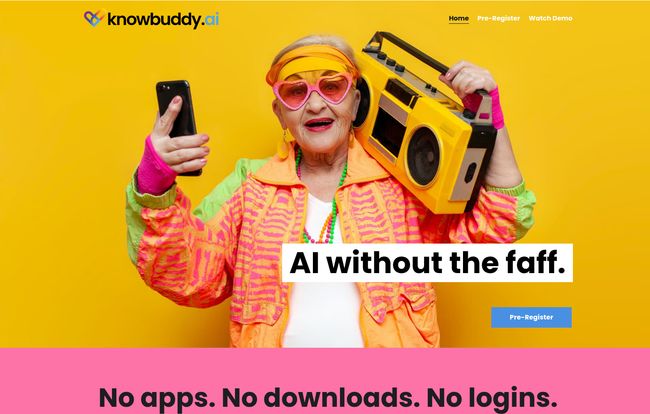
So when I stumbled upon KnowBuddy.ai, their tagline hit me right in the feels: “AI without the faff.” A bold claim. But what really caught my eye was how they planned to deliver on it. No app. No downloads. No logins. Just… WhatsApp.
Wait, really? An AI assistant that lives inside an app I already have open all day? Okay, you have my attention. This could either be genius or a gimmick. As someone who’s spent years watching tech trends come and go, I’ve learned to be skeptical. But I’m also a sucker for anything that makes life genuinely simpler. Let’s see what this is all about.
So, What Exactly is KnowBuddy?
At its heart, KnowBuddy is a super-smart chatbot you talk to on WhatsApp. Simple as that. You add its number, and you can start asking it questions or giving it commands. But here’s the cool part under the hood: it isn’t just one AI model. It’s powered by a whole bunch of them, including the famous ChatGPT, to handle different kinds of tasks. Think of it less like a single tool and more like a Swiss Army knife that you just text.
The entire philosophy seems built around what I’d call radical accessibility. The website’s big, friendly letters proclaim, “If you can send a message, you can use AI.” And honestly, that’s a pretty powerful idea. It takes AI out of the hands of us tech geeks and puts it into the hands of, well, everyone. Your mom, your grandpa, your friend who thinks ‘the cloud’ is an actual weather phenomenon. They can all use this.
Getting Started is… Well, There Isn’t a “Start”
This is the part that genuinely impressed me. There’s no signup form that asks for your mother’s maiden name and your first pet. You pre-register with your phone number, and that’s it. No password to remember. No app to hunt for in the store. No permissions to grant. It’s the lowest barrier to entry I’ve seen for a tech tool in a long, long time.
We’ve been conditioned to accept a certain amount of hassle to use new technology. KnowBuddy just throws that whole idea out the window. It meets you where you are, which, for over 2 billion of us, is WhatsApp. It’s a brilliant move, a real ‘aha!’ moment for user experience design.
Visit KnowBuddy
The Features That Actually Matter
A tool can be easy to use, but if it doesn’t do anything useful, who cares? Luckily, KnowBuddy has a surprisingly practical set of skills. I’m not going to just list them out like a robot; let’s talk about how you’d actually use this stuff.
Your Everyday Pocket Genius
Of course, it can answer your burning questions. Settle that bar bet about who was the fourth actor to play Spider-Man. Get a quick summary of quantum entanglement that you can pretend to understand. It’s great for that. But it’s the other little things that add up. Need a quick translation for a menu you’re looking at? Done. Want a new dinner idea? Just type `/recipe chicken pasta` and see what it spits out. It even has a fun `/apod` command to get NASA’s Astronomy Picture of the Day. It’s a little dose of wonder in your chat list.
The Ultimate Shopping Companion
Okay, for me, this is the killer feature set. We all know the pain of trying to find a product in stock or waiting for a price to drop. KnowBuddy turns this into a simple conversation. You can use a command like `/find PS5 console` and it will look for it. Even better, you can ask it to set up alerts. Imagine just telling your WhatsApp buddy, “Hey, let me know when this graphics card is back in stock” or “Tell me when these sneakers go on sale.” This feature alone could save people a ton of time and money, and it’s something I haven’t seen implemented this simply anywhere else.
More Than Just Text: Image Generation and More
And yes, because it’s 2024, it can generate images. The `/image` command lets you create a picture of basically anything you can imagine, right there in your chat. Want a picture of a corgi riding a skateboard on the moon? You got it. It’s a fun, creative distraction that shows off the power of the AI models it’s connected to. It’s a nice touch that makes the tool feel both practical and playful.
How KnowBuddy’s Command System Works
If you’ve ever used Slack or Discord, the command system will feel immediately familiar. You just type a forward slash (`/`) followed by a keyword to tell KnowBuddy what you want to do. This is a smart way to add powerful features without cluttering up the experience. It keeps the conversation clean and direct.
Here’s a quick look at some of the core commands you’d be using:
| Command | What It Does |
|---|---|
| /ask [your question] | The go-to for general knowledge questions. |
| /image [your prompt] | Generates a unique AI image based on your description. |
| /find [product name] | Searches for products online and can set price/stock alerts. |
| /translate [text] to [language] | Translates text into the language you specify. |
Let’s Talk Money: The KnowBuddy Pricing Model
Alright, the big question. How much does this magic WhatsApp friend cost? The pricing model is as straightforward as the tool itself, which I appreciate.
- Your first 5 messages are completely free. This is your trial run, a way to kick the tires and see if you like it.
- After that, it’s a pay-as-you-go system: $1 for every 5 messages.
I have mixed feelings about this, but mostly positive. On one hand, there are no sneaky subscriptions. You’re not going to forget to cancel and get hit with a $20 charge next month. You pay for what you use, period. This is fantastic for the occasional user who just needs a few questions answered a week. On the other hand, if you become a power user, those dollars could add up. It encourages you to be mindful of your queries, which isn’t neccessarily a bad thing.
My Honest Take: The Good, The Bad, and The… WhatsAppy?
So, after digging in, what’s my verdict? KnowBuddy is a genuinely refreshing take on AI. The good is obvious: its incredibly easy to use, the shopping features are a standout, and the pay-as-you-go model is transparent. It’s an AI for the rest of us.
The bad? Well, its greatest strength is also a potential weakness. If you’re not a big WhatsApp user, this tool isn’t for you. And while the 5 free messages are a nice taste, it’s not a generous free tier; it’s a demo. You’ll have to pull out your wallet pretty quickly if you find it useful.
But I keep coming back to the core idea. It’s personal, its proactive (it wants to learn about you to give better answers), and it’s secure. It feels less like a sterile database and more like, well, a buddy.
Who is KnowBuddy Actually For?
This isn’t for the AI enthusiast who wants to fine-tune models or the data scientist who needs complex outputs. This is for the busy parent trying to find a recipe while juggling a toddler. It’s for the student who needs a quick fact-check without opening a dozen browser tabs. It’s for the deal-hunter who wants to be the first to know about a price drop. It’s for my dad, who can definitely send a WhatsApp message but would get lost in the ChatGPT interface.
KnowBuddy is for anyone who values their time and wants a direct line to a powerful AI without any of the usual technological cruft.
Conclusion
In a world saturated with complex software, KnowBuddy’s simplicity is its killer app. It’s a smart, practical tool that understands the most important thing about technology: it should work for you, not the other way around. By living inside WhatsApp, it removes nearly every barrier to entry, making powerful AI tools feel as natural as texting a friend. The project is still in its early stages (you have to pre-register), but it’s one I’ll be keeping a close eye on. It might just be the thing that finally gets everyone chatting with AI.
Frequently Asked Questions
- What is KnowBuddy?
- KnowBuddy is an AI-powered chatbot that works directly within WhatsApp. It uses various AI models to answer questions, generate images, find products, translate text, and perform other helpful tasks through simple chat commands.
- How do I use KnowBuddy?
- You use it by sending messages and commands in a WhatsApp chat. After registering your number, you can ask questions directly or use specific commands starting with a ‘/’ (e.g., /image, /find) to access its features.
- Is KnowBuddy free?
- It’s free to try. Your first five messages are free. After that, it uses a pay-as-you-go model, which costs $1 for every five messages. There are no monthly subscriptions.
- What AI models does KnowBuddy use?
- The platform is powered by a variety of powerful AI models and services, including ones like ChatGPT, to provide a wide range of capabilities from conversational answers to image generation.
- Is my data safe with KnowBuddy?
- KnowBuddy emphasizes that it is a secure and reliable platform. The conversations happen over WhatsApp’s end-to-end encrypted network, and the service has a data processing agreement you can review during registration.
- Can it do more than just answer questions?
- Yes, absolutely. Its key features include generating AI art, searching for products online, setting price and restock alerts, generating recipes, translating languages, and more, all through simple commands.


