
Categories: AI Question Generator, AI Research Tool, AI Summarizer, AI Transcription, AI Youtube Summary
Knowledge AI Review: The AI Tool for Podcast Overload?

My podcast queue is starting to look less like a playlist and more like a digital horror story. It’s a monument to my ambition and a testament to my complete lack of free time. Between the All-In crew debating macroeconomics, Lex Fridman having a three-hour chat with a theoretical physicist, and a dozen other must-listen episodes, I’m hopelessly behind. I bet you are too.
We’re all drowning in a sea of amazing content. It’s the great irony of our age: we have access to the most brilliant minds in history, but who has the time to actually listen? I’ve been in the SEO and traffic generation game for years, and staying on top means constant learning. But the content treadmill is real, and it is exhausting.
So when I stumbled upon a tool called Knowledge AI that promised to help me “Learn More In Less Time,” my inner skeptic and my overwhelmed inner student both sat up and paid attention. An AI that summarizes podcasts and videos? Okay, I’m listening. But is it any good, or is it just another half-baked AI gimmick?
So What is Knowledge AI, Really?
At its core, Knowledge AI is a platform designed to take long-form content—think dense YouTube lectures, sprawling podcast interviews, you name it—and distill it into digestible, actionable insights. But calling it just a “summarizer” feels a bit reductive. It’s not just spitting out a block of text. Think of it more like a set of smart tools layered on top of the content.
The platform pulls in a video or audio file and then breaks it down for you. You get comprehensive summaries, sure, but also segmented breakdowns, key concepts, and even a list of common questions that arise from the material. The whole idea is to save you the time of scrubbing through a two-hour video to find the five minutes that really matter to you. It’s like having a research assistant who’s already watched everything and is just waiting for you to ask the important questions.
The Features That Actually Matter
A lot of AI tools love to boast about a laundry list of features. But which ones actually make a difference? After playing around with Knowledge AI, a few things really stood out.
AI-Powered Summaries That Don’t Suck
We’ve all seen bad AI summaries. They’re often clunky, miss the point, or just rephrase the first and last paragraphs. I was pleasantly surprised here. The summaries are segmented, meaning they break down the conversation topic-by-topic. If you’re watching a long debate, you can jump straight to the section on, say, “Economic Impact” without having to listen to the 20 minutes of pleasantries beforehand. This is huge.
Chatting With Your Content Is the Real Magic
Now, this is the part that got me really excited. Knowledge AI has an interactive AI feature. Once a piece of content is summarized, you can literally ask it questions. “What did the guest mean when she mentioned ‘decentralized automation’?” or “Can you explain the main counter-argument to this point?”
This transforms a passive listening experience into an active learning one. It’s the difference between watching a lecture from the back of the hall and being able to raise your hand and ask for clarification. For anyone trying to genuinely understand complex subjects, this is the real game-changer.
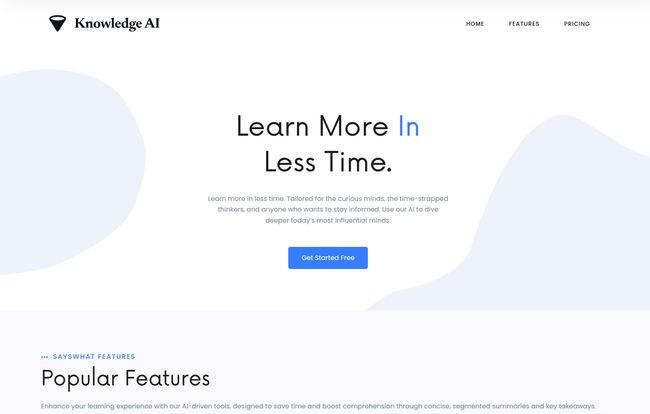
Visit Knowledge AI
Keywords and Key Concepts for the Nerds (Like Me)
As an SEO guy, I’m obsessed with keywords and core topics. The tool automatically extracts the main concepts and terms from the content. This is fantastic for a few reasons. First, it gives you a super-quick glance at what the content is really about. Second, if you’re doing research for an article (ahem), it helps you quickly identify the key jargon and themes you need to cover. It’s a small feature, but one that shows a deep understanding of what learners and researchers need.
My Hands-On Experience with Knowledge AI
I decided to throw a few things at it to see if it would break. I started with a notoriously dense and long Joe Rogan episode, then moved to a technical marketing webinar from YouTube. The results were… pretty impressive.
The Rogan episode was summarized beautifully, breaking down the guest’s main arguments into clear sections. The webinar was even better; the AI pulled out the key strategies and presented them in a way that was far easier to scan than the original video. It’s not perfect, no AI is, but it consistently saved me from the dreaded “2x speed” scrub-through, trying to find the gold.
One little thing that made me smile: on their homepage, there’s a testimonial from a “Jane Cooper” who says, “SaysWhat has revolutionized my podcast listening experience.” Now, the tool is called Knowledge AI. Is SaysWhat a former name? A simple typo? I dont know, but I kind of love it. It’s a little reminder that there are real people behind the platform, not just a faceless algorithm.
Of course, it’s not all sunshine and rainbows. The file upload limits on the lower-tier plans are a bit of a constraint. The 5 MB limit on the free plan means you won’t be uploading any feature-length films. And the credit system for the free plan, while generous enough for a trial, will have power users hitting a wall pretty quick.
Who Is This Tool For? (And Who Should Skip It?)
So, who should be rushing to sign up? In my opinion, the ideal user is someone who values their time as much as their knowledge. This includes:
- Students and Lifelong Learners: Imagine turning a 2-hour lecture into a 15-minute study guide you can chat with. It’s a no-brainer.
- Busy Professionals: If you need to stay on top of industry trends but can’t listen to eight hours of podcasts a week, this is your solution.
- Content Creators & Researchers: The ability to quickly extract themes, quotes, and data points from source material is worth its weight in gold.
However, if you’re someone who listens to podcasts for the ambience—the meandering stories, the in-jokes, the pure entertainment of the conversation—then this tool might not be for you. It’s designed for efficient information extraction, not for savoring the journey. And that’s perfectly okay.
Let’s Talk Money: The Pricing Breakdown
Pricing is always the million-dollar question, isn’t it? Thankfully, Knowledge AI’s pricing is pretty straightforward and, frankly, quite reasonable. Here’s how it breaks down:
| Plan | Price | Key Features |
|---|---|---|
| Basic | $0 / month | 10 credits daily, 5 MB file size limit, Audio Summaries. |
| Pro | $5 / month | Unlimited credits, 10 MB file size limit, Audio Summaries. |
| Premium | $10 / month | Unlimited credits, 200 MB file size limit, Audio Summaries. |
My take? The Free plan is perfect for testing the waters. The Pro plan at $5 is the sweet spot for most people—unlimited credits is huge. The Premium plan is clearly for the power users, journalists, or academics who need to upload their own large audio or video files for analysis.
Frequently Asked Questions about Knowledge AI
- 1. Can I use Knowledge AI on any YouTube video or podcast?
- For the most part, yes. You can feed it links from platforms like YouTube, and it will process the content. It’s designed for publicly available content, and its effectiveness might vary based on audio quality and clarity.
- 2. How accurate are the AI summaries?
- In my experience, they are surprisingly accurate for grasping the main points and structure of a conversation. They excel at pulling out factual information and key arguments. However, AI can sometimes miss subtle nuances, sarcasm, or emotional context, so it’s a tool for understanding, not a perfect replacement for the original.
- 3. Is the free version of Knowledge AI good enough?
- It’s excellent for a trial. The 10 daily credits let you summarize a few pieces of content and test the features. However, you’ll likely hit the credit limit or the 5 MB file size limit if you plan to use it regularly.
- 4. What kind of files can I upload?
- The platform is primarily designed for audio and video content. The file size you can upload directly depends on your plan, ranging from 5 MB on the Basic plan to a very generous 200 MB on the Premium plan.
- 5. How does the interactive AI chat feature work?
- After the AI generates a summary, a chat interface becomes available. You can type questions in natural language, and the AI will answer based on the information contained within that specific piece of content. It’s like having a conversation with the video’s transcript.
- 6. Is my data private when I use the platform?
- This is a big concern with any AI tool. While I haven’t done a deep-dive on their privacy policy, generally, services like this process the content you provide to generate summaries. For sensitive or proprietary information, you should always review the platform’s specific privacy policy before uploading.
The Final Verdict
So, is Knowledge AI the magic bullet for content overload? No, it’s not magic. But it’s a damn good tool. It’s a well-designed, genuinely useful platform that addresses a very real problem for curious and busy people.
It successfully turns passive consumption into active learning, and for me, that’s a massive win. It won’t replace the joy of listening to a great conversation unfold naturally, but for those times when you just need the key insights now, it’s an incredible asset to have in your digital toolbox. My podcast queue might still be long, but now, I feel like I finally have a fighting chance.


