
Categories: AI Animation Generator, AI Anime Generator, AI Avatar Generator, AI Cartoon Generator, AI Character, AI Text-to-Speech, AI Video Editor
Krikey AI Review: Fast AI Animation for Everyone?

I’ve been in the content game for a long time. I’ve seen trends come and go like seasons. Remember when every single brand had to have an infographic? Or the great pivot-to-video apocalypse of 2017? Good times. The latest earthquake shaking up our world is, of course, AI. And nowhere is it more visually obvious than in the world of animation.
Let’s be real for a second. Traditional animation is a beast. A time-sucking, budget-draining monster that usually requires a small army of specialists, complex software that costs a fortune, and the patience of a saint. For the average marketer, educator, or solo creator, it’s just been out of reach. A pipe dream.
But what if you could change that? What if you could create a fun, engaging animated video from your browser in the time it takes to drink your morning coffee? That’s the shiny promise of a new wave of tools, and Krikey AI is standing right at the front of the line, waving its hands. I’ve been playing around with it, and I’ve got some thoughts. So, grab that coffee and let’s talk about it.
What Exactly is Krikey AI? (And Why Should You Care?)
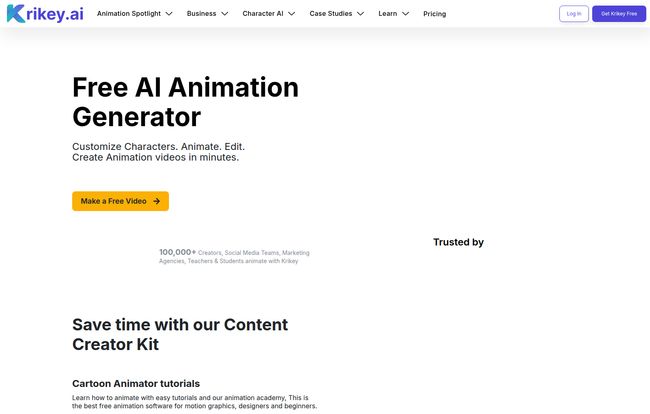
At its core, Krikey AI is an AI animation generator. That’s the fancy term. In plain English, it’s a web-based platform that lets you create animated videos without needing to know the first thing about keyframes, rigging, or rendering. Think of it less like a professional tool like Blender or Maya and more like Canva for animation. It’s designed for speed and accessibility.
Visit Krikey AI
You can type a command like, “a character waving hello,” and the AI will generate the motion for you. You can build your own custom 3D characters, give them AI-generated voices in different languages, and stitch it all together in their built-in video editor. The whole point is to take the technical headache out of the process, so you can focus on the story you want to tell. And for someone like me, who has more ideas than technical skills, that’s a pretty compelling idea.
My Favorite Krikey AI Features Unpacked
A tool is only as good as its features, right? I messed around with the platform for a while, and a few things really stood out. Some for good reasons, some that made me go… hmm.
The AI Animation Generator: Is It Magic?
This is the main event. Krikey offers two killer ways to animate: Text-to-Animation and Video-to-Animation. The text prompt is exactly what it sounds like. You describe an action, and the AI tries to create it. It’s surprisingly good for basic actions like walking, waving, or dancing. The video-to-animation is where it gets a little wild. You can upload a video of yourself doing a little dance, and the AI will apply that motion to your 3D character. The results can be a little janky sometimes, but when it works? It’s pure magic. And way more fun than it has any right to be.
Building Your Cast with the Custom Character Creator
This was genuinely enjoyable. Instead of being stuck with a library of generic characters, you can build your own. You can change hairstyles, outfits, colors, and body types. It feels a lot like creating an avatar for a video game. For a brand, this is huge—you can create a character that actually matches your brand’s style guide. Or, if you’re like me, you can try to create a horrifyingly inaccurate version of yourself. The creative freedom here is a major win.
Giving Your Characters a Voice (Literally)
Once you have your character, you need them to talk. Krikey’s Text-to-Speech AI is pretty solid. You type out your script, choose a voice and language, and it generates the audio with automatic lip-syncing. The fact that it supports multiple languages, including Spanish, French, and Japanese, is a huge plus for anyone creating content for a global audience. Are the voices 100% human-like? Not quite. You can still tell it’s an AI, but it’s miles ahead of the robotic voices we were stuck with just a few years ago.
The All-in-One 3D Video Editor
After you’ve generated your scenes, you need to put them together. The built-in 3D video editor lets you do just that. You can arrange clips, add camera angles, change backgrounds, and throw in some music or sound effects. It’s not Adobe Premiere Pro, and it’s not trying to be. But for assembling your animated short, adding an intro, and exporting the final file, it does the job without forcing you to learn another piece of software. That convenience cannot be overstated.
The Real Cost of Krikey AI: A Look at the Pricing
Okay, let’s talk money. Nothing is ever truly free, right? Krikey AI uses a freemium model with a credit system, which is becoming super common in the AI space. Here’s how it breaks down.
| Plan | Price | Key Feature |
|---|---|---|
| Krikey AI Free | $0 /month | 20 one-time credits to test things out. Features are limited. |
| Krikey AI Pro | $15 /month | 150 monthly credits. Unlocks almost all features, like removing backgrounds and premium assets. |
| Krikey AI Teams | $10 /month per person (min 3) | 200 monthly credits per person. Built for collaboration. |
| Krikey AI Enterprise | Contact for Pricing | Custom solution for large organizations. |
The free plan is really just a taster. 20 credits will disappear fast, trust me. The Pro plan is where it becomes a genuinely useful tool. Honestly, the credit system is my only real hang-up. I personally prefer a straight, unlimited subscription, but I get why they do it. AI generation is expensive, and this model meters the usage. You just need to be mindful of how you’re using your monthly credits.
The Good, The Bad, and The Animated
So, should you jump in? Like any tool, it’s not perfect. Here’s my honest breakdown.
The Good Stuff. The biggest pro is its sheer accessibility. Krikey AI democratizes animation. It takes a skill that was once reserved for specialists and puts it in the hands of anyone with an idea. It’s fast, its easy to use, and the learning curve is practically a flat line. For creating quick social media content, animated explainers, or educational material, it’s a fantastic solution that can save you a ton of time and money.
The Not-So-Good Stuff. The limitations of the free plan are a bit aggressive. You’ll hit that paywall pretty quickly. And while the AI is impressive, it’s not a mind reader. Complex or very specific animation prompts can leave it confused, resulting in some… interesting interpretations. You won’t be creating the next Pixar movie with this. It’s a tool for a specific job, and it’s important to have the right expectations.
Who is Krikey AI Actually For?
This isn’t a one-size-fits-all tool. I see it being a perfect fit for a few specific people:
- Social Media Managers: You need to pump out eye-catching content daily. Creating animated memes, announcements, or short stories with Krikey could be a game-changer for your engagement rates.
- Educators and Trainers: Imagine creating an animated history lesson or a safety training video. It’s way more engaging than a PowerPoint slide, and Krikey makes it feasible for a single teacher or corporate trainer.
- Small Business Owners: Need a quick product explainer video for your website but don’t have a $5,000 budget? This is your answer. You can create a professional-looking animated ad in an afternoon.
Who is it not for? Professional animation studios. If you’re a team of animators working on a high-end commercial or a TV show, you’ll stick with your established, more powerful pipelines. Krikey isn’t designed to replace that.
My Final Thoughts on This AI Animation Tool
After spending some quality time with Krikey AI, I’m genuinely optimistic. It successfully tears down the high walls that have surrounded animation for decades. It’s fun, intuitive, and genuinely useful for a huge slice of creators and marketers who were previously left out in the cold.
It’s not perfect, and the credit system requires some management, but the value is undeniable. We’re entering a new era of content creation, one where AI acts as a creative partner, not a replacement. Krikey AI is a fantastic example of that partnership in action. If you’ve ever thought, “I wish I could make an animated video,” well, now you probably can.
Frequently Asked Questions about Krikey AI
- Can I really make a cartoon with Krikey AI?
- Yes, absolutely. You can create short-form cartoons, animated stories, and memes. It’s ideal for web content and social media, less so for a full 30-minute television episode.
- Is Krikey AI actually free to use?
- Yes and no. There is a free plan that gives you 20 one-time credits to try out the platform. It’s great for a test drive, but for any consistent use, you’ll need to subscribe to one of the paid plans to get monthly credits and unlock all the features.
- How does the AI text-to-animation work?
- You simply type a description of the motion you want (e.g., “character does a jumping jack”) into a text box. The AI then processes your request and applies that animated motion to the character you’ve selected. It works best with clear, simple commands.
- Do I need to download any software?
- Nope! Krikey AI is entirely browser-based. You just log in on their website and start creating. This makes it super convenient and accessible from any computer with an internet connection.
- Is this better than hiring a freelance animator?
- It’s different. For quick, simple, and budget-friendly animations, Krikey AI is fantastic. For complex, highly customized, or story-driven work that requires artistic nuance, a skilled human animator will always deliver a superior result. It depends entirely on your project’s scope, budget, and quality requirements.


