
Categories: AI API, AI Charting, AI Code Generator, AI Report Generator, AI Scheduling, SQL Query Builder
Kvery.io Review: Is This AI SQL Editor Worth It?

If you’ve ever worked with data, you’ve stared at a blinking cursor, trying to remember the exact syntax for a complex `JOIN` or a window function. It’s a familiar pain. We cobble together queries from Stack Overflow, whisper a little prayer, and hit ‘run,’ hoping we didn’t just accidentally try to drop the production database. Again.
For years, we’ve heard whispers of AI coming to save us from this drudgery. We’ve seen it with code assistants, but the world of SQL has felt a bit… left behind. Well, a new tool called Kvery.io just sauntered onto the scene, promising to be our AI-powered SQL co-pilot. It claims to not only write your SQL but also to automatically spin up charts, forms, and even APIs from your queries.
Big promises. So, as someone who lives and breathes this stuff, I had to see if it was just marketing fluff or the real deal. Is this the tool that finally lets us focus on the insights instead of the syntax? Let’s find out.
Visit Kvery.io
So, What Exactly is This Kvery.io Thing?
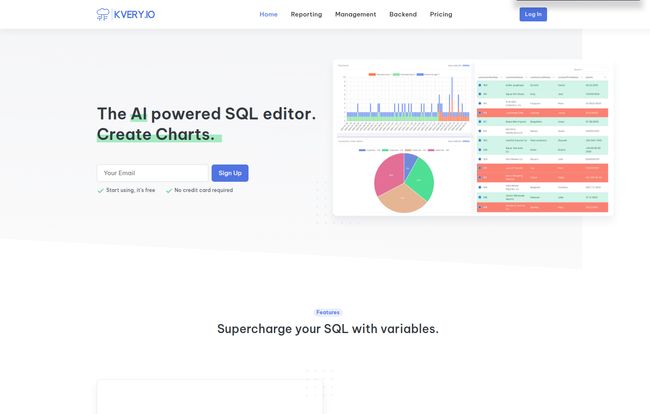
Think of Kvery.io as less of a simple editor and more of a smart database management hub. At its core, it’s an AI-powered SQL editor. You give it a plain-English prompt—say, “Show me total sales by region for the last quarter”—and it generates the SQL code to pull that data. Pretty cool, right? But that’s just the appetizer.
Where it gets really interesting is what it does after the query runs. It can instantly transform that raw data into a pie chart, a bar graph, a data card for a dashboard, or even a simple form. For developers, it goes a step further by generating APIs and admin interfaces based on your database structure. It’s like having a junior data analyst and a backend dev on speed-dial, ready to visualize data or build a quick internal tool.
The Features That Actually Move the Needle
A tool is only as good as its features, and Kvery.io has a few that really caught my eye. It’s not about having a million buttons; it’s about having the right ones that save you time and headaches.
The Magic of AI-Powered SQL Generation
This is the main event. The AI query generation is surprisingly capable. I threw a few moderately complex requests at it, and it handled them with impressive accuracy. It’s not infallible—you still need to understand enough SQL to know if the result is correct—but it eliminates so much of the initial grunt work. It’s a fantastic starting point that can get you 90% of the way there in seconds. For anyone who’s not a full-time SQL wizard, this feature alone can be a game changer, dramatically speeding up the reporting process.
From Query to Visualization in a Click
I’ve lost count of the hours I’ve spent exporting a CSV, importing it into Google Sheets or some other BI tool, and then wrangling with settings just to create a simple chart for a presentation. Kvery’s ability to automatically generate tables, graphs, and cards directly from the SQL results is just… chef’s kiss. It closes the loop between data retrieval and data presentation, keeping everything in one clean workspace. This is a huge win for generating quick business intelligence reports without all the tedious in-between steps.
Automating Your Database with Job Scheduling
Every business has those reports that need to run daily, weekly, or monthly. Setting up and managing cron jobs can be a pain, especially if you’re not a sysadmin. Kvery includes a straightforward SQL job scheduler. You can set a query to run on a recurring basis, automating your reporting and data maintenance tasks seamlessly. It’s a set-it-and-forget-it feature that adds a layer of professionalism and reliability to your data operations.
Building Backends Without the Backend Headache
This one is for the developers in the room. Kvery claims it can help you develop APIs and admin interfaces 10 times faster. Now, “10x” is a classic marketing claim, but there’s a kernel of truth here. For building simple CRUD (Create, Read, Update, Delete) APIs or internal admin panels, this tool can genuinely slash development time. It scaffolds the basics for you, letting you focus on the more complex logic. It won’t build your entire application, but it’s a powerful accelerator for internal tools and MVPs.
Who is Kvery.io Really For?
After playing around with it, I have a pretty clear picture of who gets the most out of Kvery.io. It’s not for the absolute beginner who has never seen a database. You need to have some foundational knowledge to guide the AI and validate its output.
It’s perfect for:
- Data Analysts and BI Professionals who need to rapidly answer business questions and build dashboards without getting bogged down in repetitive query writing.
- Full-Stack Developers who need to quickly spin up an admin panel or a simple data API for a new project.
- Startup Teams wearing multiple hats. When you’re the marketer, the product manager, and the data guy, a tool that automates and speeds things up is worth its weight in gold.
- Product Managers who are technical enough to write basic queries but want to self-serve for data without bugging the engineering team.
Let’s Talk Money: A Look at Kvery.io’s Pricing
Alright, the all-important question: what’s this going to cost me? Kvery.io has a tiered pricing structure that seems designed to scale with you. Here’s how it breaks down:
| Plan | Price | Limits | Best For |
|---|---|---|---|
| Free | $0 / month | 3 queries, 1 user, 1 editor | Testing the platform |
| Individual | $89.90 / month | 25 queries, 1 user, 1 editor | Solo power users |
| Team | $149.90 / month | 100 queries, 10 users, 3 editors | Small to medium-sized teams |
| Enterprise | $229.90 / month | 250 queries, 30 users, 10 editors | Larger organizations |
My take? The Free plan is really a demo. With only 3 queries a month, you can’t do any real work, but it’s enough to see if you like the interface. The Individual plan feels a bit pricy for the query limit, you’d have to be getting serious value from each of those 25 queries.
Honestly, the Team plan at $149.90 feels like the real sweet spot. The jump in query count and user seats makes it a much more viable option for any functioning business. This seems to be where Kvery expects most of its user base to land, and the value proposition is much clearer here. They also mention being able to create a personalized deal, which is a good sign for teams with specific needs.
The Good, The Bad, and The SQL
No tool is perfect. After the honeymoon phase, you start to see the little quirks. The biggest strength of Kvery.io is its sheer efficiency. It’s a force multiplier, taking tedious, multi-step processes and condensing them into a few clicks. The user interface is clean, and the automation capabilities are genuinely useful for day-to-day data tasks. Plus, the mention of multiple encryption is reassuring when you’re hooking up a tool to your precious data.
On the flip side, the reliance on query counts in the pricing model is a bit of a drag. It can lead to a sense of scarcity, where you might hesitate to run an exploratory query. I’d personally prefer a model based on users or features, but I get why they do it. And as I’ve mentioned, this isn’t for total beginners. Some might argue that it lowers the bar too much, potentially allowing inexperienced users to run inefficient queries without realizing it. You still need a human with some database sense at the wheel.
My Final Verdict: Is Kvery.io Worth the Investment?
So, here’s the bottom line. Kvery.io is a seriously impressive and genuinely useful tool. It successfully carves out a niche for itself as more than an editor and more focused than a full-blown, enterprise-level BI platform. It’s a powerful SQL Swiss Army knife supercharged with AI.
If you or your team spend any significant amount of time writing SQL for reporting, building internal tools, or managing data workflows, you should absolutely give Kvery.io a try. The time it saves could easily justify the cost, especially on the Team plan. It’s not a magic wand that replaces data expertise, but it’s one of the best assistants I’ve seen for augmenting it.
Your Kvery.io Questions Answered
- Can I use Kvery.io without knowing any SQL?
- You could, but I wouldn’t advise it. To get the most out of the tool and to ensure the AI-generated queries are correct and efficient, a basic understanding of SQL is highly recommended. Think of it as a tool for people who know what they want to do but want to do it faster.
- How secure is Kvery.io with my database?
- They state on their site that they use multiple layers of encryption for sensitive data, which is a standard best practice. As with any third-party tool, you should review their security and privacy policies and start by connecting it to a read-only replica of your production database if possible.
- What databases does Kvery.io support?
- The website doesn’t list specific databases, but tools like this typically support all major SQL databases like PostgreSQL, MySQL, SQL Server, and Redshift. It’s best to check their documentation or contact their support for a definitive list.
- Is the free plan actually useful for long-term use?
- Not really. With a limit of only 3 queries per month, the free plan is best thought of as an extended trial or a demo. It’s perfect for evaluating the platform’s core functionality before committing to a paid plan.
- Can I get a custom plan if the standard ones don’t fit my needs?
- Yes. Their pricing page explicitly states, “If you don’t find the right fit, please contact us. We are happy to work with you to create a personalized deal.” This is great for larger teams or those with unique usage patterns.
- How does the AI query generation actually work?
- It uses a Large Language Model (LLM), similar to the technology behind tools like ChatGPT, that has been specifically trained on SQL syntax and database schemas. You provide a prompt in natural language, and the model translates that request into a structured query.


