
Categories: AI Email Generator, AI Notes Generator, AI Social Media Post Generator, AI Speech-to-Text, AI Text Generator, AI Transcriber, AI Writing Assistants
Letterly Review: AI Voice Notes That Actually Write for You

As someone who lives and breathes SEO and content, my brain is a constant waterfall of ideas, half-formed thoughts, and random keywords. Getting it all out of my head and into a coherent document? That’s the messy part. It often looks like a frantic mess of bullet points, voice notes that trail off, and sentences that start strong but end… somewhere over there. You know the feeling.
So, when I stumbled upon Letterly, I was intrigued but, admittedly, a little skeptical. Another AI app promising to change my life? Yawn. We get a new one every week. But the pitch was different. It wasn’t just about turning my voice into text. It was about turning my chaotic speech into well-written text. Structured notes, formal emails, even social media posts.
Challenge accepted. For one week, I decided to let Letterly be my first-draft ghostwriter. And honestly? I’m a little bit blown away.
What Exactly is Letterly? (Hint: It’s Not Just a Recorder)
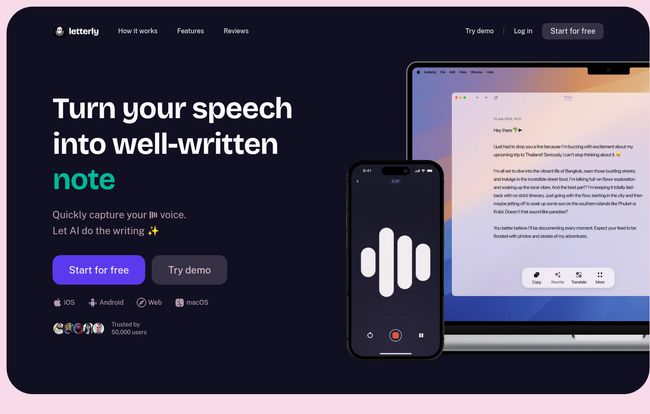
Think of it this way. Standard voice-to-text on your phone is like a stenographer—it types exactly what you say, ums, ahs, and all. Letterly is more like a clever editor or a personal assistant. You give it the raw material—your voice—and its AI engine doesn’t just transcribe it; it refines, restructures, and rewrites it based on what you need.
The core idea is simple but powerful: Your Voice → AI Magic → Amazing Text.
Visit Letterly
You can ramble on about a new content strategy, and with a tap, Letterly can transform that stream of consciousness into a structured outline with headings and key points. Or you can dictate a quick thought for a client and have it turned into a polished, professional email. It’s the ‘rewrite’ step that makes all the difference, and it’s something I haven’t seen done this smoothly in other apps.
Putting Letterly to the Test: My Real-World Use Cases
An app is only as good as its practical application, right? Here’s how I put Letterly through its paces in my daily grind.
Taming the Brain Dump for Blog Post Ideas
My best ideas often strike while I’m walking my dog, miles away from my laptop. I used to send myself rambling, borderline incoherent voice notes. This time, I spoke my idea for this very article into Letterly. I just talked, letting the ideas flow. Later, back at my desk, I hit the “Structured Text” rewrite option. What I got back wasn’t perfect, but it was a shockingly good outline. It had pulled out the main themes, created logical sections, and even used bullet points. It saved me at least 30 minutes of painful organization.
From Awkward Voice Memo to Polished Email
We’ve all been there. It’s the end of the day, your brain is fried, and you have to send that one important follow-up email. Typing feels like a monumental effort. I dictated the core message into Letterly: “Hey just followin up on the CPC report from this mornin, need the final numbers by EOD tomorrow, thanks.” I selected the “Formal Email” option, and what came out was a perfectly crafted message ready to copy and paste. It was professional, polite, and I didn’t have to think about it at all. A tiny miracle.
Instant Social Media Captions? Yes, Please.
Keeping up with social media for business is a beast. While scrolling through some industry news, I had a quick take on a recent Google algorithm update. I opened Letterly, spoke for about 45 seconds, and used the “Post” rewrite option. It spit out a concise, engaging caption perfect for LinkedIn. I added a few hashtags and it was live. The time from idea to post was under two minutes. That’s a huge win.
The Features That Genuinely Make a Difference
Beyond the core rewrite function, a few other features stood out to me as being incredibly thoughtful.
First, the Offline Recording is a lifesaver. Being able to capture thoughts on the subway or on a flight without worrying about a connection is huge. The app just saves the audio and you can transcribe and rewrite it later. The cross-device syncing is also buttery smooth. Recording on my iPhone and then seeing the note appear instantly on the web app on my Mac is exactly how modern software should work. No friction.
And then there are the little things that show they care about the user experience: using tags to organize notes, which my chaotic brain appreciates; a fantastic dark mode for my late-night work sessions; and support for over 90 languages. While I primarily used it for English, knowing I could use it for Spanish or French is a massive plus for global teams. They even have Webhooks for the techier folks who want to send notes directly to tools like Notion or Slack. I haven’t messed with that yet, but I’m going to.
Okay, But Is It Perfect? The Not-So-Great Bits
Look, no tool is a silver bullet. While I’m pretty high on Letterly, it’s not without its quirks. For one, the AI isn’t a mind reader (yet). Sometimes, especially with complex or sarcastic topics, the rewritten text can miss the mark on tone or nuance. You still need to give everything a once-over. Think of it as a brilliant first-draft assistant, not a finished-product generator.
Also, the principle of ‘garbage in, garbage out’ definitely applies. If you’re mumbling in a noisy coffee shop, the transcription accuracy will drop, and the rewrites will suffer. A clear voice and a halfway-decent mic (your phone’s is probably fine in a quiet room) make a world of difference. Some might also bring up the “skill atrophy” debate – that relying on AI will make us dumber writers. I see their point, but I disagree. For me, it’s an augmentation tool. It demolishes writer’s block and handles the grunt work, freeing up my brain to focus on strategy and creativity. It’s a partner, not a crutch.
What’s the Damage? A Look at Letterly’s Pricing
So, the million-dollar question: what does it cost? Well, this is where things get a bit mysterious. I went to find their pricing page, and was greeted by a 404 error page… featuring a very adorable, slightly judgmental-looking cat. I’m not even mad, it was great.
Jokes aside, the lack of a clear pricing table on the website suggests they probably handle it through the app stores. The site heavily pushes a “Start for free” CTA, which implies a freemium model or a generous free trial. My advice? Just download the app and see what the deal is. For mobile-first apps like this, in-app purchases and subscription tiers are the norm, so you’ll likely find the most up-to-date info there.
The Verdict: Who Should Download Letterly Right Now?
After a week of heavy use, I can confidently say who this is for:
- Content Creators, Bloggers, & Marketers: For brainstorming, drafting social posts, scripting videos, and just getting ideas down fast. It’s a massive time-saver.
- Students: Imagine turning a rambling audio note from a lecture into organized study notes. Game-changer.
- Busy Professionals: For quickly drafting emails, creating meeting summaries, and managing to-do lists without being glued to a keyboard.
- Anyone with ‘Idea Overload’: If you’re someone who thinks way faster than you can type, this app will feel like a breath of fresh air.
It hasn’t replaced my keyboard entirely, and I don’t think it ever will. But for that crucial, often painful first step of getting thoughts out of my head and onto the page in a usable format, Letterly has earned a permanent spot on my phone’s home screen. And in the world of content creation, winning that first battle is often the key to winning the war.
Frequently Asked Questions about Letterly
Does Letterly support languages other than English?
Yes! One of its impressive features is support for over 90 languages for both transcription and translation, making it a very versatile tool for international users.
Can I use Letterly without an internet connection?
Absolutely. You can use the offline recording feature to capture your thoughts anytime, anywhere. Once you’re back online, you can then transcribe and rewrite the audio.
How accurate is the Letterly transcription?
In my experience, it’s highly accurate, especially when you speak clearly in a relatively quiet environment. The quality of your microphone and lack of background noise are the biggest factors.
What platforms is Letterly available on?
It has great cross-platform support. You can get it on iOS, Android, macOS, and there’s also a web app, so all your notes and recordings sync across your devices.
How does Letterly integrate with other apps?
For more advanced users, Letterly offers Webhooks integration. This allows you to automatically send your finished notes to other tools you might be using, like Notion, Slack, or your project management software.
Is my data private and secure?
While every user should review the company’s specific privacy policy, tools like this typically use your data to process the transcription and rewrites. Reputable apps use secure connections and don’t sell your personal data. Always check the latest policy on their website or in the app store.


