
Categories: AI API, AI Developer Tools, AI Models, AI Text Generator, Large Language Models (LLMs), No-Code&Low-Code, Open Source AI Models
Lightning AI Review: The All-in-One AI Dev Platform?

If you’ve ever tried to get a serious AI or machine learning project off the ground, you know the first week is rarely about brilliant algorithms. It’s about fighting with dependencies. It’s about begging for GPU access. It’s that sinking feeling when your code works perfectly on your laptop but explodes on the server. We’ve all been there, drowning in a sea of SSH commands, Dockerfiles, and cloud console tabs. It’s a mess.
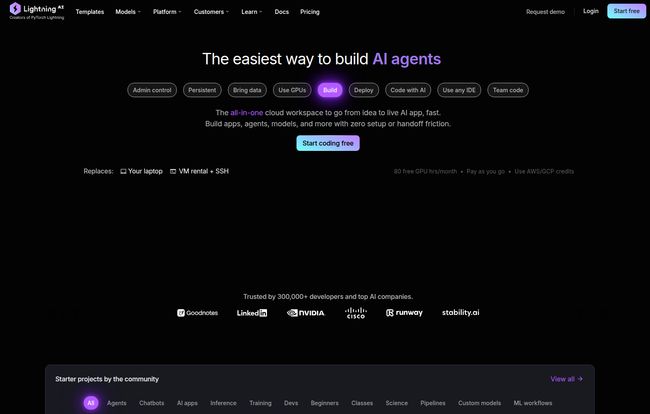
So when a platform comes along with a tagline like, “The easiest way to build AI agents,” my inner skeptic raises an eyebrow. But my exhausted inner developer leans in, intrigued. That platform is Lightning AI, and I’ve been kicking its tires to see if it lives up to the hype. Is it really the all-in-one workspace that replaces your laptop, VM rentals, and SSH headaches? Let’s get into it.
So, What Exactly is Lightning AI Anyway?
First off, if the name sounds familiar, you’re probably thinking of PyTorch Lightning, the popular open-source library that cleans up PyTorch code. The same team is behind this platform, and they’ve taken that same philosophy of simplification and applied it to the entire ML workflow.
Lightning AI isn’t just a library; it’s a full-blown cloud-based platform designed to take you from a rough idea to a fully deployed AI application without ever leaving your browser. It bundles everything you need: a development environment, access to powerful cloud GPUs, tools for training models at scale, and options for deploying them. The whole idea is to stop wasting time on infrastructure and start spending more time on what actually matters—building cool AI stuff.
The “Zero Setup” Dream: A Closer Look at DevBoxes
The core of the Lightning AI experience, for me, is the concept of a “DevBox.” Think of it as a superpowered, pre-configured computer living in the cloud. It’s a persistent environment that comes with everything you need baked in. You click a button, and you have a ready-to-code space with your storage, code, and dependencies all waiting for you. This completely sidesteps the classic “it works on my machine” problem that has plagued development teams for decades.
What I find really cool is that these aren’t just some stripped-down web editors. You can connect your local VS Code, Jupyter, or any IDE you want directly to your DevBox. You get the snappy, familiar feel of your local setup with the raw power of a cloud machine. It’s like having your cake and eating it too, except the cake has a 32-core CPU and doesn’t make your laptop sound like a jet engine.
Visit Lightning AI
Power on Demand: Let’s Talk Cloud GPUs
Alright, let’s talk about the main event for most of us: compute. Getting your hands on the right GPU can be a nightmare. You’re either waiting for access on a shared cluster, or you’re navigating the baffling pricing tiers of AWS, GCP, or Azure. Lightning AI aims to simplify this. You can spin up Studios with a wide range of GPUs, from the workhorse T4s and L4s to the absolute monsters like the A100s and H100s for when you need serious firepower.
One of the smartest features is the easy access to interruptible instances (what some people call spot instances). You can save a ton of money—they claim around 80%—if your training job can handle the risk of being paused. For a lot of experimental work or projects that aren’t on a crazy deadline, this is a game-changer for your budget. The platform also gives you real-time cost monitoring, so you don’t get a shocking bill at the end of the month. We’ve all had that moment of panic, right?
From Prototype to Production on a Single Platform
A tool is only as good as its ability to see a project through to the end. It’s one thing to build a model in a notebook; it’s another to get it into the hands of users.
Building and Training Models
Lightning AI isn’t just for solo developers. The platform is built for collaboration. You can work with your team in the same environment in real-time, which is fantastic for debugging and pair programming. When it’s time to train, you can scale up from a single GPU to multi-node training for massive datasets without having to become a Kubernetes expert overnight. It handles the orchestration, you focus on the model.
Deploying Your AI Apps with Ease
Once your model is trained, the platform helps you cross the finish line. You can deploy your work as a full-stack AI app, an API, or whatever else you need. It manages the underlying infrastructure, the scaling, and the monitoring. This integration of the full lifecycle is probably its biggest selling point. No more stitching together five different services to get your project live.
The Big Question: What are the Downsides?
Okay, it can’t all be sunshine and rainbows. No platform is perfect. My biggest gripe? The pricing can feel a bit… abstract. The system is based on “Lightning credits,” which can make it hard to estimate costs upfront compared to a simple hourly rate. You get a certain number of free credits with each plan, but once you start using beefier GPUs or running things 24/7, you’ll be buying more.
The free tier is generous enough to get a feel for things, but it has its limits. Your free Studio will restart after 4 hours, which can be a bit of a pain if you step away for a long lunch. And, of course, the most powerful features and GPUs are locked behind the paid tiers. There’s also the ever-present risk of vendor lock-in. Once you build your entire workflow on a single platform, it can be tough to leave. It’s a trade-off between convenience and flexibility.
Breaking Down the Lightning AI Pricing Tiers
So, let’s talk money. This is where you need to pay attention to see if it fits your budget and needs. They have a few main tiers, and it scales up pretty logically.
Free Tier ($0/month): This is your starting point. You get 15 free Lightning credits each month, which is enough to play around. You can use a single T4, L4, or A10G GPU, but your active session gets restarted every 4 hours. You get 50 GB of persistent storage, which is decent for smaller projects. It’s a great way to see if you even like the platform.
Pro Plan ($50/month): This is for the serious individual developer or researcher. You get more credits (40 per month), your Studio can run 24/7 (hallelujah!), and you get access to multi-GPU setups and even the powerful A100 and H100 GPUs. Your storage limit also bumps up to 200 GB. This feels like the sweet spot for freelancers or academics.
Teams Plan ($140/user/month): As the name suggests, this is for professional teams. You get even more credits, access to full-node A100s and H100s for multi-node training, and a much larger 2 TB storage limit. It also adds real-time cost controls and the ability to purchase through the AWS marketplace.
Enterprise Plan (Custom Pricing): This is the “call us” plan. It’s for large organizations that need all the bells and whistles: SOC 2 compliance, single sign-on (SAML/SSO), the ability to deploy in your own VPC, priority GPU access (including the latest B200s), and a dedicated support channel. This is for companies going all-in on the Lightning ecosystem.
For the most current details, you should always check their official pricing page, as these things can and do change.
Final Verdict: Who is Lightning AI For?
After spending some time with it, I have a pretty good idea of who would love Lightning AI.
- Solo Developers & Students: The free and pro tiers are fantastic for individuals who want to build impressive projects without the infrastructure headache. The ability to quickly prototype and access powerful hardware is a huge advantage.
- Startups & Small Teams: The Teams plan is a perfect fit here. It provides the collaborative tools and scalable power a growing company needs without requiring them to hire a dedicated DevOps or MLOps engineer right away.
- Large Enterprises: For big companies, the Enterprise plan offers the security, compliance (like SOC 2 and HIPAA), and control they require. Being able to deploy in their own cloud environment is a major selling point.
Ultimately, Lightning AI is a powerful accelerator. It’s for anyone who looks at the mountain of setup and infrastructure work required for an AI project and thinks, “There has to be a better way.” And you know what? There just might be.
Frequently Asked Questions about Lightning AI
- 1. What exactly are Lightning Credits?
- Think of them as the platform’s currency. Instead of charging you different hourly rates for different CPUs and GPUs, you use credits. A simple CPU might cost 1 credit per hour, while a powerful A100 GPU might cost 350. Each plan comes with a monthly allowance, and you can buy more if you run out. It simplifies billing across different hardware types.
- 2. Can I use my existing cloud credits from AWS or GCP?
- Yes, but typically on the Enterprise plan. One of the features of the top-tier plan is the ability to connect your own cloud account and use your existing credits, or even deploy the platform directly into your own VPC (Virtual Private Cloud).
- 3. Is Lightning AI good for a total beginner in AI?
- I’d say yes. By removing the infrastructure barrier, it lets beginners focus on learning to code and build models. The community starter projects provide excellent templates to learn from, so you’re not starting from a blank screen. It’s much less intimidating than setting up a cloud server from scratch.
- 4. How is a DevBox different from a regular Jupyter Notebook online?
- A DevBox is a full, persistent development environment. A simple online notebook is just an interface to run code. With a DevBox, you have your own file system, a terminal, you can install any software you want, and it all stays there between sessions. You can also connect it to your local IDE, which you can’t do with most basic notebook services.
- 5. Does Lightning AI support models other than PyTorch?
- Absolutely. While it grew out of the PyTorch ecosystem, the platform itself is framework-agnostic. You can run TensorFlow, JAX, or any other Python-based AI framework within your Studio or DevBox. It’s a flexible environment for general AI development.
Reference and Sources
- Lightning AI Homepage: https://lightning.ai/
- Lightning AI Pricing Page: https://lightning.ai/pricing/
- PyTorch Lightning Project: https://www.pytorchlightning.ai/


