
Categories: AI App Builder, AI Developer Tools, AI Image Recognition, AI Image Segmentation, AI Models, AI Text Classifier, No-Code&Low-Code
Liner.ai Review: No-Code Machine Learning for Everyone?

For years, the world of machine learning has felt like a walled garden. You either had a Ph.D. in computer science, the patience of a saint to wrestle with Python libraries and CUDA drivers, or the budget to rent a small server farm from AWS or Google. For the rest of us—the web developers, the curious creators, the small business owners—it was mostly a spectator sport.
Every now and then a tool comes along that promises to change all that. To ‘democratize’ AI. Most of them are either too simple to be useful or just a friendly front-end for a wallet-emptying API. So when I stumbled upon Liner.ai, my professional skepticism was, let’s say, fully engaged. It claims to let you train and deploy real ML models with zero code. And it’s… free?
Yeah, I had to take a look. And what I found was pretty darn interesting.
What on Earth is Liner.ai?
In the simplest terms, Liner.ai is a downloadable desktop application (for Windows and Mac) that gives you a visual interface for training machine learning models. Think of it less like a black-box ‘AI magic’ button and more like a user-friendly control panel for powerful engines like TensorFlow. You bring the data, you click some buttons, and you walk away with a trained model you can actually use in your own projects. No `pip install`, no cryptic error messages, no tears. Well, fewer tears anyway.
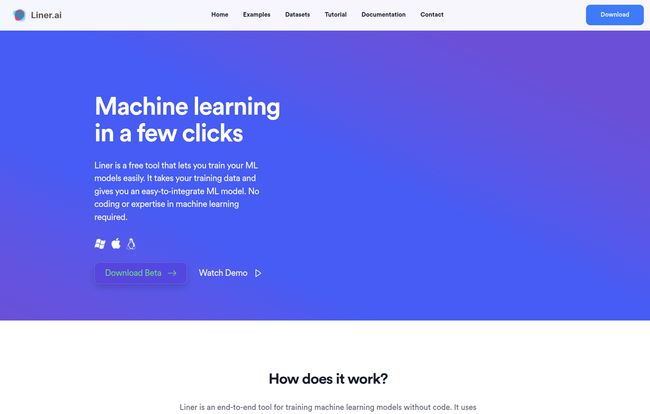
Visit Liner.ai
The whole idea is to strip away the intimidating layer of code and complex setup that forms a barrier for so many people. It takes the part that’s conceptually simple—showing a computer a bunch of examples until it learns—and makes the process just as simple in practice.
Getting Your Hands Dirty: The Liner.ai Workflow
The website pitches a clean three-step process, and I have to say, it’s refreshingly accurate.
- Import Your Data: This is the starting point for any ML project. You gather your labeled data (e.g., photos of cats in a ‘cats’ folder, photos of dogs in a ‘dogs’ folder) and feed it to the app.
- Train the Model: This is where the magic happens. You choose a project template that fits your goal—and there are quite a few to start with. We’re talking Image Classification, Object Detection, Text Classification, and even Audio and Video analysis. You select your template, point it at your data, and hit ‘Train’. The app then chugs away on your local machine.
- Export and Integrate: Once the training is done, Liner.ai doesn’t hold your model hostage. It lets you export it in several standard formats, including Keras, TensorFlow.js, TensorFlow Lite, and ONNX. This is the part that gets me excited, because it means you can immediately plug your new creation into a website, a mobile app, or another application.
The pre-built templates are a fantastic starting point. Instead of facing a blank canvas, you’re given a clear path for common use cases. Want to build a model that can tell if someone is wearing a mask? There’s a template for that. Need to identify different types of products on a shelf? There’s a path for that too. It’s a smart way to lower the learning curve.
The Features That Actually Matter
Okay, so it’s easy to use. But what are the standout features that make it more than just a toy? I’ve been in the SEO and digital trends space for a while, and I can tell you that a few of these are genuine game-changers for accessibility.
Forget Expensive GPUs, Your CPU is Enough
This one is huge. Traditionally, serious ML training requires a powerful (and expensive) GPU. I’ve spent more hours than I’d like to admit trying to configure NVIDIA drivers just to get a model to train. Liner.ai is optimized to run on your computer’s main processor, the CPU. It turns your trusty laptop into a perfectly capable, if modest, ML workstation. No, you won’t be training massive language models, but for the tasks Liner is built for, it means you can get started with the hardware you already own. It’s a massive win for students, hobbyists, and bootstrapped startups.
Your Data Stays Your Data
In an age where we’re all a bit paranoid about data privacy, this is a breath of fresh air. Many online AI tools require you to upload your proprietary data to their servers. With Liner.ai, all the training happens locally on your machine. Your images, your text, your precious data—it never leaves your hard drive. This is a critical feature for anyone working with sensitive or confidential information.
From Training to App in Minutes (Almost)
The export options are what separates Liner.ai from being a purely educational tool. Exporting to TensorFlow.js means a web developer can create a model and run it directly in a user’s browser. TensorFlow Lite is perfect for mobile apps on Android and iOS. And ONNX (Open Neural Network Exchange) is a fantastic, neutral format that lets you use your model with a wide variety of other frameworks and tools. This focus on interoperability is a sign of a mature and genuinely useful platform.
So, What’s the Catch? The Liner.ai Price Tag
Alright, let’s address the elephant in the room. It’s free. The website says “Liner is completely free to download,” and there’s no pricing page in sight. In a world of tiered subscriptions and feature-gated freemium models, a powerful tool being genuinely free makes you look for the catch. As far as I can tell, there isnt one. At least not right now. It seems to be a genuine effort to put powerful tools in more hands, perhaps to build a community and an ecosystem around the platform. For now, the price is zero. You can’t beat that.
Where Liner.ai Shines and Where It Stumbles
No tool is perfect, and it’s important to have realistic expectations. Liner.ai is a scalpel, not a swiss army knife.
It absolutely shines for rapid prototyping, learning ML concepts hands-on, and adding specific AI features to existing projects without hiring a dedicated data scientist. If you have a clear, well-defined problem and a clean dataset, you can get a working model incredibly fast.
Where does it stumble? Well, its greatest strength—running locally—is also its primary limitation. You’re bound by the power of your own computer. If you’re trying to train a model on a million high-resolution images with a ten-year-old laptop, you’re going to have a bad time. It’s also not designed for the incredibly complex, nuanced models that big tech companies spend months and millions of dollars on. You’re not going to build the next DALL-E 3 with this. But for identifying dog breeds or classifying customer feedback? It’s fantastic.
Who is This Tool Really For?
After playing around with it, I have a pretty clear picture of the ideal Liner.ai user:
- The Curious Developer: A front-end or back-end dev who wants to understand how ML works and add a smart feature to their app without getting bogged down in a new programming language.
- The Student or Educator: It’s an incredible teaching tool for demonstrating the fundamentals of model training without the barrier of code.
- The Startup Prototyper: Someone with a great idea for an AI-powered app who needs to build a proof-of-concept quickly to show investors or potential users.
- The Small Business Owner: Imagine training a model to automatically sort pictures of your products or flag defective items on a conveyor belt. The possibilities are huge.
Final Thoughts: Is Liner.ai Worth the Download?
My verdict? A resounding yes. It’s a zero-cost, low-risk way to step into the world of machine learning. Liner.ai successfully removes the most intimidating barriers—code complexity and hardware cost—and replaces them with a clean, intuitive interface. It knows what it’s trying to be: a tool for practical, focused ML tasks, and it executes on that promise brilliantly.
It may not be the tool you use to build an AI empire, but it might just be the tool that lets you build your first AI-powered feature. And in my book, that’s more than enough to make it worth a try. It’s one of the most promising and genuinely useful applications of the ‘no-code’ philosophy I’ve seen in the AI space. Go give it a download.
Frequently Asked Questions about Liner.ai
- Is Liner.ai really free to use?
- Yes, based on all the information available on their website, the Liner.ai application is completely free to download and use.
- Do I need a powerful computer to run Liner.ai?
- Not necessarily. It’s optimized to run on standard CPUs, so you don’t need a high-end gaming or data science rig. However, like any processor-intensive task, a more powerful computer will train your models faster.
- Does Liner.ai take my data?
- No. One of its core privacy features is that all model training occurs locally on your computer. Your data is never uploaded to their servers.
- Do I need to know how to code to use it?
- Absolutely not. The entire purpose of Liner.ai is to provide a no-code environment for training machine learning models.
- What can I do with the models I create?
- Because you can export the models to standard formats like TensorFlow.js and ONNX, you can integrate them into websites, mobile applications, desktop software, and other projects. They are designed to be portable and useful in real-world applications.
- What kind of data do I need to get started?
- You’ll need a ‘labeled’ dataset. For example, if you want to classify images, you’ll need folders of images organized by their label (e.g., a ‘roses’ folder, a ‘daisies’ folder). The more clean, high-quality data you have, the better your model will be.




