
Categories: AI Content Detector, AI Grammar Checker, AI Paraphraser, AI Proofreading, AI Rewriter, AI Spell Check, AI Writing, AI Writing Assistants
Linguix Review: The AI Writing Tool I Actually Use

The world is absolutely swimming in AI tools right now. Every other day, there’s a new ‘revolutionary’ platform that promises to write your emails, craft your marketing copy, and probably walk your dog if you ask it nicely. As someone who lives and breathes SEO and content, my inbox is a graveyard of pitches for these things. Most of them are… fine. They do a job. But very few make me stop and think, huh, this is actually useful.
A few weeks ago, I started playing around with Linguix. Another AI writing assistant, another Chrome extension. I was skeptical, to say the least. My brain is already wired to spot a misplaced comma from a mile away, so what could it really offer me? Well, I’m here to eat a little bit of humble pie. It’s more than just a grammar checker, and it’s slowly wormed its way into my daily workflow. It’s not perfect, no tool is, but it does some things incredibly well.
So, is this the tool that finally tames your chaotic content process? Let’s get into it.
So What Is Linguix, Really?
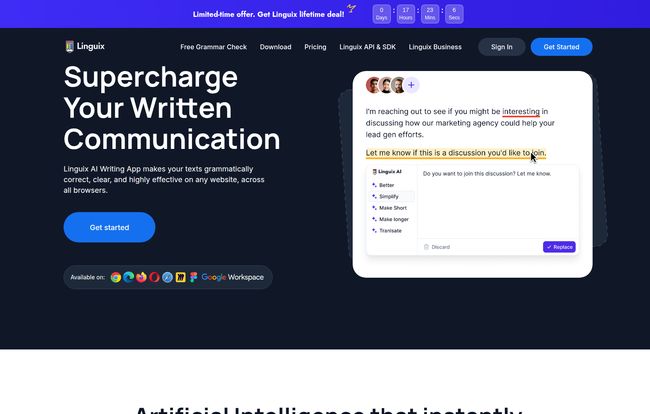
At its core, Linguix is an AI-powered writing assistant. But that’s a bit of a vague, corporate-speak description, isn’t it? Think of it less like a stern English teacher with a red pen and more like a helpful co-pilot for your keyboard. It’s designed to work wherever you do—in your Gmail, your Google Docs, your HubSpot CRM, your Asana tasks—thanks to a browser extension.
Its main gig is to check your grammar and spelling in real-time. But its real power, in my opinion, lies in the extra layers. It helps you rephrase clunky sentences, maintain a consistent brand voice across a team, and even speeds up your typing with clever shortcuts. It’s built for people who write for a living, or at least for a big part of their job. We’re talking marketers, salespeople, customer support agents… basically anyone who doesn’t want to sound like a robot in an important email.
Visit Linguix
The Standout Features That Made Me Look Twice
A feature list is just a list until you see how it actually helps. Here’s the stuff that genuinely impressed me.
More Than Your Average Grammar Cop
Of course, it has a top-notch grammar and spell checker. That’s table stakes for a tool like this. What caught my eye was the multilingual support. The site clearly shows it handles English, German, Spanish, and Portuguese, which is a big deal for global teams. We all know that feeling of writing in a language that isn’t your first—the constant second-guessing. A tool that can smooth out those rough edges across languages is a massive confidence booster. It’s surprisingly good at catching those subtle errors that a basic spellcheck would just breeze past.
The AI Rewriter That Saves You From Yourself
This is my favorite part. We’ve all been there. You’ve written a sentence, and you know it’s garbage. It’s clunky, it’s awkward, it just doesn’t flow. You rewrite it five times and it only gets worse. Linguix’s AI rewriter is like having a creative partner on call. You highlight the offending text, and it offers up a few different ways to say the same thing, but better. It’s fantastic for turning passive voice into active voice or just finding a more professional or persuasive tone. It’s not about replacing your thought, its about polishing the delivery.
Your Secret Weapon for Speed: Typing Shortcuts
At first, I glossed over this feature, thinking it was just a text expander. I was wrong. They call them ‘shortcuts’, and they are a productivity machine. Imagine you’re in customer support and you type the same three-paragraph answer to a common question ten times a day. With Linguix, you can save that entire block of text under a simple shortcut like `//faq-billing`. Type that, and boom, the full text appears. For sales teams, this is gold for outreach templates. For me, it’s for standard email sign-offs or replies to common blog comments. It saves a few seconds here and there, which, as we all know, adds up to hours.
Keeping the Brand Voice on Point with Style Guides
This is the feature that elevates Linguix from a personal tool to a serious business asset. The Style Guide. If you’ve ever managed a team of writers or marketers, you know the pain. One person writes “e-commerce,” another writes “eCommerce,” and a third writes “ecommerce.” One uses the Oxford comma, another thinks its a waste of space. It creates a disjointed experience for the customer. The Style Guide lets you set these rules for your whole team. You can define company-specific terms, tone of voice guidelines, and formatting rules. The assistant will then flag any text that doesn’t conform. It’s like having a brand manager built into every text box your team uses.
Let’s Talk Money: Breaking Down The Linguix Pricing
Alright, the all-important question: what’s this going to cost me? I appreciate that Linguix keeps their pricing pretty straightforward. There isn’t a confusing matrix of ten different tiers with arbitrary limits.
Here’s the breakdown as of my writing this:
| Plan | Billed | Price | Effective Monthly Cost |
|---|---|---|---|
| Monthly | Monthly | $15.00 / mo | $15.00 |
| Annual | Yearly | $70.00 / year | ~$5.84 |
| 2 Years | Every 2 Years | $120.00 / 2 years | $5.00 |
My take? The monthly plan is fine if you want to test the waters, but the real value is in the longer-term plans. The 2-year plan brings the cost down to five bucks a month. That’s less than a single fancy latte for a tool that you’ll likely use every single day. If you write professionally, the annual or biennial plan is a no-brainer for the ROI.
The Good, The Bad, and The AI-Powered
No review is complete without a little tough love. Nothing is perfect.
The Good Stuff: The time-saving from the rewriter and shortcuts is real. My writing is cleaner, and I spend less mental energy agonizing over phrasing. For teams, the style guide is a legitimate solution to the problem of brand consistency. The integrations with platforms like Google Workspace and Asana mean it just works without you having to change your habits.
The Not-So-Good Stuff: Yes, to get the most out of it, you need to be on a paid plan. The best features aren’t free. Shocker, I know. You also have to install a browser extension, which I know some people are hesitant about, but that’s pretty standard for this kind of service. And the biggest caveat, which applies to all AI: its suggestions are only as good as the data it was trained on. It’s a tool, not a human editor. It won’t catch a factual error or a flaw in your argument. You still need to use your brain. Sorry.
My Final Verdict: Is Linguix Worth Your Time and Money?
After a few weeks of solid use, I’m keeping Linguix in my digital toolbox. It’s hit that sweet spot of being powerful without being intrusive. It’s there when I need it and quiet when I don’t.
Who should get it? I’d strongly recommend it for small-to-medium-sized business teams, especially in marketing, sales, and support. The team management and style guide features are built for you. Freelance writers, content creators, and serious bloggers will also get a ton of value from the paraphrasing and productivity features. If writing is a core part of your job, the investment is easily justified.
Who can probably skip it? If you only write the occasional email and are perfectly happy with the free checker built into your browser or word processor, you probably don’t need to pay for a premium tool like this. And that’s okay!
Ultimately, Linguix feels like a mature, business-focused tool in a sea of novelties. It’s less about flashy AI tricks and more about solving the real, everyday problems of writing clearly, quickly, and consistently. And for that, it gets a solid nod of approval from me.
Frequently Asked Questions
- Which Linguix plan is the best choice for me?
- If you’re a solo user like a freelancer or blogger who does a lot of writing, the Pro plan (especially the annual or 2-year deal) is your best bet. If you are part of a team and need to manage multiple users and ensure brand consistency, you’ll want to look at the Business plan.
- How does Linguix handle billing?
- It’s pretty standard. Once you pick your plan (monthly, annual, etc.), you’re billed immediately. The plan then renews automatically according to the cycle you chose. You can manage it from your account.
- Can I pay for Linguix with PayPal?
- Yes! The pricing page explicitly states they support both cards and PayPal at checkout, which is great for flexibility.
- What happens if I downgrade my plan from Pro or Business?
- You won’t immediately lose your corrections. You will lose access to the premium features, but any corrections or suggestions you previously reviewed will remain visible. You can always re-subscribe to get the full feature set back.
- Is an AI writing assistant going to make my writing sound generic?
- That’s a valid concern. My experience is that it depends on how you use it. If you blindly accept every suggestion, maybe. But if you use it as a tool to polish your ideas and break through writer’s block, it actually helps you find a better version of your own voice. The rewriter gives you options, it doesn’t make the decision for you.
Reference and Sources
- Linguix Official Website
- Linguix Pricing Page
- Nielsen Norman Group on Tone of Voice – A great resource on why brand voice consistency, a feature Linguix helps with, is so important.


