
Categories: AI Marketing, AI SEO Tools, AI Summarizer, AI UX Design
Linkz.ai Review: Stop Losing Traffic to External Links

We SEOs and bloggers have a serious dilemma. We’re told to link out. Link to your sources! Add authority! Provide value! And we do. But every single time we add an <a href> tag, a little part of us winces. Why? Because every external link is a leak. A tiny hole in your website’s bucket, spilling precious traffic and session duration all over the internet.
It’s this constant tug-of-war between providing comprehensive, well-sourced information for your readers and desperately trying to keep them from clicking away into the internet ether, never to be seen again. For years, I just accepted this as the cost of doing business. You either open the door for your visitors to leave, or you create a walled garden that Google will probably penalize for being unhelpful. A classic catch-22.
Then I stumbled upon a tool that promised to let me have my cake and eat it too. It’s called Linkz.ai, and honestly, it’s one of those elegantly simple ideas that makes you wonder, “Why didn’t I think of that?”
So, What Exactly is This Linkz.ai Thing?
Imagine your reader is scrolling through your brilliant article. They see a link to a case study, a YouTube tutorial, or even a Wikipedia page you’ve referenced. Their curiosity is piqued. But are they curious enough to leave your page, open a new tab, and potentially get lost down a rabbit hole? Maybe. Maybe not.
Linkz.ai changes this gamble. When a user hovers over a link on your site, a slick little pop-up appears, showing a preview of the content on the other side. It’s not just a URL; it’s a rich, live preview. For an article, they’ll see the title and opening paragraphs. For a YouTube link, they can watch the video right there. For a Google Doc, they can scroll through the document.
It’s like giving your readers x-ray vision for links. They can peek inside without committing to a full click-away. They get the context they need, satisfy their curiosity, and—here’s the magic part—they never leave your page.
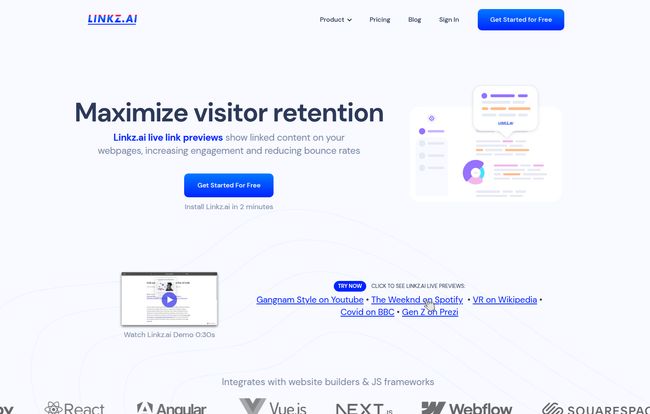
Visit Linkz.ai
The SEO Angle: Why This Matters More Than Just Being ‘Cool’
A fancy preview pop-up is neat, but as an SEO, I need to know the so what. How does this translate to better rankings and more traffic? Well, it ties directly into some of the most important, albeit fuzzy, metrics we obsess over.
Slashing Bounce Rate & Boosting Dwell Time
When a user clicks a link and leaves your site, that session often ends. If they do it quickly, it can look like a bounce. By keeping them on your page to consume that linked info, you’re naturally extending their session duration. Google pays attention to engagement signals like Dwell Time. A user who sticks around is a happy user, and a happy user is a signal to Google that your page is a good result for their query.
A Better User Experience (UX)
Let’s face it, modern SEO is just as much about user experience as it is about keywords. Giving your users instant context without the jarring experience of opening new tabs is just… better. It’s smoother. It makes your site feel more sophisticated and thoughtful. It’s one of those small details that contributes to a premium feel.
Faster Website Loading (Wait, Really?)
This was the part that surprised me. I’m always paranoid about adding new scripts to a site. Bloat is the enemy of speed, and speed is a ranking factor. But Linkz.ai has a clever trick up its sleeve. For embeds, like YouTube videos, it essentially lazy-loads them. Instead of your page loading the heavy YouTube player upfront, it just loads a lightweight link. The preview only loads when a user hovers. This means you can have a dozen video references on a page without killing your initial PageSpeed Insights score. That’s a huge technical SEO win.
Getting It Running: My Experience with the Features
The promise is you just “Add Linkz.ai script to your site.” And for the most part, that’s true. If you’ve ever added a Google Analytics or Facebook Pixel script, you can handle this. It integrates with pretty much everything—WordPress, Squarespace, Webflow, even custom React or Vue sites. A simple copy-and-paste into your site’s header, and you’re off to the races.
The features are straightforward but powerful. The mobile optimization is solid; the previews reflow nicely for smaller screens, which is non-negotiable these days. There are also customizable themes and an auto light/dark mode, which is a nice touch for maintaining brand consistency.
But for me, the real gem is the link preview analytics (available on paid plans). It shows you which external links your visitors are actually previewing. This is gold. It tells you what your audience is most curious about, helping you refine your content strategy and double down on what resonates. It turns your outbound links from a traffic leak into a source of audience insight.
The Good, The Bad, and The Script-y
No tool is perfect. It’s important to see both sides of the coin before you jump in.
What I Genuinely Like
The core benefit is obvious: you keep people on your site. The engagement boost is real. But I also have to applaud the privacy focus. Linkz.ai makes it clear they use no third-party tracking scripts and no cookies. In a world of GDPR and growing user skepticism, being able to add a feature without adding to the privacy headache is a massive plus. The lazy-loading of embeds is also, as I said, a game-changer for content-heavy pages.
Some Things to Consider
My main hesitation with any tool like this is the reliance on an external script. While Linkz.ai’s script is lightweight, it’s still another thing your site has to load. It’s a small price to pay for the functionality, but a price nonetheless. Also, the tool’s effectiveness depends entirely on the quality of your links. If a linked page has poor metadata or is behind a paywall, the preview might not be very helpful. Finally, you have to exercise some restraint. On a page with hundreds of links, the pop-ups could feel a bit overwhelming. It’s a powerful tool, so you need to be tasteful with it.
Let’s Talk Money: Linkz.ai Pricing
This is where Linkz.ai really shines, in my opinion. The barrier to entry is practically non-existent. They have a generous free tier that makes it a no-brainer to at least try out.
| Plan | Price per Month | Unique Previews | Best For |
|---|---|---|---|
| Free | $0 | 2,500 | Small blogs or testing the waters. |
| Blog | $5 | 15,000 | Established blogs and content sites. |
| Website | $10 | 30,000 | The sweet spot for most businesses. Gets you analytics. |
| Store | $25 | 150,000 | High-traffic e-commerce sites or content hubs. |
| Publisher & Platform | $50 – $100 | 400k – 1M | Large-scale media and enterprise applications. |
The free plan gives you 2,500 unique previews a month, which is more than enough to see if it works for you. The paid plans are very reasonably priced, and the jump to the $10 ‘Website’ plan to unlock analytics and remove branding is an easy decision if you see positive results.
So, Is Linkz.ai Actually Worth It?
In my book, yes. It’s not a magic bullet that will instantly triple your traffic overnight. But it’s a smart, targeted tool that solves a real, persistent problem for anyone who creates content on the web. It directly improves the user experience and positively influences the engagement metrics that Google cares about.
Think of it as patching up the leaks in your traffic bucket. You work so hard to get people to your site; it just makes sense to do everything you can to keep them there. For the cost—which can be zero—it’s one of the lowest-risk, highest-potential-upside tweaks you can make to your website this year.
Frequently Asked Questions
- How does Linkz.ai count a “unique preview”?
- A unique preview is counted the first time a specific visitor previews a specific link within a month. If the same person hovers over the same link 10 times, it still only counts as one unique preview towards your monthly limit.
- Is Linkz.ai really free to use?
- Yes, there’s a permanent free plan that gives you 2,500 unique previews per month. It includes the Linkz.ai branding on the previews, but it’s fully functional and a great way to start.
- What happens if I go over my plan’s preview limit?
- The previews will simply stop showing for the rest of the month. Your site won’t break, and your links will function as normal links. The service will resume automatically at the start of the next billing cycle.
- Will this slow down my website?
- The script itself is very small and loads asynchronously, so it shouldn’t impact your initial page load time. In cases where you’re linking to heavy content like videos, it can actually speed up your initial load by lazy-loading those elements until a user hovers.
- Does it work on my website builder, like WordPress or Webflow?
- Yes. It’s designed to work with virtually any website platform where you can add a small snippet of JavaScript to the header. This includes WordPress, Squarespace, Webflow, Wix, and many others.
Final Thoughts
Stop letting your outbound links be a one-way street. Linkz.ai turns them into an interactive experience, giving your readers the context they crave while keeping them engaged with your content. It’s a clever solution to an age-old problem. My advice? Sign up for the free plan, install it on your most popular blog post, and watch your analytics. The data might just surprise you.
References and Sources
- Linkz.ai Official Website
- Linkz.ai Pricing Details
- Backlinko’s Guide to Dwell Time (A great read on why engagement matters)


