
Categories: AI Assistant, AI Copilot, AI SEO Tools, AI Workflow
Lkin Review: The Website Management Tool I Actually Use

Tab Overload is Real. Can a Simple Dashboard Fix It?
Let’s be honest. If you’re an agency owner, a freelancer, or an in-house marketer juggling multiple web properties, your mornings probably look a little like mine used to. You fire up your browser, and the ritual begins. Open the tab for Client A’s WordPress site. Open the tab for Client B’s Shopify. Another for that Squarespace project you’re nursing. Then the Google Analytics tabs. The PageSpeed Insights tabs. Before you know it, you’re staring at a favicon-littered nightmare, and you haven’t even had your second coffee.
For years, I’ve relied on a messy combination of browser bookmarks, a password manager, and a creaking spreadsheet to keep track of it all. It works, kind of. But it’s clunky. It’s slow. And it’s incredibly inefficient.
So when I stumbled upon a tool called Lkin, which promised to be a central command center for all my sites, my interest was piqued. I’ve seen dozens of these platforms come and go, most of them either too bloated or too basic. But Lkin looked… different. Cleaner. More focused. So I took it for a spin. And I have some thoughts.
So, What is This Lkin Thing Anyway?
Imagine a master key ring for all your websites. That’s the simplest way I can put it. Lkin isn’t trying to be your all-in-one project management suite or replace your entire tech stack. Its goal is much more focused: to give you ridiculously fast access to your websites’ backends and provide a quick, top-level health report in a single glance. No more digging through bookmarks or trying to remember which client used `_wp-admin` versus `/login`.
It’s designed for people like us—the developers, designers, and SEOs who need to dip in and out of multiple sites daily. It supports a whole slew of platforms, from the usual suspects like WordPress and Shopify to others like Wix, Joomla, and Squarespace. This wide compatibility is a huge plus right out of the gate, because client work is rarely a one-platform game.
The Core Features That Actually Matter
A pretty dashboard is nice, but if it doesn’t save me time or make me money, it’s just shelfware. I was pleasantly surprised to find that Lkin has a few tricks up its sleeve that genuinely improve my workflow.
Lightning-Fast CMS Access and Smart Diagnostics
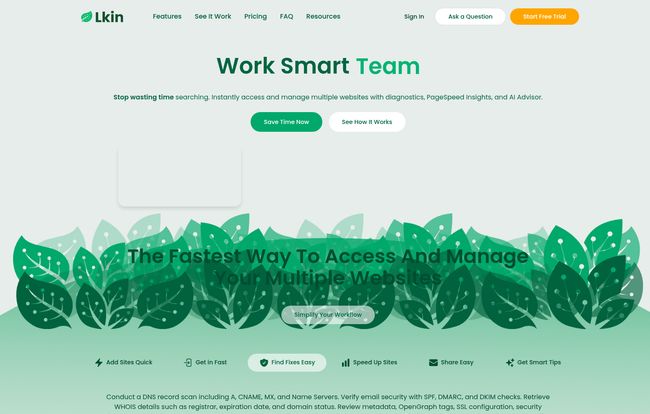
This is the main event. You drop a website URL into Lkin, and it instantly recognizes the CMS and gives you a one-click button to its login page. It’s a small thing, but shaving off 15-20 seconds per site adds up fast when you’re managing 30 of them. The dashboard also runs a bunch of ‘Smart Checks’ automatically. It pulls DNS records (A, CNAME, MX), checks your SSL configuration, peeks at your `robots.txt` file, and even identifies tracking codes like Google Analytics or the Facebook Pixel. It’s like having a junior tech do a quick audit on every site in your portfolio, 24/7.
Visit Lkin
The AI Advisor Is More Than Just a Gimmick
I’ll admit, when I see “AI” plastered on a new SaaS tool, I roll my eyes a little. But Lkin’s AI Advisor, powered by GPT-4o, is genuinely useful. It integrates with Google PageSpeed Insights and gives you plain-English recommendations on how to improve performance, accessibility, and SEO. It’s not going to write a full-blown SEO strategy for you, but it’s fantastic for spotting low-hanging fruit. For example, it might flag that a key page is missing a meta description or that your image compression could be better. For quick client reporting or task-list creation, it’s brilliant.
Collaboration That Doesn’t Involve Spreadsheets
If you work in a team, you know the pain of sharing credentials and site lists. It’s often a security and organizational mess. Lkin lets you group sites into folders (e.g., “eCommerce Clients,” “New Leads”) and share access with your team members. Your developer can have access to the whole portfolio, while a content writer might only get access to the blogs they manage. It’s simple, clean, and gets the job done without the chaos of shared password vaults.
Putting Lkin to the Test
I decided to really kick the tires. I exported a list of 90—yes, 90—websites from my various management tools and used Lkin’s CSV import feature. The entire process of uploading and having Lkin analyze all 90 sites took about two minutes. I was genuinely impressed. No complex formatting needed, just a list of domains.
The first thing I noticed was how it immediately flagged two client sites with SSL certificates that were about to expire. These were older sites I don’t check daily, and it would have been an embarrassing email to get from the client. That alone almost justified the price of admission for me. It’s like a silent watchdog for your portfolio’s technical health.
It’s Not Perfect, Though. Let’s Talk About the Flaws.
No tool is perfect, and it’s important to be upfront about the limitations. I’d be doing you a disservice if I painted Lkin as a magical solution to every problem.
First, it doesn’t store your passwords. From a security standpoint, this is actually a smart move. They offload that responsibility to you and your dedicated password manager (you are using one, right?). But for pure convenience, it’s an extra click. You hit the Lkin button to go to the login page, then trigger your password manager to fill the credentials. It’s a minor gripe, but a gripe nonetheless.
Second, it’s not a full-blown maintenance platform like ManageWP. You can’t use Lkin to perform one-click plugin updates across all your WordPress sites or run cloud backups. Lkin is a diagnostic and access tool, not a maintenance and deployment tool. You need to understand that distinction. It complements those tools, it doesn’t replace them.
Lastly, they note that the search function can get a bit slow with very large datasets (over 1,000 websites). I’m not quite at that level yet (thankfully), but for massive agencies, it’s something to keep in mind.
A Look at Lkin’s Pricing Structure
The pricing is refreshingly straightforward and scales well, from solo freelancers to large agencies. They offer a 7-day free trial, and you don’t even need to enter a credit card, which is a big green flag in my book. They clearly want you to see the value before you commit.
| Plan | Monthly Price | Annual Price (Save 17%) | Best For |
|---|---|---|---|
| Individual | $6 | $60 | Solo freelancers and developers. |
| Team (2 Users) | $20 | $200 | Small agencies or partnerships. |
| Team (4 Users) | $30 | $300 | Growing teams. |
| Team (Unlimited) | $100 | $1000 | Large agencies and enterprises. |
Prices are accurate as of this writing but can change. Check their official pricing page for the latest details.
The Verdict. Who Is This Really For?
The long and short of it is this: Lkin is for the doers. It’s for the agency pro who needs to quickly answer a client’s question about their site’s performance. It’s for the freelance developer who needs to jump between ten different WordPress installs before lunch. It’s for the SEO who needs a quick, high-level overview of a prospect’s site without running a full-blown, hour-long crawl.
If you’re looking for a heavy-duty maintenance machine to automate backups and updates, this isn’t it. But if your biggest bottleneck is simply getting into and getting a quick read on your sites, Lkin is an elegant, affordable, and surprisingly powerful solution. It’s found a permanent spot in my daily toolkit.
Frequently Asked Questions About Lkin
- 1. Does Lkin actually store my sensitive website passwords?
- Nope! Lkin does not store any passwords. It provides a direct link to the correct login page, and you use your browser or a password manager to fill in the credentials. This is a security feature, not a bug.
- 2. How easy is it to add a large number of websites?
- It’s incredibly easy. While you can add sites one-by-one, the CSV import feature is the real star. You can export a list of domains from your registrar or current tools, paste it in, and Lkin will process them in bulk very quickly.
- 3. Is Lkin a replacement for a tool like MainWP or ManageWP?
- Not directly. Think of Lkin as a specialized tool for quick access, diagnostics, and high-level reporting. Tools like MainWP are focused on hands-on maintenance like plugin/theme updates and backups. They can and do work very well together in the same workflow.
- 4. What kind of insights can I get from the AI Advisor?
- The AI Advisor analyzes your site’s technical and on-page elements. It provides actionable suggestions based on Google PageSpeed Insights, Core Web Vitals, accessibility standards (WCAG), and basic SEO best practices. It’s great for generating a quick to-do list for site improvements.
- 5. Is there a free trial to test it out?
- Yes, Lkin offers a 7-day free trial for all its plans, and you don’t need a credit card to sign up. This gives you a no-risk opportunity to see if it fits your team’s workflow.


