
Categories: AI Chatbot, Large Language Models (LLMs), Open Source AI Models
LlamaChat Review: Run LLaMA & Alpaca Locally On Your Mac

As someone who lives and breathes SEO and digital trends, I’m swimming in AI tools every single day. It feels like a new wrapper for GPT-4 drops every hour. We’re all entangled in a web of API keys, monthly subscriptions, and that nagging little voice in the back of our heads wondering, “Where is my data actually going?
It’s exhausting.
So when I stumbled upon LlamaChat, I felt a flicker of something I hadn’t felt in a while: genuine excitement. The promise? To run powerful Large Language Models—the brains behind tools like ChatGPT—directly on your Mac. No cloud. No fees. No prying eyes. Just you, your machine, and a whole lot of AI potential. But does it live up to the hype? I had to find out.
So, What Exactly is LlamaChat?
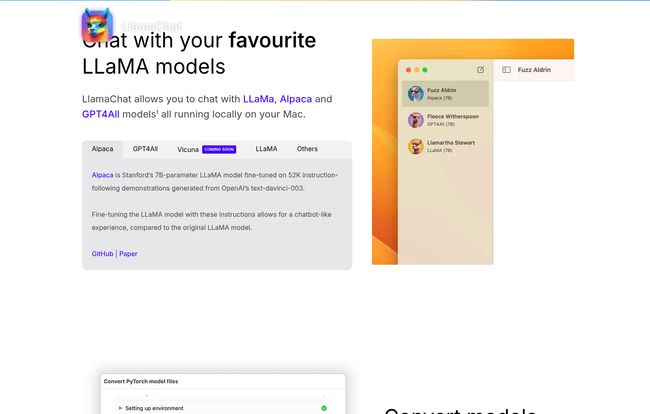
In the simplest terms, LlamaChat is a clean, straightforward application for your Mac that lets you have a conversation with open-source LLMs. Think of it as a private chat room where the only other guest is a powerful AI that lives entirely on your computer’s hard drive. It’s built by the open-source community, for the community, powered by some seriously clever projects like llama.cpp and llama.swift.
The models on the menu are some of the biggest names in the open-source world: Meta’s LLaMA, Stanford’s Alpaca, and the ever-popular GPT4All. These aren’t toy models; they’re the real deal, the very engines that sparked a revolution in accessible AI. The entire thing is free and open-source, which in this economy, is a beautiful, beautiful thing to hear.
Getting Your Hands Dirty with LlamaChat
Alright, let’s set expectations. This isn’t a one-click-and-go experience like you’d get from a polished, billion-dollar company. And honestly? That’s part of its charm. It’s for people who like to tinker.
The first thing to know is that LlamaChat is the car, but you need to bring your own engine. You have to source the model files yourself. This might sound daunting, but it’s more of a digital scavenger hunt than a major technical hurdle. You’ll be spending some quality time on platforms like Hugging Face, the go-to repository for AI models.
Visit LlamaChat
Once you have a model, LlamaChat is pretty slick. It can import either the raw PyTorch model files or the more optimized, pre-converted .ggml files. The app itself handles the conversion process, showing you a neat little progress bar as it works its magic. It’s like turning your raw ingredients into a ready-to-use AI. The whole process feels surprisingly solid for a free tool, and once you’re set up, you’re set up for good.
Why Running LLMs Locally is a Total Game-Changer
I can’t stress this enough: moving your AI workload from the cloud to your local machine is more than just a novelty. It fundamentally changes your relationship with the technology. It’s a shift in power back to the user.
The Unbeatable Argument for Privacy
This is the big one for me. I often use AI to brainstorm sensitive client strategies, analyze proprietary data, or even just vent about a project. The idea of that information being used to train some future corporate model has always felt… icky. With LlamaChat, that concern vanishes. Your conversations never leave your Mac. They aren’t logged on a server in Virginia or Dublin. They are yours. Period. This is a massive win for anyone working with confidential information.
Kiss Those Pesky API Bills Goodbye
I once experimented with an AI-driven content generation script and woke up to a surprise bill from OpenAI that made my morning coffee taste like regret. The pay-as-you-go model is great, until it isn’t. LlamaChat is free. The models it runs are free. Once you’ve downloaded the files, you can generate text, write code, or ask a million questions without ever thinking about tokens or usage tiers. Your only cost is the electricity your Mac uses. It feels like cheating, but it’s not.
Unplug and Unwind (With Your AI Pal)
Ever been on a flight with a brilliant idea but no Wi-Fi to use your favorite AI tool? Or maybe you just want to work from a cafe with notoriously spotty internet. Local LLMs dont care about your connection status. This offline capability makes your AI assistant a truly reliable partner, ready whenever and wherever inspiration strikes. It turns your MacBook from a simple terminal for cloud services into a self-contained AI laboratory.
Let’s Be Real: The Not-So-Shiny Parts
No tool is perfect, and LlamaChat is no exception. Its strengths are tied directly to its weaknesses, and it’s important to be honest about them.
“The freedom of open source often comes with the responsibility of a little DIY. LlamaChat embodies this—it gives you the power, but you have to be willing to turn the wrench.”
First, the model hunt is a real thing. For a non-developer, navigating repositories and figuring out which file is the right file can be confusing. It’s a barrier to entry, for sure. You need a bit of patience.
Second, it’s a Mac-only affair, and specifically for machines running macOS 13 or later. This unfortunately leaves a chunk of users with older (but still perfectly good) hardware out in the cold. I get it, new frameworks and all that, but it’s still a limitation.
Finally, the performance is tied to your hardware. My M1 Pro handles it like a champ, but an older Intel Mac or a MacBook Air might huff and puff a bit, especially with larger models. The responses won’t be as instantaneous as a massive server farm, and that’s just the physics of it.
So Who is LlamaChat Actually For?
After playing with it for a week, I’ve got a pretty clear picture of the ideal LlamaChat user. This is a dream tool for:
- Developers and Tinkerers: If you love experimenting with AI and want to see how different models behave without an API tether, this is your playground.
- The Privacy-Conscious Professional: Lawyers, researchers, strategists, and writers who need a confidential brainstorming partner will find immense value here.
- The Frugal AI Enthusiast: If you want to harness the power of modern LLMs without a subscription, look no further.
It’s probably not for your friend who just wants to generate a clever Instagram caption once a month. The setup, while not Herculean, is more involved than just signing up for a website. It’s for those of us on the front lines who want a bit more control.
A Welcome Step Towards AI Democratization
LlamaChat isn’t just an app; it’s a symptom of a larger, incredibly positive trend. It represents the democratization of powerful AI. For years, this kind of tech was locked away in the data centers of a few giant corporations. Now, thanks to the open-source community, we can run it on the laptop sitting on our desk.
It’s a powerful, promising, and refreshingly transparent tool that puts control back where it belongs: with you. It has its rough edges, but it’s a glimpse into a future where AI is less of a service we rent and more of a tool we own. And I am absolutely here for that.
Frequently Asked Questions
- Is LlamaChat really free?
- Yes, 100%. The application itself is free and open-source. The models it runs (LLaMA, Alpaca, GPT4All) are also available for free for research and, in some cases, commercial use (always check the model’s specific license!).
- What do I need to run LlamaChat?
- You’ll need a Mac computer running macOS 13 (Ventura) or a newer version. You will also need to download the model files separately from a source like Hugging Face.
- Where do I get the LLaMA or Alpaca models?
- The best place to start is the Hugging Face model repository. You’ll be looking for models in the PyTorch or GGML format. A quick search for “Alpaca 7B GGML” or “LLaMA 13B GGML” will usually point you in the right direction.
- Is it safe to run these models on my Mac? Will it slow my computer down?
- It’s safe, but it is computationally intensive. When the model is generating a response, you can expect your Mac’s fans to spin up. Performance depends heavily on your Mac’s processor (Apple Silicon chips like M1/M2/M3 are particularly good at this). It won’t harm your computer, but it will use significant resources while active.
- How does it compare to just using the ChatGPT website?
- ChatGPT is more polished, often faster, and requires zero setup. LlamaChat’s main advantages are privacy (everything is local), cost (it’s free), and control (you can swap out different open-source models). If you prioritize convenience, stick with ChatGPT. If you prioritize privacy and cost, LlamaChat is a fantastic alternative.


