
Categories: AI Agent, AI Comic Generator, AI Design Assistant, AI Design Generator, AI Graphic Design, AI Logo Generator, AI Marketing, AI Poster Generator, Storyboard AI
Lovart AI Review: Your New AI Design Co-Pilot?

If you’re in the creative or marketing space, you’re probably getting a bit of AI fatigue. Every other day, there’s a new ‘game-changing’ tool that promises to revolutionize your workflow, write your copy, design your logos, and probably walk your dog. Most of them are… fine. They do one thing okay, but they rarely fit into a real, professional workflow without a ton of hassle.
So when I first heard about Lovart, I was skeptical. Another AI design generator? Great. But then I started looking at what it actually is—an “AI design agent.” That phrasing caught my attention. It suggests a partner, a collaborator, not just a vending machine for images. And after spending some time with it, I can tell you, it’s one of the first AI tools in a while that feels like it was built by people who actually understand the creative process. It’s not about replacing designers; it’s about giving them a seriously smart co-pilot.
Visit Lovart
So, What Exactly is This Lovart AI Design Agent?
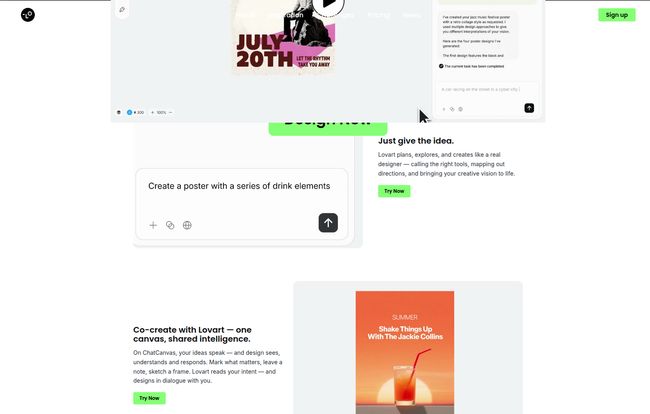
Okay, marketing speak aside, Lovart is a platform that takes your text prompts and generates full-blown design assets. We’re not just talking about a single, isolated image like you’d get from Midjourney. We’re talking about crafting creative stories, building out storyboards, generating brand visuals, and even producing video and music. They call it the “world’s first AI design agent,” which is a bold claim, but the approach feels different enough to warrant it.
The core idea is Human + AI collaboration on one canvas. This isn’t a fire-and-forget tool. It’s an interactive workspace. You provide the spark, the initial idea, and the AI builds out a foundation. Then, you jump in and refine it. It’s a back-and-forth, a conversation between your creative vision and the machine’s incredible speed. It feels less like a magic wand and more like a super-powered chisel; you still need to be the sculptor.
How You’ll Actually Use Lovart
The workflow is surprisingly intuitive. It strips away a lot of the intimidating complexity you see in other platforms.
It Starts With a Simple Idea
Everything begins with the prompt. You have an idea—say, “a vibrant poster for a summer music festival on July 20th with a refreshing drink as the centerpiece.” You feed that to Lovart. Instead of just spitting out a static image, the AI agent starts composing, considering layout, typography, and imagery. It’s designed to think a little more like a designer, not just a pixel-pusher. This is where getting good at writing prompts really pays off, a skill I’ve been telling my team is the new SEO of the creative world.
The Human and AI Collaboration Canvas
This is the part that really sells me. Once the AI generates its first pass, you’re not stuck with it. You’re on a seamless canvas where you can edit, tweak, and regenerate specific parts. Don’t like the font? Change it. Want a different color palette? Adjust it. This turns the process from a lottery into a proper design session. It’s scalable, too. You can start with a rough brainstorm and build it all the way up to final, polished artwork without ever leaving the platform. Its a pretty slick experience.
Who Should Be Using Lovart?
Looking at their structure, it’s clear Lovart isn’t just for one type of creative. I can see a few groups getting a ton of value here.
- Freelancers and Solo Designers: The ability to quickly ideate and produce high-quality drafts is a massive time-saver. It’s perfect for mood boards, initial concepts, and social media content when you’re juggling multiple clients.
- Marketing Teams and Brands: For teams that need to pump out a lot of content, especially for social media or video, this is a powerhouse. The Basic plan, tailored for video creators and brands, seems custom-built for this.
- Agencies: The Pro plan is obviously aimed at agencies that need high volume and the best possible pricing on credits. Being able to quickly generate entire campaign concepts, from visuals to storyboards, could seriously speed up pitching and production.
Basically, if you feel the constant pressure of the content treadmill, Lovart is designed to give you a speed boost.
The All-Important Question: What’s the Price Tag?
Alright, let’s talk money. AI tools can range from ‘practically free’ to ‘sell a kidney’ expensive. Lovart’s pricing is actually pretty transparent and flexible, which I appreciate. They run on a credit system, which is common for these kinds of services.
Here’s the breakdown in plain English:
There’s a Free plan to get your feet wet. You get 500 credits to start and 300 more each day for free, which is generous. It’s a great way to test the waters and see if the workflow clicks for you, though it uses limited AI models. No reason not to try it.
The first paid tier is the Starter plan at $16/month. This feels like the sweet spot for most individual creators or freelancers. You get 2000 monthly credits, access to the full agent abilities, and a commercial license, which is absolutely critical for professional work. You can create a decent amount of images and a few videos with this.
Next up is the Basic plan for $27/month. This bumps you up to 3500 credits and is geared towards those who do more with video and images, like content creators or small businesses managing their own social media.
Finally, the Pro plan is $74/month for a whopping 11,000 credits. This is for the power users—the agencies and full-time creative teams who will be living in the platform day in and day out. At this level, the cost per creation becomes much more efficient.
Note: They offer a discount for annual billing, which is pretty standard practice.
The Honest Truth: Pros and Some Real-World Caveats
No tool is perfect, especially one that’s still growing. Here’s my honest take.
Things That Genuinely Impress Me
The speed is undeniable. Going from a simple sentence to a fully composed design concept in under a minute feels like some kind of witchcraft. The integrated, all-in-one platform is also a huge plus. Not having to jump between five different apps for images, video, and editing smooths out the creative process immensely.
But the real standout is the collaborative canvas. That’s the feature that lifts Lovart above being just another image generator. It respects the designer’s need to be in control.
A Few Things to Keep in Mind
First, it’s a new platform, and the website indicates its in beta. That means you might run into the occasional bug or limitation. Patience is a virtue. Second, the output is only as good as your prompt. If you’re new to AI, there’s a learning curve to figuring out how to ‘talk’ to the machine to get what you want. And third, a very important note from their own materials: “Brand names are for reference only.” This is a big one. It implies you can’t just say “design a poster in the style of Nike” and expect a legally-sound, commercially-usable result. You have to use it as inspiration, not a copy-paste machine. Always be mindful of copyright and trademark law.
Lovart AI Frequently Asked Questions
- What are credits and how are they used in Lovart?
- Credits are like tokens you spend to perform actions, such as generating an image, creating a video, or running an agent conversation. Each action consumes a certain number of credits. The paid plans give you a monthly allowance of credits.
- Can I use the designs I create for commercial purposes?
- Yes, but only on the paid plans (Starter, Basic, and Pro). These plans include a commercial license, which is essential if you’re creating work for clients or your own business. The Free plan is for personal use and evaluation only.
- What happens if I run out of my monthly credits?
- Based on the FAQ on their site, it seems you can top-up your credits if you run out before your next billing cycle. This is great for those unexpectedly busy months.
- Do my unused credits roll over to the next month?
- The pricing page mentions monthly credits, which typically don’t roll over in these types of subscription models. It’s best to check their latest policy, but a good rule of thumb is to try and use what you pay for each month.
- Is there an API to integrate Lovart with other tools?
- Yes, the features list mentions integration via APIs. This is more for advanced users and businesses who want to build Lovart’s capabilities directly into their own applications or workflows.
My Final Thoughts on Lovart
So, is Lovart the future of design? That’s a big question. What I can say is that it’s a significant step in the right direction for AI-powered creative tools. It’s one of the first platforms I’ve seen that truly feels built for a professional designer’s workflow, not just as a novelty toy.
It’s not going to steal your job. But it might just become your new favorite assistant—the one who never complains about doing a dozen different versions and is always ready to brainstorm at 2 AM. If you’ve been on the fence about incorporating AI into your work, the Lovart free plan is a genuinely compelling, no-risk way to see what the fuss is all about.


