
Categories: AI Assistant, AI Speech Recognition, AI Speech-to-Text, AI Transcriber, AI Transcription
Lugs.ai Review: Offline AI Captions for Your Mac?

You’re trying to follow a fast-paced work meeting on Zoom, watch an important university lecture, or just enjoy a YouTube video from a creator who mumbles. You turn on the auto-captions, hoping for some clarity. What you get instead is… creative gibberish. “Let’s discuss the fiscal report” becomes “Let’s disgust the physical resort.” It’s comical, sure, but it’s also incredibly frustrating. For some, it’s an inconvenience. For the millions of people in the hearing impaired community, it’s a constant barrier.
For years, I’ve seen countless transcription tools pop up. Most of them follow the same playbook: they’re web-based, they require a solid internet connection, and they send your private conversations—every laugh, every sensitive detail, every ‘umm’—off to some anonymous server in the cloud. It always felt like a necessary evil. You traded privacy for convenience. But what if you didn’t have to?
A few days ago, a new tool called Lugs.ai floated across my screen, fresh from a launch on Product Hunt. The headline was simple and bold: “Caption and transcribe everything… No internet connection required.” Now that got my attention.
So, What Exactly is Lugs.ai?
Think of Lugs.ai not as a website or a cloud service, but as a small, dedicated stenographer that lives right inside your computer. It’s a downloadable application that listens to any audio your Mac picks up—whether it’s from a video call, a podcast you’re listening to, or someone speaking into your microphone—and turns it into text in real-time. On your screen. Instantly.
The secret sauce here is that all the heavy lifting, all the AI-powered “thinking,” happens directly on your device. It doesn’t send your audio data across the internet. This isn’t just a minor feature; in my opinion, it’s a fundamental shift in how we should approach transcription technology.
Visit Lugs.ai
The Features That Genuinely Got My Attention
On the surface, it’s a transcription app. But when you look at how it’s built and what it prioritizes, a few things really stand out. This isn’t just another clone of existing services; it feels like it was born from actual frustration with the status quo.
Offline by Design: Your Conversations Stay Yours
This is the big one. The absolute game-changer. The fact that Lugs works entirely offline is a massive statement in today’s world of data-hungry apps. Think about it. Using a cloud-based transcription service is like writing your private thoughts on a postcard and mailing it to a company to have them read it back to you. You just have to trust they’ll throw it away after. Lugs, on the other hand, keeps the entire conversation inside a locked room. Your room.
This has huge practical benefits too. Working from a cafe with spotty Wi-Fi? On a plane? No problem. Lugs keeps on captioning. For journalists conducting sensitive interviews or business teams discussing proprietary information, this isn’t just a convenience—it’s a security requirement.
AI That Understands Context (Finally!)
Accuracy has always been the holy grail for transcription. Lugs.ai claims its AI is built to “deeply understand your conversation,” allowing it to follow context and deliver unmatched accuracy. This is a tall claim, but it makes sense. Most transcription errors happen when a tool just translates sounds into words phonetically, without grasping the topic. An AI that understands that you’re talking about ‘stock market trends’ and not ‘stalk market friends’ is going to make far fewer mistakes. It’s the difference between a parrot and a genuine listener.
Built by the People Who Need It Most
This might be the most important feature of all, even if it’s not a technical one. The Lugs.ai website states, clear as day: “Built by the hard of hearing for their own daily use.”
We’re constantly improving based on real experiences, not perceived ones.
Stop and think about that for a moment. This isn’t a team of developers in Silicon Valley guessing what a community needs. This is a tool forged from lived experience. It means the pain points are understood intimately. It suggests the solutions will be practical, thoughtful, and genuinely useful, because the creators are also the primary users. That builds a level of trust that no marketing budget can buy.
My Hands-On First Impressions (And a Few Questions)
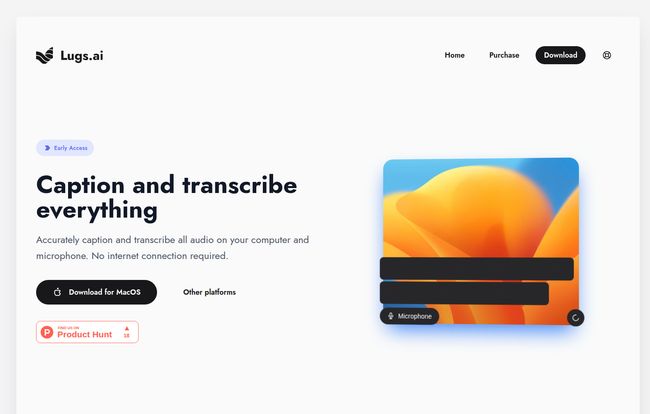
Okay, so I headed over to the site to download it. The design is clean, minimalist, and straight to the point. No fluff. Just a clear value proposition and a big ‘Download for MacOS’ button. The user experience, from the landing page alone, feels refreshingly simple.
The focus on macOS is immediately apparent. As a Mac user, that’s great for me, but it’s also the first big question mark. What about Windows users? Or Linux? The site has a greyed-out link for ‘Other platforms’, which gives me hope that they’re in the works, but for now, it seems to be an Apple-exclusive party. It’s a classic startup strategy—dominate one platform first—but one that will leave many potential users waiting.
Who is Lugs.ai Really For?
The primary audience is clearly and beautifully the hearing impaired community. It’s an accessibility tool at its heart, designed to tear down communication barriers in a digital world.
But honestly? The potential user base is much, much broader.
- Students: Imagine getting a perfect, real-time transcript of every lecture, online or in-person, without having to ask for permission to record.
- Content Creators: Podcasters and YouTubers can get instant, rough transcripts to make editing and show notes a breeze.
- Journalists & Researchers: Conduct interviews knowing you have a private, accurate text backup without relying on an internet connection.
- Remote Workers: Anyone who spends their day in back-to-back video calls can benefit from having a searchable log of their meetings. It’s like having a perfect memory.
Basically, if you ever deal with spoken audio and wish you had a text version of it, Lugs.ai is aimed at you.
The Elephant in the Room: Pricing and Platform
So, the two big questions I’m left with are the same ones you probably have: how much does it cost, and when is it coming to other platforms?
The website says “Try now for free” and has a “Download now” button, which suggests a free trial or a freemium model. However, there’s also a “Purchase” link in the main navigation. When I clicked it… I got a 404 “Not Found” error. Ouch. For a new product, broken links like that can be a bit of a confidence-killer. I’ll give them the benefit of the doubt—it’s an early access product, and these things happen. But the lack of a clear pricing page is a definite friction point. Is it a one-time purchase? A subscription? We just dont know yet.
And as mentioned, the MacOS focus is a limitation. I really hope a Windows version is high on their priority list, because a tool this promising deserves to be available to everyone, regardless of their operating system.
Frequently Asked Questions About Lugs.ai
1. Does Lugs.ai really work without an internet connection?
Yes, absolutely. This is its main selling point. All the AI processing happens on your computer, so it works anywhere, anytime, ensuring your data remains completely private.
2. Is Lugs.ai a free tool?
It appears to have a free trial, as the site encourages a free download. However, the final pricing model isn’t clear yet. The presence of a (currently broken) “Purchase” link suggests it will likely be a paid product after the trial period.
3. What operating systems does Lugs.ai support?
Currently, the website prominently features a download for MacOS. While there’s a mention of “Other platforms,” there’s no official release or timeline for Windows or Linux versions just yet.
4. How is Lugs.ai different from tools like Otter.ai or Descript?
The primary difference is its offline, privacy-first approach. Most other popular services are cloud-based, meaning they require an internet connection and process your audio on their servers. Lugs does everything locally on your machine.
5. Is my data safe and private when using Lugs.ai?
Yes. Because the tool operates entirely offline and processes all audio on your device, your conversations and transcriptions never leave your computer. This makes it one of the most private options available.
6. Who created Lugs.ai?
The platform was built by members of the hearing impaired community. This unique origin means it’s designed based on real-world needs and experiences, not just theoretical use cases.
Is Lugs.ai Worth the Download? My Final Take
Despite the couple of hiccups—the unclear pricing and the Mac-only availability—I’m genuinely excited about Lugs.ai. It’s not just another tech tool; it feels like a statement. It’s a move toward more accessible, more private, and more human-centric technology.
The promise of accurate, context-aware transcription that happens entirely on my own machine is incredibly compelling. The fact that it’s built with the empathy and insight that can only come from personal experience gives it an authenticity that many competitors lack. It’s a solution created out of necessity, and those are often the ones that truly change the game.
If you’re a Mac user who values privacy and needs reliable, real-time captioning, downloading the free trial seems like a no-brainer. For everyone else on Windows, let’s keep our fingers crossed. This is one tool I’ll be watching closely.
Reference and Sources
- Lugs.ai Official Website: https://lugs.ai/
- Lugs.ai on Product Hunt: https://www.producthunt.com/products/lugs-ai
- W3C Introduction to Web Accessibility: https://www.w3.org/WAI/fundamentals/accessibility-intro/


