
Categories: AI Marketing, AI Video Editor, AI Video Generator, Text to Video
Lumen5 Review: AI Video Creation Made Shockingly Easy?

For years, every marketing guru and their dog has been screaming from the rooftops: “VIDEO IS KING!” And they’re not wrong. Video gets the clicks, the engagement, the sweet, sweet traffic. But here’s the part they always whisper: creating good video is a massive pain. It’s expensive, time-consuming, and requires a skillset that most of us content folks and business owners just don’t have lying around.
I’ve been on that hamster wheel. I’ve stared at Adobe Premiere Pro, felt my soul leave my body, and quietly closed the program. I’ve gotten quotes from videographers that made my wallet weep. So when another “AI-powered video creation platform” slides across my desk, my default setting is a healthy, Grade-A skepticism. But every so often, something actually works. And friends, I think Lumen5 might be one of those things.
Visit Lumen5
So, What Exactly is Lumen5?
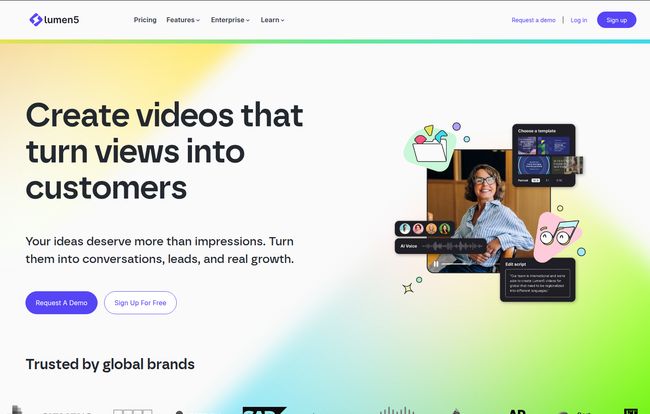
Imagine you have a great blog post. It’s well-researched, full of juicy info, and pulling in some decent organic traffic. Now, what if you could take that article and, with a few clicks, transform it into a slick, engaging social media video? That’s the core promise of Lumen5. It’s not a full-blown video editor for making the next blockbuster. Think of it more as a ridiculously smart translator. It takes your written content—a blog post, a script, even just a few ideas—and translates it into a visual story using AI.
The platform scans your text, pulls out the key sentences, and automatically matches them with relevant video clips and images from its library. It’s like having a junior video editor who does all the boring legwork for you, presenting you with a first draft in minutes. Literally, minutes. From there, you just drag, drop, and tweak until it feels right.
The Features That Actually Matter
Any platform can throw a list of features at you. But which ones actually save you from a headache? After messing around with it, here’s what stood out to me.
AI That Gives You a Running Start
The whole text-to-video thing is Lumen5’s main party trick. You paste in a link to a blog post, and its AI gets to work. It doesn’t just randomly chop up your paragraphs. It seems to have some smarts about identifying key phrases and structuring them into a coherent sequence of scenes. Is it perfect every time? Of course not. But it gets you 70-80% of the way there, which, in my book, is a massive win. It completely obliterates that dreaded “blank page” feeling.
A Media Library That Doesn’t Look Cheap
We’ve all seen those terrible videos made with the same three cheesy stock clips. I was pleasantly surprised by the quality and variety in Lumen5’s library. The free and lower-tier plans give you a solid selection of standard stock media. But when you get to the Professional and Enterprise plans, you unlock access to heavy hitters like Shutterstock and Getty Images. This is a game-changer for creating videos that look polished and professional, not like a high school project.
Keeping It On-Brand is Surprisingly Easy
This is huge for any real business. Nothing screams amateur hour like inconsistent branding. Lumen5 seems to get this. With their paid plans, you can create ‘Brand Kits’. You upload your logo, set your specific brand colors (using hex codes), and choose your fonts. Once it’s set up, every video you create automatically pulls from this kit. Your logo is watermarked perfectly, your text overlays use the right font, and your scenes have color schemes that match your website. It’s a simple feature that provides enormous value by ensuring brand consistency across all your video content. It just works.
Let’s Talk Money: A Real-World Look at Lumen5’s Pricing
Alright, the all-important question: what’s this going to cost? Lumen5 uses a tiered subscription model, which is pretty standard. Here’s my breakdown of who each plan is for:
- Community Plan ($0/month): This is your test drive. It’s completely free and lets you make a handful of videos a month. They’ll have a Lumen5 watermark on them and be in 720p resolution, but it’s more than enough to see if you like the workflow. Perfect for students or if you’re just curious.
- Basic Plan (starts at $19/month, billed annually): This is the first paid step. The biggest perk? No Lumen5 watermark. Your videos instantly look more professional. You’re still at 720p, but for a small business owner or solopreneur just getting their feet wet with video, this is a fantastic entry point.
- Starter Plan (starts at $59/month, billed annually): This feels like their sweet spot and is marked as the ‘Most Popular’. You get 1080p resolution (a must for a crisp look), access to way more stock media, and you can set up one Brand Kit. If you’re a marketer or a small business that’s serious about video content, this is likely where you’ll land.
- Professional Plan (starts at $149/month, billed annually): Now we’re talking serious content creation. You get everything in Starter, plus access to millions of premium clips from Shutterstock and Getty. You can also set up multiple brand kits, which is great for agencies managing several clients.
- Enterprise Plan (Custom Pricing): This is for the big leagues. Large teams, corporations that need custom templates, special security features, and a dedicated account manager. If you need this, you’ll know it.
The annual billing offers a pretty significant discount, so if you’re planning to commit, it’s the smarter financial move.
The Good, The Bad, and The AI
No tool is perfect. Let’s weigh the pros and cons from the perspective of someone who’s deep in the SEO and content trenches.
Why I’m Impressed (The Pros)
The biggest pro is the sheer speed and efficiency. I turned a 1,500-word article into a pretty decent 90-second video in under 20 minutes, and that included me being fussy with the edits. Doing that from scratch would have taken hours, if not days. It dramatically lowers the barrier to entry for video marketing. It’s also incredibly easy to use. If you can use PowerPoint or Canva, you can use Lumen5. The cost-saving is also obvious; even the Professional plan is a fraction of what you’d pay a freelancer for a handful of videos.
Where It Might Fall Short (The Cons)
Let’s be realistic. This isn’t a replacement for a skilled human video editor for high-stakes projects. The reliance on templates means that if you’re not careful, your videos could start to feel a bit cookie-cutter. The AI is a fantastic starting point, but it’s not a creative genius. It won’t understand nuance, sarcasm, or complex visual metaphors. You are still the creative director. For brands with extremely specific and rigid visual guidelines, the templates might feel a tad restrictive compared to building everything from scratch in After Effects. It’s a trade-off: you’re sacrificing a degree of granular control for a massive gain in speed and accessibility.
Is Lumen5 the Right Tool for You?
After spending some quality time with Lumen5, I can confidently say it’s a powerful and legitimate tool. It’s not trying to be something it’s not. It’s not for Hollywood directors.
It’s for the scrappy marketer, the busy small business owner, the content creator who knows they need to be doing video but just doesn’t have the bandwidth. It’s a tool designed to help you repurpose your existing content and get it in front of more eyeballs on social media, quickly and affordably. If you’ve been putting off creating video because it feels too hard or too expensive, then I genuinely think you should give Lumen5’s free plan a spin. It might just be the thing that finally gets you in the game.
Frequently Asked Questions
- Can I really use Lumen5 for free?
- Yes, absolutely. The Community plan is free forever. It allows you to create up to 5 videos per month with a Lumen5 watermark in 720p. It’s a great way to learn the platform without any commitment.
- How does the blog post to video feature work?
- You simply paste the URL of your blog post into Lumen5. Its AI technology then analyzes the content, pulls out key sentences, and automatically populates a video storyboard with your text and relevant stock media. You can then edit every aspect of this AI-generated draft.
- Can I use my own images and video clips?
- Yes, on all plans, including the free one, you can upload your own photos, video clips, and even your own music to incorporate into your projects.
- Is it hard to keep videos on-brand?
- Not at all, especially with the paid plans. The Brand Kit feature (available on Starter plans and up) lets you pre-load your logo, brand colors, and fonts to ensure every video you create is consistent and professional.
- What happens if I cancel my subscription?
- You can cancel your plan at any time. If you cancel, your plan will remain active until the end of your billing cycle, and you won’t be charged again. You’ll still have access to all the videos you’ve created.
- Is Lumen5 a good fit for creating long-form YouTube videos?
- While you can create longer videos, Lumen5 really shines at producing short-form, text-overlay-heavy videos perfect for social media platforms like LinkedIn, Facebook, and Instagram. For complex, long-form content with lots of talking heads or intricate edits, a traditional video editor might still be a better choice.


