
Categories: AI Crypto, AI Face Swap Generator, AI Face Swap Video, AI Image Generator
Lyvia AI Review: Uncensored Image & Video Generator?

As someone who spends their days neck-deep in the world of SEO, traffic, and content creation, I’ve developed a love-hate relationship with AI image generators. On one hand, they’re incredible. We can now visualize concepts in seconds that used to take artists hours or days. But on the other hand… the guardrails. Oh, the guardrails.
I can’t count the number of times I’ve tried to generate a perfectly innocent, slightly edgy, or just plain weird concept on a mainstream platform, only to be met with the dreaded “This prompt may violate our policy” message. It feels like trying to paint a masterpiece while wearing mittens. You can sort of do it, but all the nuance is lost. So when I stumbled upon Lyvia, a tool that proudly brandishes the “uncensored” label, my curiosity was definitely piqued. Is this the digital speakeasy for creatives we’ve all been searching for, or is it just too good to be true?
So, What Exactly is Lyvia?
At its core, Lyvia is an AI image and video faceswap generator. Think of it as a creative suite that lives on your phone (iOS and Android) or in your web browser. The big hook isn’t just that it can create stunning images from a text prompt; it’s that it promises to be a “workbench for your wildest ideas.” The entire platform is built around the idea of providing a private, safe, and most importantly, unrestricted space for you to create.
This isn’t just about making pretty pictures of astronauts riding unicorns (though you can totally do that). It’s about giving you the freedom to explore concepts without an algorithm breathing down your neck. It also integrates some seriously cool deepfake and faceswap technology, letting you swap faces in both static images and videos. Fun stuff.
The Uncensored Promise: A Breath of Fresh Air
The main selling point here is the lack of censorship. In an industry increasingly dominated by big players like OpenAI and Google who are, for understandable reasons, building very high walls around their gardens, Lyvia feels like a trip to the wilderness. It’s for the creators who want to generate a gritty film noir scene, a piece of satirical art, or just something that doesn’t fit neatly into a sanitized, corporate-friendly box.
I’ve always felt that true creativity happens at the edges. It’s messy, sometimes uncomfortable, and it definitely doesn’t always follow the rules. By removing the content filters, Lyvia gives that power back to the user. Of course, this comes with its own set of responsibilities, but for artists and creators who understand the medium, it’s a massive advantage.
A Quick Tour of Lyvia’s Features
AI Image Generation
From the looks of it, the image generation is pretty versatile. The gallery showcases everything from photorealistic portraits and moody landscapes to high-fantasy battle scenes. The variety suggests a robust model underneath the hood, capable of handling a wide range of styles. This is your main canvas for bringing those text-based ideas to life.
Image and Video Faceswapping
This is where things get really interesting. While AI image generation is common, high-quality, accessible video faceswapping is still a bit of a niche. Lyvia puts this tool right in your hands. You can use it for professional work, like visualizing a character for a film pitch, or for what most of us will do: creating absolutely legendary memes and social media content. It’s like having a Hollywood special effects studio in your pocket. I can already see the potential for some hilarious content. It’s a digital costume box, and everyone’s invited to play.
Your Personal Cross-Device Art Gallery
One of the most practical features is the Account Library. Any art you generate is saved to your account and accessible whether you’re on your iPhone, your Android tablet, or your desktop. This is a bigger deal than it sounds. My creative process is chaotic; an idea might strike while I’m in line for coffee, and I’ll want to flesh it out later on my main computer. Lyvia’s portability means your ideas follow you, which is exactly how it should be.
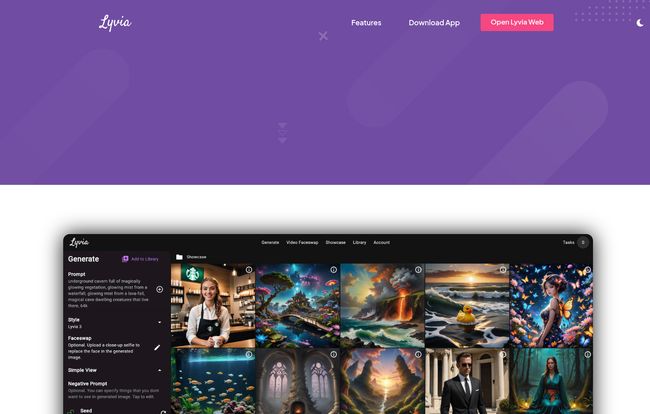
Visit Lyvia App
The Good, The Bad, and The Kinda Weird
No tool is perfect, right? Lyvia has some incredible strengths but also a few quirks you should know about. It’s not a straight-up list of pros and cons, more like a friendly chat about what to expect.
Creative Freedom and Pure Accessibility
The combination of being uncensored and available on multiple platforms is Lyvia’s superpower. You don’t need a beast of a PC with an expensive graphics card to get started. The fact that they have a web app, an iOS app, and an Android version means it’s open to almost everyone. It truly democratizes access to this powerful tech.
Hold On, Where Is It on The Google Play Store?
Okay, here’s a big one for my fellow Android users. Lyvia isn’t available on the Google Play Store. My guess? It’s likely due to that same ‘uncensored’ policy that makes it so appealing. Google has some pretty strict rules for apps on its official store. This means you’ll likely need to download the APK file directly from their website and install it yourself (a process known as sideloading). It’s not difficult, but it’s an extra step and something to be aware of. For me, it’s a small price to pay for creative freedom, but it’s a hurdle nonetheless.
A Few Other Things to Keep in Mind
There are a couple of other small details. First, your generated art gets automatically deleted after 30 days. This is probably to keep server costs down, but it means you have to be diligent about saving your favorite creations to your own device. Don’t let your masterpiece disappear into teh ether! Second, they mention that paying with cryptocurrency is “coming soon.” It’s not here yet, but it’s a nod to a privacy-conscious user base and modern payment trends. I appreciate that.
So, What’s the Price of Freedom?
This is the part of the review where I’d normally break down the pricing tiers. But when I went to check Lyvia’s pricing page… I was greeted by a cute cat on a 404 error page. Whoops. While that’s a bit of an issue, it’s also a very real-human problem that happens with websites. So, as of this writing, I can’t give you a concrete number.
Based on how similar services operate, I’d wager they have a freemium model. You’ll probably get a certain number of free credits to try it out, with options to buy more credits or subscribe for unlimited access. This is just my educated guess, so you’ll have to download the app and check the pricing for yourself. A bit of mystery, I suppose!
Who Is Lyvia Actually For?
Is this a tool for everyone? Maybe not. If you’re perfectly happy creating SFW (safe for work) images on mainstream platforms, you might not need it. But if you’re one of the following, I think Lyvia will feel like a revelation:
- The Digital Artist: Someone who wants to explore darker themes, nuanced emotions, or abstract concepts without a filter.
- The Meme Lord: The video and image faceswap features are a goldmine for creating viral, hilarious content.
- The Indie Developer or Writer: Perfect for quickly storyboarding scenes or creating concept art that might be a little too intense for other AIs.
- Anyone Who’s Felt Creatively Caged: If you’ve ever been frustrated by an AI’s limitations, Lyvia is your protest vote.
Final Thoughts: Is Lyvia a Keeper?
I’m optimistic. Lyvia is stepping into a gap in the market that a lot of us have been complaining about for a while now. It’s a tool built on a philosophy of freedom and user-driven features. It’s not as polished as some of the billion-dollar platforms, and it has some quirks like the 30-day deletion policy and the lack of a Play Store presence. But it’s got heart.
It feels less like a sanitized corporate product and more like a tool built by creators, for creators. It’s a bit rough around the edges, sure, but it’s also powerful and, most importantly, liberating. If you prioritize raw creative potential over a polished, hand-holding experience, then I’d say Lyvia is absolutely worth a download.
Frequently Asked Questions about Lyvia
Is Lyvia AI safe to use?
Yes, according to their site, Lyvia aims to be a private and safe space for creation. However, since it’s an uncensored platform, user discretion is always advised. The responsibility for the content you create is your own.
How can I get Lyvia on my Android phone?
Since it’s not on the Google Play Store, you’ll need to visit the official Lyvia website from your Android device and download the APK (Android Package Kit) file directly. You’ll then need to enable installations from unknown sources in your phone’s settings to install it.
Do I get to keep my generated images forever?
No. Lyvia automatically deletes generated art from your account library after 30 days. It’s very important to save any images or videos you want to keep directly to your phone or computer.
Is Lyvia free to use?
The pricing information wasn’t available at the time of this review. Most AI generator tools offer a limited free trial or a credit-based system, with paid subscriptions for heavier use. It’s best to check the app for the most current pricing.
What makes Lyvia different from Midjourney or DALL-E?
The two main differentiators are its commitment to being an uncensored platform, which allows for a wider range of creative expression, and its built-in, user-friendly video faceswapping feature, which isn’t a primary function of most mainstream image generators.
Conclusion
In a world of digital walled gardens, Lyvia is hacking a gate in the fence. It’s a bold move and one that I think a lot of creatives will appreciate. It’s not perfect, but it is powerful, and it puts the creative control back where it belongs: with you.
Reference and Sources
- Lyvia Official Website: lyvia.app
- The Debate on AI Censorship: The Inevitable and Impossible Task of AI Content Moderation (TechPolicy.Press)


