
Categories: AI Assistant, AI Chatbot, Large Language Models (LLMs)
MagicBuddy Review: A ChatGPT Bot Inside Your Telegram?

How many tabs do you have open right now? And how many of those are for some kind of AI tool? ChatGPT, Claude, Midjourney… the list goes on. I’m an SEO guy, I live and breathe this stuff, and even I get overwhelmed. The constant app-switching, the copy-pasting, the mental gymnastics of remembering which tool does what best—it’s a drag. It’s the digital equivalent of having your tools scattered all over the workshop instead of in one handy toolbox.
For weeks, I’ve been searching for something to streamline my workflow. Something that felt less like a chore and more like a conversation. And then I stumbled upon MagicBuddy. At first, I was skeptical. Another chatbot? Yawn. But this one was different. It promised the power of ChatGPT, but right inside Telegram, the messaging app I already have open all day long. No new app to download, no new website to bookmark. Just a new contact in my chat list.
I decided to give it a whirl. And honestly? It’s kind of a game-changer.
Visit MagicBuddy
So, What Exactly is This MagicBuddy Thing?
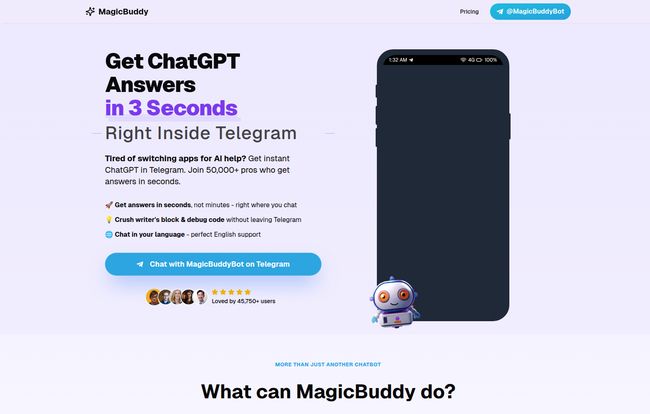
Think of MagicBuddy as a super-smart intern living in your Telegram DMs. It’s built on the back of OpenAI’s powerful models (the same tech behind ChatGPT) and integrated directly into the Telegram platform. This means you can ask it complex questions, have it write an email draft, debug a snippet of code, or even just brainstorm ideas for dinner, all without ever leaving your chat window.
But calling it ‘just a chatbot’ feels like a massive understatement. It’s more of a personal assistant. It’s the convenience of a quick message versus the formality of opening a dedicated application. A subtle but powerful shift in how I interact with AI.
The Real Reason I’m Hooked: Convenience is King
As someone who gets paid to analyze trends, I can tell you that the biggest hurdle for any new tech is user friction. If it’s not easy, people won’t use it. MagicBuddy pretty much eliminates that friction for anyone who’s already a Telegram user.
The End of App-Switching Insanity
My typical workflow used to involve having a conversation in Telegram or Slack, getting an idea, opening a browser, logging into ChatGPT, typing my query, copying the result, and pasting it back into the chat. It sounds simple, but do that fifty times a day and it feels like running a marathon in flip-flops. With MagicBuddy, the entire process happens in one window. It’s a small change that has had a huge impact on my daily productivity. It just feels… lighter.
Voice Notes Are No Longer a Black Hole of Information
This. This right here is the feature that made me go from ‘interested’ to ‘I’m telling all my friends about this‘. I get a lot of voice notes. Rambling, 10-minute-long streams of consciousness from clients and colleagues. I used to dread them. Now, I just forward them to MagicBuddy. Within seconds, I get a neat, summarized transcript of the entire message. It pulls out the key points and action items. It’s… well, it’s magic. No other word for it.
I’ve always felt that voice notes were a great idea with a terrible user experience. MagicBuddy fixes that. It’s one of those ‘how did I live without this?’ features.
A Look at the MagicBuddy Toolbox
Beyond the basics, there’s a whole host of things this bot can do. While the free version is impressive, the premium features are where it really starts to feel like you’re living in the future.
- Standard Chatbot Stuff: It can answer your questions, write poetry, explain quantum physics, or give you a recipe for vegan lasagna. It’s fast and the conversation history is pretty solid, especially on the premium plan.
- Reminders and News: You can tell it, “/remind me to call the accountant tomorrow at 10 am,” and it will. Simple as that. You can also ask for daily news summaries to get the headlines without the noise of a full news site.
- The Premium Playground: This is where it gets really fun. With a premium subscription, you unlock the ability to generate images using DALL-E. Need a quick graphic for a blog post of a ‘robot butler serving tea’? Just ask. You can also create your own custom ChatGPT bots, which is a seriously powerful feature for anyone looking to create a specialized assistant for a specific task.
The Price of Magic: A Look at the Premium Plans
Nothing this good is ever completely free, right? MagicBuddy operates on a freemium model. The free tier is generous enough to give you a real feel for the tool, but there are limits. If you’re a heavy user like me, you’ll probably want to upgrade.
Here’s a quick breakdown of their pricing, which I have to say is pretty competitive, especially with the discounts.
| Plan Duration | Price Per Month | Discount |
|---|---|---|
| 1 Month | $12.99 | 50% OFF |
| 3 Months | $9.99 | 60% OFF |
| 12 Months (Best Value) | $5.99 | 75% OFF |
In my opinion, the annual plan at $5.99 a month is a no-brainer. That’s less than two fancy coffees for a month of unlimited AI assistance, image generation, and that glorious voice note transcription. The premium tier also gives you faster responses, which is definately noticeable during peak hours.
What I Love and A Few Caveats
No tool is perfect. While I’m clearly a fan, it’s only fair to give you the full picture. The biggest strength of MagicBuddy is also its main limitation: it’s tied to Telegram. If you’re not a Telegram user, this tool isn’t for you. It’s as simple as that. And, of course, the most powerful features are locked behind the premium subscription. That’s not really a con, just the reality of the business model, but it’s something to be aware of.
But what I love far outweighs those points. The sheer convenience is unmatched. The voice note processing is, as I’ve said, a killer feature. And the speed and reliability of the AI have been consistently impressive. It feels less like a clunky piece of software and more like a helpful, responsive colleague.
Frequently Asked Questions About MagicBuddy
Is MagicBuddy free to use?
Yes, there is a free tier available! It lets you use the core chatbot features but with some usage limits. To get unlimited messages, faster responses, image generation and voice message support, you’ll need a premium plan.
How does the voice note feature work?
It’s incredibly simple. You just forward any voice note you receive in Telegram directly to your MagicBuddy chat. The bot automatically processes the audio and sends back a written transcript, often with a helpful summary of the key points.
Is MagicBuddy secure to use?
According to their site, they prioritize secure and private transactions. Since it operates within Telegram, it benefits from Telegram’s existing security infrastructure. As with any AI, I’d avoid sharing extremely sensitive personal data, but for general productivity and creative tasks, it’s great.
Can it really generate images like Midjourney?
Yes! The premium version integrates DALL-E, one of the leading AI image generation models. You can describe an image you want in plain text, and the bot will create it for you right in the chat. The quality is excellent for brainstorming, social media posts, or just having fun.
How is this different from just using the ChatGPT app?
The main difference is integration. MagicBuddy brings the power of ChatGPT into your existing messaging workflow. This means no app-switching, plus you get unique, Telegram-specific features like voice note processing and seamless reminder setting. It’s about making AI more accessible and part of your daily conversation flow.
My Final Verdict: Is The Magic Real?
After a few weeks of heavy use, I can confidently say that for me, the magic is very real. MagicBuddy has successfully carved out a permanent spot in my digital toolkit by doing one thing exceptionally well: it makes powerful AI incredibly convenient to use. It’s not trying to be a standalone, do-everything platform. It’s a smart, powerful enhancement to a tool I already use every single day.
If you’re a Telegram user and you’ve been dabbling with AI tools, I genuinely think you should give MagicBuddy a try. Start with the free version. Forward it a voice note. Ask it a tough question. See how it feels to have that power just a message away. You might be surprised at how quickly it becomes indispensable.


