
Categories: AI Photo Editor, AI Video Editor
MetaPix Review: AI Photo Editor or Digital Ghost?

If you’re a content creator, a social media manager, or just someone who likes to make their photos pop, your phone is probably overflowing with editing apps. One for quick video clips, another for that perfect vintage filter, and a third for zapping photobombers out of existence. It’s a lot to manage. So, whenever a new app pops up promising to be the “all-in-one” solution, my ears perk up. But my skepticism does, too.
The latest name buzzing in these circles is MetaPix. It claims to be a mobile powerhouse, blending standard photo and video editing with a heavy dose of AI magic. On paper, it sounds like the dream tool we’ve all been waiting for. But as I started digging, I stumbled upon a little mystery. More on that in a bit.
Visit MetaPix
So, What’s the Big Idea Behind MetaPix?
At its core, MetaPix is supposed to be your go-to mobile studio. The idea is to stop you from app-hopping. Need to trim a video for your Reels, then create a stunning thumbnail for it with AI-generated elements, and finally swap your face onto a meme for a laugh? MetaPix says, “I got you.” It’s designed to be that versatile Swiss Army knife for modern, fast-paced content creation. It’s not just about slapping a filter on something; it’s about transforming your media from the ground up, all within a single interface.
A Closer Look at the MetaPix Feature Set
Okay, let’s get into the nitty-gritty. What can this thing actually do? Based on the info out there, the feature list is pretty impressive and seems to cover all the essential bases for creators.
Your Everyday Photo and Video Editing
First up, the fundamentals. MetaPix offers the standard suite of tools you’d expect. For photos, you can tweak brightness, contrast, and saturation, apply a range of filters, and add text or elements from a sticker collection. For video, you get the essentials like trimming clips, merging multiple segments, and adding background music. It’s the foundational stuff, but it’s crucial to get it right. An intuitive interface here is a huge win, and from what I gather, it’s one of their strong suits.
The AI-Powered Special Sauce
This is where things get interesting. The “AI” label is slapped on everything these days, but MetaPix seems to have some genuinely cool applications. The AI Editing feature is a one-tap enhancer that automatically adjusts your photos for optimal lighting and color, which is a lifesaver when you’re in a hurry. Then there’s the AI Image Generation. This lets you create visuals from scratch using text prompts. Imagine needing a specific background for a product shot—instead of spending hours searching stock photo sites, you could just… create it. That’s a game-changer for workflow efficiency.
Fun Extras for Viral Potential
Beyond the serious editing, MetaPix leans into the fun, shareable side of content. The Face Swap feature is exactly what it sounds like, perfect for creating hilarious memes or just having a laugh with friends. And the Background Changer is another powerful AI tool. It can cleanly cut you out of a photo and place you in a completely new environment, whether it’s a tropical beach or the surface of Mars. These are the kinds of tools that can make a piece of content go viral on TikTok or Instagram.
The Good, The Bad, and The Questionable
No tool is perfect, right? Every platform has its ups and downs. From the available information, here’s how MetaPix seems to stack up.
On the plus side, the feature set is undeniably versatile and powerful. Having robust photo, video, and generative AI tools in one place is a massive advantage. The promise of an intuitive interface is also a huge draw, as overly complicated software can kill creativity. It seems built for speed and convenience.
However, there are a couple of potential downsides. Performance can be a big one. AI processing, especially for video and image generation, is resource-intensive. This means the app’s performance could be sluggish on older or less powerful phones. Also, it’s almost certain that the best features are locked behind a subscription paywall. That’s just the standard model for apps like this, so be prepared for a freemium experience where the free version is more of a trial than a fully functional tool.
The Elephant in the Room: Is MetaPix a Digital Ghost?
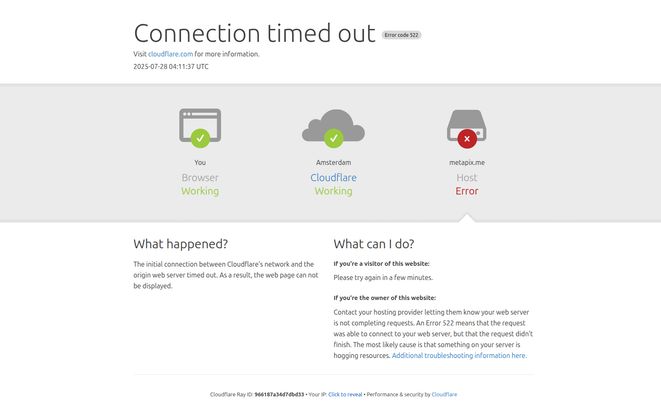
Alright, time to address teh mystery I mentioned earlier. As part of my research, I always go to the source: the product’s official website. So I tried to navigate to metapix.me. And what did I get? A big, fat “Connection timed out” error. Specifically, a Cloudflare Error 522.
Now, for those not deep in web jargon, this isn’t just a simple “site is down” message. It means that Cloudflare (the service that protects and speeds up websites) can reach the internet just fine, but it can’t get a response from the MetaPix server. The lights are on, but nobody’s home. I tried it multiple times, on different days. Same result.
What does this mean? It could be a temporary technical glitch. Or, and this is a common story in the tech world, it could be a sign that the project has been abandoned or is on life support. Maybe the development team ran out of funding, or they’ve pivoted to something else. It makes you wonder if the app is still being updated or supported in the app stores. It’s like finding a fantastic brochure for a theme park that might have closed down. The pictures look great, but you cant buy a ticket.
What’s the Damage? A Look at MetaPix Pricing
This brings us to the pricing, which is, unsurprisingly, a complete unknown. With the website down, there’s no official pricing page to check. Based on the feature set and industry standards, I’d bet my last dollar it operates on a freemium model.
You’d likely get to download it for free and use basic editing tools. But the cool stuff? The AI image generation, unlimited background removals, watermark-free exports? That’ll almost certainly require a weekly, monthly, or annual subscription. This is just speculation, but it’s an educated guess based on seeing this exact model a hundred times before.
Frequently Asked Questions about MetaPix
- Is MetaPix free to use?
- It likely has a free version with limited features. For full access to its AI tools and to remove watermarks, you will probably need to purchase a subscription.
- What are the main features of MetaPix?
- MetaPix combines photo editing (filters, adjustments), video editing (trimming, merging), and several AI tools, including an automatic photo enhancer, AI image generator, face swap, and background remover.
- Does MetaPix work on all phones?
- While it’s a mobile app, the performance of its advanced AI features will heavily depend on your phone’s processing power. Newer, more powerful devices will likely provide a much smoother experience.
- Is the MetaPix app still available?
- This is the big question. With its official website being down for an extended period, the app’s current status and support are uncertain. You would have to search for it directly on the Apple App Store or Google Play Store to see if it’s still listed for download.
- Is MetaPix good for professional content creators?
- It seems positioned more for social media managers and prosumers who need to create high-quality content quickly on the go, rather than for high-end professional photographers or videographers who would use desktop software.
My Final Thoughts
So, where does that leave us with MetaPix? The concept is a 10/10. An affordable, powerful, AI-driven creative suite in your pocket is the holy grail for so many of us. The feature list is spot on, hitting all the right notes for creating engaging social media content.
But the execution and, more importantly, the current existence of the project are shrouded in doubt. That persistent Error 522 is a major red flag that you just can’t ignore. My advice? If the idea of MetaPix excites you, by all means, search for it on your device’s app store. If you find it and it works, it might just be the hidden gem you’ve been looking for. But go in with your eyes open, and maybe hold off on that annual subscription until you’re sure the park isn’t closing down for good.
Reference and Sources
- Cloudflare Support – Understanding the Error 522 Connection Timed Out.


