
Categories: AI Photo Editor, AI Style Transfer, Image to Image
MimicBrush Review: AI Image Editing That Copies Reality

I’ve been in the SEO and digital content game for a long time. Long enough to remember when ‘optimizing’ an image meant squishing it down to 100kb so it wouldn’t break your dial-up connection. For years, my toolkit was Adobe Photoshop. It was my hammer, my screwdriver, my entire toolbox. And I got pretty good at it. I could spend hours—and I mean hours—with the clone stamp and patch tools, trying to make a client’s product look just right. Changing the fabric on a sofa? That was half a day’s work, a dozen layers, and a whole lot of caffeine.
You’d be trying to match lighting, perspective, and the one thing that always trips people up: texture. You can get the color right, but if the texture is off, the whole thing looks fake. It’s a painstaking process. A real grind.
So, when I first heard about a tool called MimicBrush, I was skeptical. An AI platform that lets you edit an image just by showing it another one? “Yeah, right,” I thought. “Another overhyped AI toy that produces mushy, uncanny-valley results.” But I’m a professional, so I had to try it. And folks, I’m here to eat a little bit of humble pie.
So, What on Earth is MimicBrush?
Let’s get one thing straight. This isn’t another AI image generator like Midjourney or DALL-E where you type in a wild prompt and see what happens. MimicBrush is an AI image editor. Think of it less as a wild artist and more as a hyper-skilled, ridiculously fast apprentice.
The core idea is brilliantly simple. You take your image, tell the AI which part you want to change, and then you show it a reference image. You’re essentially telling it, “See this wooden table? Make it look like this piece of marble.” Or, “See this cotton t-shirt? Make it look and feel like this leather jacket.” The AI then analyzes the reference—the color, the lighting, the shadows, and most importantly, the texture—and applies it to your target area. It’s like a digital chameleon, perfectly blending in.
Getting My Hands Dirty: A Walkthrough
I decided to put it to the test with a classic e-commerce problem: product variations. Let’s say I have a photo of a nice ceramic mug, but I also want to show it in a different finish, maybe a speckled stoneware look. Normally, this would be a nightmare to mock up convincingly.
With MimicBrush, the process was almost laughably easy. The website says it’s five steps, and they aren’t kidding.
- Select the Area: I uploaded my mug photo and used a simple masking tool to ‘paint’ over the part I wanted to change. It’s like using a digital highlighter. No complex pen tool paths needed.
- Provide a Reference: I found a photo of a stoneware plate I liked and uploaded it as the reference.
- Let the AI Cook: I hit the button and waited. It took maybe… 20 seconds?
- Check the Result: The result popped up. And it was good. Scary good. The mug wasn’t just recolored; it had the subtle texture and matte finish of the stoneware plate.
- Experiment: The best part? I could just upload another reference image—say, a picture of polished chrome—and do it again, creating a completely different version in another 20 seconds.
Let that sink in. A task that would’ve taken me an hour in Photoshop, with questionable results, was done in under a minute. It felt like cheating.
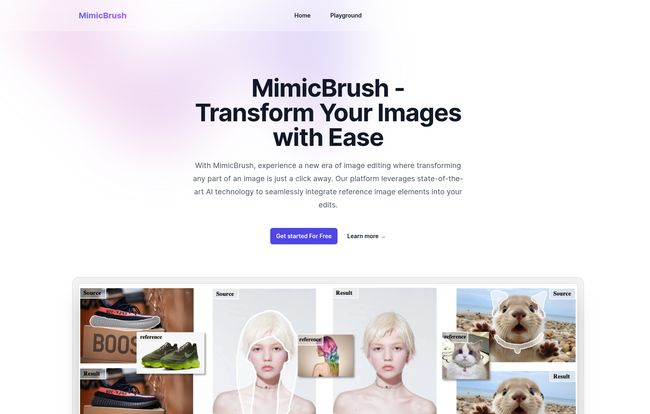
Visit MimicBrush
The Standout Features That Genuinely Impressed Me
Okay, it’s fast. But a lot of things are fast and bad. What makes MimicBrush special are a few key things that, as a pro, I truly appreciate.
Finally, Editing That Stays in Its Lane
They call it “Localized Modifications,” which is a very corporate way of saying it only changes the bit you told it to. This is huge. One of the biggest pains in photo editing is “bleed,” where your edits accidentally spill over and affect other parts of the image. MimicBrush keeps the changes neatly contained within your masked area, preserving the integrity of the rest of the photo. Want to change just the tie on a suit, or one petal on a flower? You can do that without worrying about ruining the whole shot. It’s precision without the pain.
It’s All About That Texture, Baby
This is the real magic. Lots of tools can swap colors. But MimicBrush transfers texture. It understands the difference between the gloss of a painted car and the matte finish of a carbon fiber hood. It gets the grain of wood, the weave of fabric, teh subtle bumps on a concrete wall. This is what lifts the edits from “a decent photoshop” to something that looks real. It’s a level of nuance I did not expect from an automated tool.
So Easy, Anyone Can Use It
I love my complex software, I really do. But I also know that for 90% of people, Photoshop is intimidating overkill. MimicBrush has no layers, no blending modes, no confusing menus with a million options. It’s an automated process. If you can upload a photo to Facebook, you have all the technical skills you need to use this. It truly opens up high-quality image editing to everyone, not just us nerds who’ve spent years learning the hard way.
Is MimicBrush Your New Best Friend?
So who is this actually for? In my opinion, the applications are massive.
- E-commerce store owners: This is a killer app for you. Create dozens of product variations (different colors, materials, patterns) from a single photoshoot. This saves an insane amount of time and money.
- Interior Designers & Architects: Quickly visualize different materials for clients. Show them what that wall would look like in brick vs. plaster, or that floor in hardwood vs. tile.
- Social Media Managers: Need to quickly tweak an image to fit a new aesthetic or campaign? Done in minutes.
- Hobbyist Photographers: Want to experiment and get creative without a steep learning curve? Go wild.
Now, who is it not for? If you’re a digital artist who needs absolute, 100% pixel-perfect control over every single aspect of your work, you might still want the manual control of traditional software. Also, and this is important, the tool is heavily dependent on the quality of your reference image. If you feed it a low-res, blurry reference, you’re going to get a low-res, blurry result. Garbage in, garbage out—that old rule still applies.
Okay, But How Much Does This Magic Cost?
This is usually the part where the dream dies. You find a great new tool, and then you see the enterprise-level price tag. Not here. I checked out the MimicBrush pricing page, and it’s refreshingly straightforward.
| Plan | Price | Key Features |
|---|---|---|
| Free | $0 / month | Partial functionality, great for testing the waters and occasional use. |
| Advanced | $9.90 / month (annually) | Unlimited usage, all features unlocked. |
There’s a Free plan that gives you a taste of what it can do, which is more than fair. But the real deal is the Advanced plan. At $9.90 a month (if you pay annually), it’s basically the cost of two fancy coffees. For unlimited use? That is an absolute bargain, especially when you consider an Adobe subscription is significantly more. For any business or professional who edits images even a few times a month, the time saved makes this a no-brainer investment.
MimicBrush vs. The Old Guard (Like Photoshop)
How does this stack up against the tools I’ve used for years? For the specific task of reference-based editing, MimicBrush blows them out of the water in terms of speed and ease of use. Doing this in Photoshop would involve carefully selecting an area, creating multiple adjustment layers for color and brightness, and then painstakingly painting in textures using other images and blend modes. It’s a true art form that takes ages to master.
MimicBrush automates that entire workflow. It’s not a full Photoshop replacement; you can’t do vector graphics or complex photo compositing with it. But for its core purpose, it’s like choosing a teleportation device over walking. Both get you there, but one is in a completely different dimension of efficiency.
Your Burning Questions Answered
Can I use this for any style of photo?
Pretty much. I’ve seen it work on everything from realistic product shots to more stylized illustrations. Its main strength is in realism, but it’s flexible enough to experiment with. The key is having a clear reference for the AI to learn from.
Is it actually easy for a total beginner?
Honestly, yes. I’d be comfortable sending my parents a link to this tool. If you can click a mouse and upload a file, you’re 90% of the way there. The interface is clean and doesn’t bombard you with options.
Can I use the images I create for my business?
You bet. The platform is built for both personal and commercial projects, which is a huge plus. Always good to double-check terms of service, but it’s designed for professional use.
Do I still need my other editing software, like Photoshop?
I’d say yes, for now. Think of MimicBrush as a new, incredibly powerful tool in your toolbox. It’s a specialist. You’ll still want Photoshop or other programs for tasks like graphic design, typography, or complex, multi-image composites. But for changing surfaces and textures? I’ll be reaching for MimicBrush first.
The Final Verdict: Should You Bother with MimicBrush?
Yes. A thousand times, yes. Especially if you are an e-commerce owner, designer, marketer, or anyone who has ever stared at an image and wished you could just say, “Make this part look like that.”
MimicBrush isn’t just another AI gimmick. It’s a practical, powerful, and affordable tool that solves a real-world problem. It dramatically lowers the barrier to creating high-quality, realistic image variations and edits. It saves time, it saves money, and frankly, it’s a lot of fun to use. It’s one of the first AI tools I’ve tested that feels less like a replacement for human creativity and more like a powerful amplifier for it. Go give the free version a try. You might just be surprised.
Reference and Sources
-
MimicBrush Official Website: https://mimicbrush.com/
-
MimicBrush Pricing Details: The pricing information was sourced directly from their official pricing page.


