
Categories: AI Notes Generator, AI Summarizer, AI Transcription
MIRTILLA Review: The AI Meeting Assistant I Didn’t Know I Needed

If I have to sit through one more hour-long Zoom call that could have been an email, I might just lose it. My days are a blur of back-to-back meetings, and my brain feels like a sieve. I take notes, I promise I do, but trying to find that one crucial detail from a call two weeks ago? It’s like searching for a specific piece of hay in a giant haystack that’s also on fire.
I’ve been playing around with different AI productivity tools for a while now, some good, some… not so much. As I’ve mentioned in my past rundowns of AI tools for marketers, the market is getting crowded. So when a new name, MIRTILLA, popped up on my radar, my first thought was, “Great, another one.” But I gave it a shot. And I’m actually, genuinely impressed.
Stick with me here, because this might be the tool that finally tames the meeting beast.
What Exactly is MIRTILLA?
At its core, MIRTILLA is an AI-powered meeting assistant. But that’s a bit of a boring description for what it does. Think of it less as an ‘assistant’ and more as a personal archivist with a super-powered brain. You feed it your meeting recordings (audio or video), and it diligently transcribes, summarizes, and makes everything searchable. It’s designed to be the central hub for all that verbal information that usually just vanishes into the ether after a call ends.
But where it gets interesting is how it does it. It’s not just another transcription service. There’s more under the hood.
The Core Features That Actually Matter
A feature list is just a feature list until you see how it solves a real problem. Here’s what stood out to me during my testing.
Flawless Meeting Transcription (and Translation!)
The foundation of any tool like this is the quality of its transcription. If it’s garbage, nothing else matters. MIRTILLA’s is surprisingly accurate, even with multiple speakers and a bit of background noise. It handles various audio and video formats, which is a relief—no need to convert files beforehand.
It also provides timestamping for each sentence, so you can jump right to the audio/video moment if you need to hear the tone of voice. And here’s a neat trick: it can translate the transcription into English from other languages. For global teams, that’s a massive win.
Summaries That Don’t Suck
A full transcript is great for legal or compliance, but for a quick recap? It’s overkill. MIRTILLA creates concise summaries, minutes, and records of the meeting. You can get the gist in two minutes instead of re-reading a 10-page document. It’s pretty good at pulling out the key points, decisions made, and action items. This alone has saved me hours.
Custom Requests, Your Personal AI Intern
Now this is the part that made me sit up and pay attention. MIRTILLA has a feature for “Custom Requests.” You can literally ask the AI to re-process the meeting data for a specific purpose. For example, after a client strategy call, I asked it to: “Create a LinkedIn post summarizing the key takeaways for our new project.”
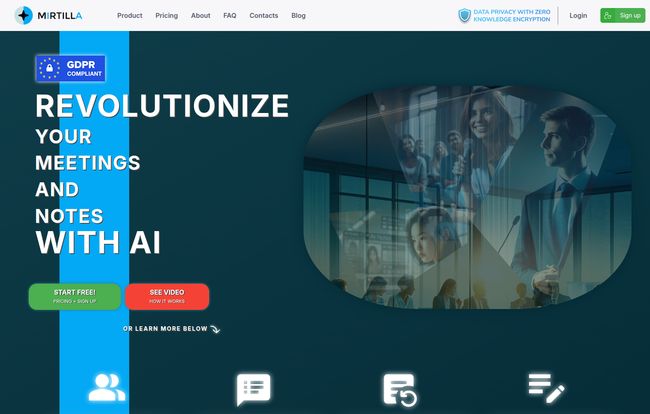
Visit MIRTILLA
And it did. It wasn’t perfect, it needed a human touch, but it was a solid 80% of the way there. You can ask it to define focus areas, generate a list of action items for a specific person, or even provide feedback on the meeting’s flow. It’s like having a junior assistant who never needs a coffee break.
AI-Powered Notes, Your Second Brain
This isn’t just a simple notepad tacked on as an afterthought. You can jot down your own notes, ideas, and reminders, but here’s the magic: you can tag them for classification. More importantly, you can search through all your notes and your meeting transcripts using natural language. No more trying to remember the exact keyword you used. I can just search for “that idea about the Q3 budget from the marketing sync last month” and it… just finds it. This feature is ridiculously powerful.
Let’s Talk About Security, The Elephant in the Room
I can hear the security and compliance folks hyperventilating from here. “You’re uploading sensitive meeting recordings to a third-party AI?!” And that’s a valid concern.
This is where MIRTILLA pulls out its trump card: Zero-Knowledge Encryption. In simple terms, this means that even MIRTILLA itself cannot access or read your data. Your data is encrypted on your device before it’s uploaded, and only you hold the key to decrypt it. According to security experts like those at CompTIA, this is the gold standard for privacy. For any business dealing with confidential information, this isn’t just a feature; it’s a necessity.
“Data privacy shouldn’t be an afterthought. With zero-knowledge encryption, the platform is built on a foundation of trust, ensuring that your conversations remain your own.”
The Good, The Bad, and The Nitty-Gritty
No tool is perfect, right? After kicking the tires, here’s my honest breakdown.
The upsides are obvious. The AI-powered summarization and custom requests are a game-changer for productivity. The search function across all your meetings and notes feels like a superpower. And the zero-knowledge encryption gives me genuine peace of mind. The flexible upload options are just the cherry on top.
On the flip side, the platform operates on a credit-based system, of sorts. Your transcription hours, number of custom requests, and even how far back you can access historical transcriptions are all tied to your pricing plan. If you’re a meeting-heavy organization, you could hit those limits on the lower tiers. For the real tech-heads, there’s also a ‘fair value cap on tokens used for embeddings’, which basically means power users who do extremely complex or frequent AI requests might hit a ceiling. It’s a minor point for most, but something to be aware of.
MIRTILLA Pricing, How Much Does it Cost?
Alright, the all-important question: what’s the damage? The pricing structure is actually quite flexible, with a very generous free plan. But here’s the kicker, and you’ll want to pay attention to this: they are offering introductory pricing that increases significantly after June 2025. Getting in early could save you a decent chunk of change.
| Plan | Current Price (€/mo) | Price After Jun 2025 (€/mo) | Key Features |
|---|---|---|---|
| Free | 0€ | 0€ | 3 hours transcription/mo, 50 notes, 15+ custom requests. |
| Note-taker | 3€ | 4€ | Focus on notes (2,500), 150+ custom requests, no transcription. |
| Basic | 8€ | 12€ | 15 hours transcription/mo, 130+ requests, 1,000 meeting history. |
| Premium | 15€ | 24€ | 30 hours transcription/mo, 250+ requests, 3,000 meeting history. |
| Business | 29€ | 48€ | 60 hours transcription/mo, 500+ requests, unlimited search. |
| Corporate | Contact for custom pricing. |
For the most up-to-date details, check out their official pricing page.
My take? The Free plan is a no-brainer to try out. For freelancers or consultants, the Basic plan at 8€ is a steal for the value it provides. Teams will likely want to look at the Premium or Business tiers to get enough transcription hours for everyone.
My Final Verdict, Is MIRTILLA Worth It?
Yes. Unequivocally, yes. For professionals who live in meetings—project managers, consultants, team leads, marketers, agency owners—MIRTILLA isn’t just another shiny object. Its a practical tool that solves a real, painful problem.
It turns chaotic conversations into structured, searchable, and actionable data. The combination of high-quality transcription, genuinely useful AI summaries, and the game-changing custom requests feature makes it a standout. Add the serious commitment to privacy with zero-knowledge encryption, and it becomes a tool I can actually recommend without hesitation.
If you’re drowning in meeting notes and feel like valuable information is constantly slipping through your fingers, you owe it to yourself to try MIRTILLA. The free plan is generous enough that you have absolutely nothing to lose.
Frequently Asked Questions about MIRTILLA
- What is MIRTILLA in a nutshell?
- MIRTILLA is an AI-powered platform that transcribes, summarizes, and analyzes your meeting recordings. It makes all your meeting content searchable and allows you to create custom outputs like reports or social media posts from the meeting data.
- How does the Free plan work?
- The Free plan gives you 3 hours of free transcription and summarization each month, which is perfect for trying out the core features. It also includes the ability to take notes, make custom requests, and use the AI-powered search, albeit with lower limits than paid plans.
- Is my data actually safe on MIRTILLA?
- Yes. MIRTILLA uses zero-knowledge encryption, meaning your data is encrypted on your device and the company has no way to access the raw content of your meetings. This makes it one of the more secure options on the market.
- Can it handle languages other than English?
- Yes, it supports transcription from any language, and importantly, it can translate those transcriptions into English, making it very useful for international teams.
- Who is this tool best for?
- It’s ideal for anyone whose work involves a lot of meetings: project managers, consultants, sales teams, marketers, and executives. If you need to recall details, share information, and generate content from your meetings, MIRTILLA is for you.
- What happens to the price after June 2025?
- The current pricing is introductory. After June 2025, the monthly cost for all paid plans will increase. Subscribing before then locks you into a lower rate, at least for a while, making it a good time to get started.
So, there you have it. My deep dive into MIRTILLA. In a world full of AI hype, it’s refreshing to find a tool that just… works. It solves a real problem, respects your privacy, and has a clear value proposition. Go give it a whirl and reclaim your sanity from the meeting monster.
References and Sources
- MIRTILLA Official Website: https://mirtilla.org/
- MIRTILLA Pricing Page: https://mirtilla.org/pricing
- CompTIA – What is Zero-Knowledge Encryption?: https://www.comptia.org/content/articles/what-is-zero-knowledge-encryption


