
Categories: AI Headshot Generator, AI Image Generator, AI Portrait Generator, AI Video Generator
Mixart.ai Review: Pro AI Headshots Without the Hassle?

That Awkward Moment You Need a New Headshot
Let’s be real. When was the last time you updated your professional headshot? If you’re anything like me, your LinkedIn profile picture might be celebrating its fifth birthday. The thought of finding a good photographer, dropping a few hundred bucks, and then trying to look both professional and “approachable” for an hour is… a lot. I’d rather spend that time optimizing a CPC campaign, thank you very much.
So, like every other marketer and their dog, I’ve been watching the AI headshot trend with a mix of fascination and horror. We’ve all seen the results on our feeds. Some look uncannily good, while others have that classic six-fingered hand or a soulless, plastic-sheen stare that screams, “I was made by a robot.” It’s a digital Wild West out there.
But the promise is just so tempting, isn’t it? Professional photos without the studio, the photographer, or the awkward small talk. That’s why I decided to take a proper look at one of the newer players on the scene: Mixart.ai. It claims to deliver “Perfect Photos Without the Hassle,” and my hassle-averse brain immediately said, “Go on…”
What Exactly is Mixart.ai?
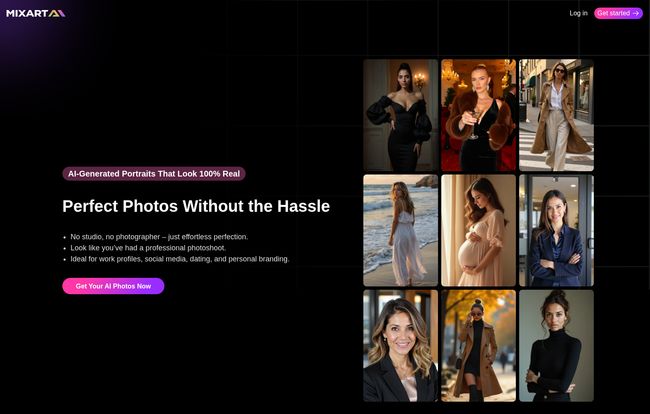
At its core, Mixart.ai is an AI image generator that specializes in creating professional-looking portraits. You feed it a handful of your existing photos, and it trains a custom AI model on your face to generate brand-new, studio-quality images of you in different styles, outfits, and settings. No photographer, no lighting rigs, just you and a surprisingly smart algorithm.
The process they lay out seems almost too simple, which always makes my inner skeptic raise an eyebrow.
- Upload 10 Photos: You gather at least 10 decent photos of yourself. Selfies, travel pics, whatever—as long as they clearly show your face from different angles.
- Choose Your Style: This is the fun part. You can pick from styles like LinkedIn, Casual, Business, or even Wedding. So you can get a sharp blazer shot for your professional profile and a relaxed, casual one for your personal brand website, all from the same batch.
- Generate: You hit the button, go make a coffee, and a few minutes later, you supposedly have 50+ AI-generated portraits waiting for you.
It sounds like magic, but we in the SEO world know there’s no such thing. There’s just good tech and bad tech. So, which one is this?
Visit Mixart.ai
Putting The ‘Art’ in Artificial: How Good Are The Results?
This is the million-dollar question. I’ve tested a few of these platforms, and the output can range from “Wow, that’s me!” to “Who is that monster?” I have to say, the examples from Mixart.ai look pretty impressive. The lighting looks natural, the skin textures are there, and they don’t have that overly smooth, airbrushed look that gives away a lot of AI generations.
But here’s the most important thing to understand, and this applies to any AI image tool: the quality of your results depends entirely on the quality of your input. Think of it like a chef. You can give a Michelin-star chef the best ingredients and they’ll create a masterpiece. Give them expired canned goods, and… well, you get the picture. Your 10+ uploaded photos are the ingredients. If you upload blurry, low-light photos where you’re wearing sunglasses and a hat, you can’t expect the AI to create a crystal-clear business portrait. Garbage in, garbage out, as they say.
For best results, you want clear shots of your face, varied angles, and different expressions. The AI needs to learn you, not just one specific photo of you.
More Than Just a Static Image: The AI Video Feature
Okay, this part is pretty cool and something I haven’t seen everywhere. Mixart.ai has a feature that lets you turn your newly generated portraits into short AI videos. Imagine your professional headshot subtly smiling, looking to the side, or nodding. It’s a small touch, but for things like social media profiles or website “About Me” pages, that little bit of motion can be incredibly engaging. It’s a traffic-stopper, for sure. They call it their AI VideoPRO Mode, and it’s included in all the paid plans. It’s a clever way to add more value and help your content stand out from the sea of static images.
The All-Important Question: What’s The Price Tag?
Alright, let’s talk turkey. We’re busy professionals, and budget matters. A traditional photoshoot can easily set you back $300-$1000. Mixart.ai offers a tiered subscription model, which seems pretty reasonable in comparison. They do have a very limited free plan to get a feel for it, but the real power is in the paid tiers.
| Plan | Price per Month | Who It’s For | Key Features |
|---|---|---|---|
| Basic | $15 | Newcomers, individuals just exploring. | 1 AI model, 150 generations, AI VideoPRO Mode. |
| Standart | $25 | Serious users, freelancers, small businesses. | 2 AI models, 300 generations, 4 simultaneous generations, AI VideoPRO Mode. |
| Premium | $40 | Power users, agencies, content creators. | 4 AI models, 600 generations, 8 simultaneous generations, AI VideoPRO Mode. |
The “Standart” plan at $25 a month seems like the sweet spot for most people. For less than the price of lunch in a major city, you get enough generations to refresh your professional image across all platforms and then some. For teams or agencies needing consistent branding, the Premium plan’s capacity looks solid.
My Honest Take: The Good and The Not-So-Good
No tool is perfect. After poking around, here’s my breakdown. The biggest advantage is obviously the convenience and cost. You get high-resolution, commercially-usable images in minutes for a fraction of a photographer’s fee. It’s easy to use on both desktop and mobile, which is a huge plus for those of us who live on our phones. The AI video option is a genuinely unique selling point that adds a ton of value.
On the flip side, there are a few things to be aware of. The biggest one for me is the no-refund policy. They state that due to the nature of AI-generated content (and the costs involved on their end to process it), they can’t offer refunds if you’re not happy with the results. This makes uploading high-quality source photos even more critical. You’ve got one shot to give the AI the right material to work with. And naturally, the free plan is quite limited, so you really need to commit to a paid plan to see what it can do.
So, Who Should Use Mixart.ai?
In my opinion, Mixart.ai is a fantastic tool for a specific type of person. Are you a freelancer, a solopreneur, a consultant, or a job seeker who needs a sharp, modern headshot yesterday? This is for you. Are you a startup founder who wants to give your whole team consistent-looking profile pictures for the company website without a massive budget? This is an amazing solution. A blogger who needs a professional bio pic? Perfect.
Is it going to replace high-end editorial photographers for magazine shoots? No, of course not. But for 95% of our daily professional needs—LinkedIn, company websites, speaker bios, social media—it’s more than powerful enough. It democratizes the ability to have a polished, professional image.
Frequently Asked Questions About Mixart.ai
How realistic do these AI photos actually look?
They can look surprisingly realistic! The key is in the photos you upload. With good source images, the final portraits often have natural skin tones, realistic lighting, and accurate facial features. They’re designed to be high-resolution, so they won’t look blurry or pixelated.
How long does it take to get my photos?
It’s pretty quick. Once you upload your photos and select a style, the AI gets to work. Most users report getting their batch of 50+ photos back in a matter of minutes, not hours. It’s fast enough to do on your lunch break.
Is there a refund if I hate the results?
This is a big one: No. Mixart.ai has a no-refund policy. Because generating AI images costs them computing power and resources, all sales are final. So take your time and choose your 10+ upload photos carefully to give the AI the best possible chance of success.
Can I use these AI portraits for my business or for printing?
Absolutely. The images are generated in high resolution, making them perfectly suitable for business use on websites, social media like LinkedIn, and even for printing on business cards or in brochures. You have the commercial rights to the images you generate.
What kind of photos should I upload for the best outcome?
Variety is your best friend. Use a mix of clear selfies and photos taken by others. Make sure your face is visible from different angles (front, side profile, three-quarter view) and with different expressions (smiling, neutral). Avoid group photos, sunglasses, hats, and low-quality, blurry images.
Final Thoughts: Is Mixart.ai a Game Changer?
Look, the world of AI is moving at a breakneck pace, and tools like Mixart.ai are at the forefront of a major shift in how we create content. While it’s not a magical one-click solution that reads your mind, it’s a powerful and incredibly efficient tool for solving a common and often annoying problem. It puts the power of a professional photoshoot into the hands of anyone with a smartphone and a few decent selfies.
For the cost, the speed, and the quality of the output, I think Mixart.ai is a definite win for most professionals looking to level up their personal branding without breaking the bank or their schedule. Just remember to give it good clay to work with.


