
Categories: AI Assistant, AI Chatbot, AI Developer Tools, AI Knowledge Base, AI Models, AI Productivity Tools, AI Prompt Generator, Large Language Models (LLMs), Open Source AI Models
Msty Review: The AI Chat App You Actually Need?

As an SEO, my desktop is a chaotic landscape of open tabs. One for ChatGPT-4, another for Claude 3 Opus, maybe a third for a niche model I’m testing for a specific task. Each has its own login, its own quirks, and its own monthly bill. It’s a juggling act that feels less like cutting-edge work and more like digital plate-spinning. And don’t even get me started on the privacy implications of feeding sensitive client data into these cloud-based black boxes.
I’ve been on a quest for a while now to find the holy grail: a single, clean, powerful interface to rule them all. Something that can run models locally on my machine for privacy, but also connect to the big players when I need their raw power. Something that doesn’t require me to fire up Docker and pretend I’m a DevOps engineer for an afternoon. For a long time, I thought I was dreaming. Then I stumbled upon Msty.
And folks, I think this might be it.
Visit Msty
So What is Msty, Anyway?
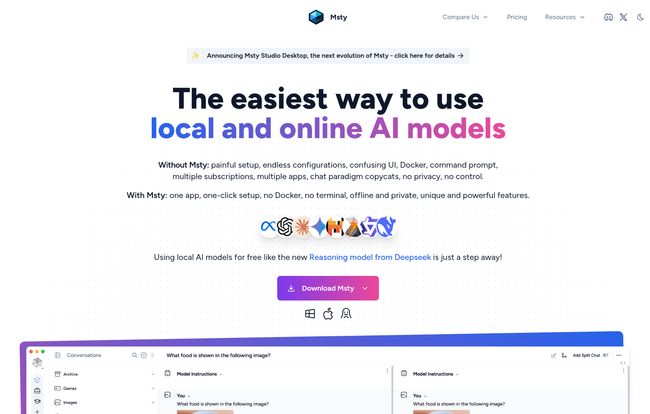
In the simplest terms, Msty is a desktop application that acts as a central command center for a huge range of AI models. Think of it as a beautifully designed universal remote for AI. It aims to be a direct competitor to tools like Jan AI and LM Studio but, in my humble opinion, it lowers the barrier to entry significantly. No command line nonsense, no complicated setup. You download it, you install it, and you start chatting. It brings together models from OpenAI, Deepseek, Claude, and—the part that really got my attention—local models via Ollama and Hugging Face, all into one unified, slick interface.
The Features That Actually Matter
A long feature list is one thing, but features you’ll actually use are another. Here’s the stuff that genuinely impressed me.
Going Off the Grid: Offline-First AI
This is the big one for me. The ability to run powerful models entirely on my own computer is a game-changer. With its seamless Ollama integration, I can download models like Llama 3 or Mistral and use them without an internet connection. Why does this matter? Privacy. I can analyze client keyword lists, draft internal strategy documents, or experiment with proprietary data without a single byte leaving my machine. It’s also incredibly reliable—no more ‘high traffic’ messages from OpenAI when you’re on a deadline.
The “Multiverse” Chat Experience
Okay, they call it “Parallel Multiverse Chats,” which sounds a bit sci-fi, but the feature is incredibly practical. Msty lets you split your chat window to talk to two different models at the same time with the same prompt. Ever wondered if Claude’s creative writing is better than GPT-4’s for a specific ad copy? Now you can see it side-by-side, in real-time. You can compare, contrast, and even branch conversations off from any point. It’s like having A/B testing built right into your workflow.
Tired of Stale Data? Msty’s Web Search
One of the biggest limitations of many LLMs is their knowledge cutoff. Ask about a recent Google algorithm update, and you’ll often get a polite apology about its training data ending in 2023. Msty solves this with built-in web search. It can access real-time information from the internet to inform its answers. For SEOs, content creators, and trend analysts, this is non-negotiable. It turns the LLM from a static encyclopedia into a dynamic research assistant.
Building Your Own Brain with RAG
RAG, or Retrieval-Augmented Generation, sounds super technical, but Msty makes it surprisingly simple with a feature called “Knowledge Stacks.” You can basically feed Msty a collection of your own documents—PDFs, text files, whatever. It then uses that specific information to answer your questions. Imagine uploading all your past SEO audits for a client and then asking, “What were the most common technical SEO issues I found for this client over the past year?” It’s an incredibly powerful way to create a personalized, expert AI without any complex programming.
My Honest Take: The Good, The Bad, and The GPU
No tool is perfect, right? After spending a good amount of time with Msty, here’s my unfiltered breakdown.
What I’m Loving About Msty
The user experience is just… smooth. It feels like an app built by people who actually use AI tools daily. The setup is a breeze, especially the relief of not needing Docker. The interface is clean and intuitive. But honestly, the combination of offline privacy and the unified access to all the major online models is the killer combo. It has genuinely simplified my daily routine and reduced my tab-anxiety.
Where It Could Improve
Let’s talk hardware. Running those big, powerful local models isn’t for the faint of heart—or the faint of GPU. If you’re on an older machine or a standard work laptop without a decent graphics card, you’ll be limited to smaller, less capable models. It’s not Msty’s fault, its just the reality of local AI right now. Also, while the free version is incredibly generous, the pro license for commercial use has a price tag. It’s not exorbitant, especially the lifetime deal, but it’s a consideration for freelancers or small agencies on a tight budget.
Let’s Talk Money: Msty Pricing Explained
The pricing structure is refreshingly straightforward, and I love that you don’t even need an account to get started. Here’s how it breaks down based on their current pricing page:
| Plan | Price | Best For |
|---|---|---|
| Free | $0 (Forever) | Students, hobbyists, and professionals who just want to try it out. The feature set is incredibly generous and more than enough for most personal use. |
| Aurum Annual | $129 / year | Professionals and businesses who need the commercial license and advanced features like Vapor Mode (a cool privacy feature) and cherry-picking messages to export. |
| Aurum Lifetime | $249 (One-time) | Power users, agencies, and anyone who hates subscriptions. You get everything, including all future updates, forever. In my book, if you plan to use this professionally for more than two years, this is a no-brainer. |
Frequently Asked Questions
Can I use Msty completely offline?
Absolutely. If you download local models using the built-in Ollama integration, you can run the entire application without any internet connection. All your data and chats stay on your machine.
What’s the real difference between the Annual and Lifetime plans?
Both give you the same core pro features and a commercial use license. The main difference is the payment model. The Annual plan is a yearly subscription, while the Lifetime plan is a one-time payment that guarantees you access to all current and future features forever. The lifetime plan also gives you access to the upcoming Msty Studio.
Do I need an account to use Msty?
Nope! This is one of my favorite parts. You can download and use the app, including the paid features if you buy a license, without creating an account or signing up. It’s a big win for privacy and convenience.
Is there a commercial use license?
Yes. The free plan is for personal use only. If you want to use Msty for work or any commercial purpose, you’ll need to purchase either the Aurum Annual or Aurum Lifetime license.
What kind of computer do I need?
The app itself is lightweight. However, to run large local AI models effectively, you’ll benefit greatly from a modern computer with a powerful dedicated GPU (like an NVIDIA RTX series card) and at least 16GB of RAM. You can still run smaller models on less powerful machines, though.
Is Msty a good alternative to LM Studio or Jan AI?
In my experience, yes, especially if you value ease of use and a polished user interface. While LM Studio is incredibly powerful, Msty feels more accessible and less intimidating for users who aren’t deep in the technical weeds. It strikes a fantastic balance between power and simplicity.
Final Thoughts: Is Msty Worth Adding to Your Toolkit?
After weeks of putting it through its paces, my answer is a resounding yes. Msty isn’t just another AI wrapper; it’s a thoughtfully designed tool that solves real-world problems for people who work with AI every day. It tackles the chaos of managing multiple services, addresses the critical need for privacy with its offline capabilities and offers genuinely innovative features like the split-screen chats.
It’s managed to take a complex, fragmented ecosystem and make it feel coherent and, dare I say, enjoyable. If you’re an SEO, a writer, a developer, or just an AI enthusiast feeling the fatigue of the current landscape, do yourself a favor and give Msty a try. It might just be the piece of software you didn’t know you were waiting for.


