
Categories: AI Art Generator, AI Prompt Generator, Text to Image
MusesAI Review: Free AI Art Prompts for Midjourney?

You’re staring at the Midjourney prompt bar, the little cursor blinking expectantly. You have a vision in your head, a glorious, traffic-stopping hero image for your next blog post. But the words just… won’t come. You type in “a futuristic city with flying cars,” and you get something that looks like a rejected sketch from The Jetsons. The struggle is real.
For years, we SEOs and content creators have focused on keywords for Google. Now, we have to be poets for AI image generators. It’s a whole new skill set, and honestly, it can be exhausting. That’s why when I stumbled across a tool called MusesAI, my ears perked up. A free, massive library of AI art prompts? It sounded too good to be true. So, naturally, I had to take a look.
So, What Exactly is MusesAI Anyway?
In simple terms, MusesAI is a website that collects and organizes a huge number of prompts for AI art platforms. Think of it less like a generator and more like a sprawling, digital library of inspiration. It’s specifically built for platforms we all know and love (or are at least trying to master), like Midjourney, Stable Diffusion, and even prompts that can be adapted for ChatGPT’s DALL-E 3. The whole point is to give you a jumping-off point, a way to see what works and borrow ideas to create something amazing without starting from absolute scratch.
Visit MusesAI
First Impressions and Finding Your Way Around
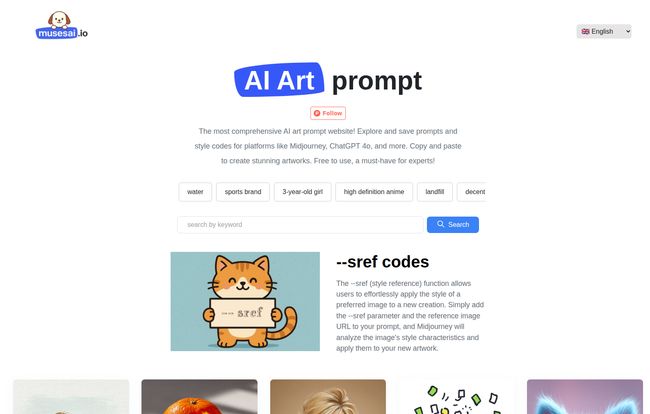
Landing on the MusesAI homepage feels… clean. Almost surprisingly simple. There’s no fluff, no aggressive pop-ups. Just a search bar and a gallery of intriguing, wildly different images. You can search for specific keywords like “cyberpunk samurai” or browse through popular tags like “anime girl,” “background,” or “3-year-old girl” (a strangely specific but probably useful tag!).
I punched in a few test queries, and the results were instant. Each image is paired with the exact prompt that created it. You just copy it, paste it into your AI tool of choice, and see what happens. It’s a beautifully straightforward process. No sign-up required, no credit card, just prompts. I gotta say, in an online world that wants my email for everything, that’s a refreshing change of pace.
The Real Magic: Midjourney Style Codes (sref)
Okay, here’s where I got genuinely excited. MusesAI doesn’t just give you prompts; it gives you –sref codes. If you’re a Midjourney user, you know this is a game-changer. For those who aren’t, the `–sref` or Style Reference parameter is a feature in Midjourney that lets you replicate the style of another image perfectly.
Think about that for a second. You find a ‘look’ on MusesAI that you absolutely love—maybe a specific watercolor technique, a vintage photo effect, or a weird, glitchy aesthetic. Instead of trying to describe it with a dozen adjectives, you just grab the `sref` code. It’s like having the secret recipe. You can apply that same style to a completely different subject. This is HUGE for brand consistency. Imagine creating a whole set of blog images that all share the same subtle, unique artistic flair. That’s how you build a memorable visual identity.
The Good, The Not-So-Good, and The Arty
No tool is perfect, right? After playing around with it for a bit, here’s my honest breakdown of MusesAI.
The Things I Really Liked
First off, the price. It’s free. In a world of monthly subscriptions for everything, a genuinely useful and free tool feels like finding a unicorn. The sheer volume of prompts is another massive plus. Even if you don’t use a prompt exactly as it’s written, scrolling through the gallery is an incredible cure for creative block. I also appreciate that it’s not just a Midjourney-only club; the prompts are often versatile enough for other platforms. And the multi-language support is a thoughtful touch that shows a global perspective.
A Few Little Caveats
Now, for the other side of the coin. Because it’s a massive, open collection, the quality of the prompts can be a bit of a mixed bag. Some are pure genius, crafting incredible detail and mood. Others are… well, a bit basic. You still need to use your own judgment. Also, I feel like this tool is most powerful if you already have some basic familiarity with how AI art generators work. A complete beginner might copy a prompt and not know how to tweak or refine it. It’s more of a creative accelerant than a hand-holding tutorial.
How I’d Weave MusesAI into My SEO Workflow
As an SEO guy, my brain immediately goes to efficiency and impact. And I can see a few solid ways to use MusesAI:
- Unique Blog Imagery: This is the most obvious one. Say goodbye to boring, overused stock photos. With a good prompt, you can create a completely original hero image that perfectly matches your article’s topic. This not only improves user experience but also gives you something unique to feature in social sharing, which can boost traffic.
- A/B Testing Visuals: Not sure what kind of image will resonate with your audience? Use MusesAI to quickly generate a few different styles for the same concept. Run them on social media or in an email and see which one gets more engagement.
- Visual Trend Spotting: This is a sneaky one. By watching the popular tags and the types of images being generated, you can get a feel for visual trends. What aesthetics are people into right now? This is valuable intel that can inform your entire content strategy, not just your images.
Frequently Asked Questions About MusesAI
I figured you might have some questions, so I’ve put together a quick FAQ based on my experience.
What is MusesAI best for?
It’s best for artists, content creators, and marketers looking for inspiration and a shortcut to creating high-quality AI art. It’s particularly great for overcoming creative block and replicating specific art styles.
Is MusesAI really free to use?
Yes. As of my review, the platform is completely free to use, with no hidden costs or required sign-ups to access the prompts.
What AI art platforms does MusesAI support?
While many prompts seem geared towards Midjourney (especially with the `–sref` codes), the text prompts can be easily adapted for Stable Diffusion, DALL-E 3 (via ChatGPT), and other text-to-image generators.
What are those `–sref` codes I keep hearing about?
It’s a parameter specific to Midjourney that allows you to use an image as a style reference. MusesAI provides these codes so you can easily copy an aesthetic you like and apply it to your own creations.
Do I need to be an AI art expert to use it?
Not an expert, but some basic knowledge helps. Knowing how to copy-paste a prompt is all you need to start, but understanding how to modify prompts will give you much more power and flexibility.
Can I use the images I create for my business?
This is an important one! MusesAI just provides the prompt. The usage rights for the final image depend on the terms of service of the AI platform you use to generate it (e.g., Midjourney’s subscription plans). Always check the TOS of the tool you’re using!
So, Should You Add MusesAI to Your Toolkit?
My final verdict? Absolutely. For the grand price of zero dollars, you get a powerful brainstorming partner and a shortcut to achieving complex visual styles.
Is it a magic wand that will instantly solve all your creative problems? No. You still have to bring your own ideas and a discerning eye to the table. But it’s an incredible resource for getting the ball rolling. It turns the daunting, blank prompt box into a playground of possibilities. It’s like a cheat sheet for creativity, and in the fast-paced world of content and SEO, we can all use one of those. Go give it a try. You’ve literally got nothing to lose and a whole gallery of amazing images to gain.


