
Categories: AI Background Remover, AI Design Generator, AI Image Generator, AI Interior Design, AI Photo Editor, AI Room Planner
MyRoomDesigner.ai Review: AI Interior Design on Steroids?

Staring at an empty room, or a room you’ve just grown tired of, is a special kind of creative torture. You know it needs something, but what? You spend hours, days, maybe even weeks falling down the Pinterest rabbit hole, pinning hundreds of images that all vaguely contradict each other. You’ve got a board with stark minimalism right next to a pin of a bohemian maximalist paradise. The result? A bad case of design paralysis and a living room that still has the same sad, beige walls it’s had for a decade.
I’ve been there. As someone who lives and breathes this stuff, even I get stuck. For years, the only solution was to hire a pricey designer or just take a wild guess and hope for the best. But the AI boom has thrown a fascinating new wrench in the works. Suddenly, we have tools that can act as our creative co-pilots. And that’s where I stumbled upon MyRoomDesigner.ai. It promised to take a simple photo of my space and transform it in seconds. Skeptical? Absolutely. Intrigued? You bet.
So, What Exactly is MyRoomDesigner.ai?
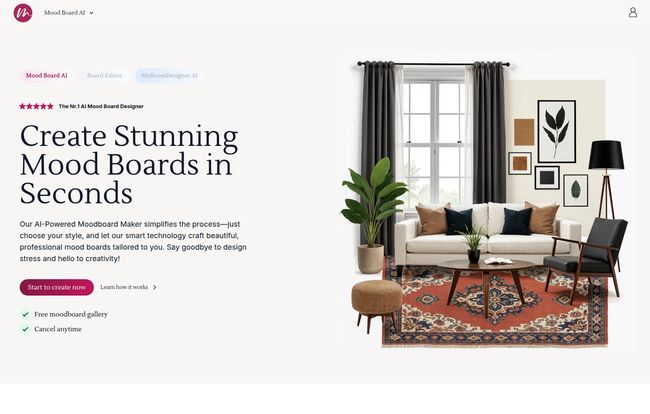
First off, let’s clear something up. When you go to check it out, you’ll land on a site called MoodBoardAI.com. That’s because MyRoomDesigner.ai isn’t just a single tool; it’s part of a 3-in-1 suite. Think of it as a little interior design power pack. You get:
- MyRoomDesigner.ai: The main event. This is where you upload your room photo and let the AI work its magic, rendering it in different styles.
- Mood Board AI: A tool for creating those all-important mood boards, pulling together colors, textures and products to nail down your vision.
- Mood Board Editor: This gives you fine-tuned control to tweak your mood board, remove backgrounds from product shots, and really perfect the details.
The core idea is simple: it bridges the gap between that jumbled mess of ideas in your head and a photorealistic render of what your room could actually look like. It’s designed to be fast, intuitive, and a whole lot cheaper than hiring a human design team for the initial concept phase.
My First Spin with the AI Design Process
Alright, so I took my own slightly-cluttered home office as the guinea pig. The process was surprisingly straightforward, almost like a guided meditation for the design-challenged.
Starting with Your Space
You just snap a picture of your room and upload it. The better the lighting and the clearer the photo, the better the results will be. Garbage in, garbage out, as they say. I uploaded a photo of my office, complete with my messy desk and questionable cable management.
Visit MyRoomDesigner.ai
Choosing Your Vibe and Letting Go
This is the fun part. You’re presented with a whole menu of design styles. We’re talking everything from Japandi and Coastal to Industrial and Mid-Century Modern. You pick a style, maybe specify a color palette or some keywords like “cozy” or “bright,” and hit go. It’s like a slot machine for interior design ideas. You pull the lever and see what comes up.
The Magic and the Mayhem of AI Generation
In less time than it takes to make a cup of coffee, I had a dozen different versions of my office. Some were… interesting. The AI occasionally gets a little weird, maybe putting a plant where a chair should be or misinterpreting a shadow as a piece of furniture. It’s part of the charm and a good reminder that this is a creative tool, not a perfect architectural draft. But some of the results were genuinely stunning. It saw possibilities I hadn’t even considered, completely changing the layout and feel of the room in a way that just worked.
Beyond a Pretty Picture: Mood Boards and Shopping Lists
Here’s where MyRoomDesigner.ai started to really win me over. A cool render is one thing, but making it happen is another. The integrated Mood Board AI is the bridge. You can save your favorite generated designs, pull in product images from around the web, and create a cohesive plan. It turns your messy folder of screenshots into a coherent battle plan for your living room.
Even better is the shopping list generator. The platform can identify items in your new design and suggest real-life products you can buy. While it’s not always a perfect 1-to-1 match, it’s a fantastic starting point. It takes you from “I love that vibe” to “Oh, I can get a similar lamp at West Elm.” That, for me, is a game-changer for people who want to take action.
Let’s Talk Money: The MyRoomDesigner.ai Pricing Tiers
Of course, none of this matters if it costs a fortune. The pricing structure seems pretty fair and is broken down into a few tiers. It’s a freemium model, which I always appreciate.
| Plan | Price | Key Features |
|---|---|---|
| Free | $0 / Month | 1 Board/month, 3 custom product imports, 1 AI background removal, 5 AI generations. A great way to test the waters. |
| Personal | $15 / Month | 10 Boards/month, 200 product imports, 100 background removals, 50 AI generations/month, plus ‘Upscale’ and ‘Clean-Up’ tools. Perfect for a dedicated home project. |
| Business | $39 / Month | 100 Boards/month, 400 product imports, 200 background removals, 200 AI generations/month. Aimed at freelancers or small design firms. |
| Premium | $75 / Month | 200 Boards/month, 800 product imports, 400 background removals, 400 AI generations/month. For the power users and agencies. |
My take? The free plan is genuinely useful for a single room refresh. If you’re planning a major renovation or are a serial redecorator, the Personal plan at $15 is a pretty small investment for the amount of creative juice it gives you.
The Good, The Bad, and The AI-Generated
No tool is perfect. Let’s break it down honestly.
What I Really Liked
The speed is undeniable. The ability to churn through ideas quickly is its biggest strength. It shatters creative blocks. I also loved the integration of the mood board and shopping tools. It creates a complete workflow, from a spark of an idea to a list of actionable items. The ‘Upscale’ and ‘Clean-Up’ features on the paid plans are also super handy for refining an image you really like, removing that one weird AI-generated artifact that’s bothering you.
Some Things to Keep in Mind
Now for the reality check. The quality of the AI generations can be a bit of a mixed bag. You’ll get some duds. That’s just the state of AI in 2024. Also, and this is a big one, they do not offer refunds. Their reasoning is that generating these images consumes significant GPU resources, which costs them money. So, definitely start with the free plan to make sure it works for you before you jump into a subscription. Don’t just ape in.
Who Is This Tool Actually For?
So, who gets the most out of MyRoomDesigner.ai? In my opinion, it’s a dream for the enthusiastic DIY home decorator. It’s for the person who loves the idea of interior design but gets overwhelmed by the execution. It’s a fantastic brainstorming partner.
Could a professional interior designer use it? Yes, but probably more for rapid, early-stage concepting to show a client a range of possibilities before sinking hours into detailed CAD work. For real estate agents looking to virtually stage a property quickly, this could also be a surprisingly powerful tool.
Frequently Asked Questions
- Is MyRoomDesigner.ai really free to use?
- Yes, there is a free plan! It has limitations on the number of designs (generations), mood boards, and special features you can use each month, but it’s more than enough to try it out on a single room.
- Can I use my own furniture in the designs?
- Sort of. The ‘One-Click Custom Product Import’ feature lets you pull in images of furniture you like from anywhere on the web to build your mood board. The AI then uses this as inspiration, but it won’t perfectly place an exact 3D model of your sofa into the render.
- What if I don’t like the AI’s design ideas?
- Just generate more! Part of the process is sifting through the options. You can also try refining your text prompts, asking for different colors, materials, or moods to guide the AI toward what you want. It’s an iterative process.
- Why doesn’t MyRoomDesigner.ai offer refunds?
- They state it’s because each AI generation requires significant and costly computing power (GPU resources). Once those resources are used to create your image, the cost is sunk. This makes a free trial period all the more important.
- Is MyRoomDesigner.ai the same as MoodBoardAI?
- MyRoomDesigner.ai is a key tool within the larger MoodBoardAI.com platform. When you sign up for MoodBoardAI, you get access to MyRoomDesigner.ai along with the mood board creator and editor.
- How accurate is the ‘find similar products’ feature?
- It’s best to think of it as a powerful suggestion engine rather than a perfect matchmaker. It’s great at identifying the style and type of a product (e.g., “a black metal floor lamp with a drum shade”) and finding commercially available options that fit the description.
My Final Thoughts on This AI Design Partner
After playing around with MyRoomDesigner.ai for a while, I’m genuinely impressed. It’s not going to replace the nuanced eye of a human designer, but that’s not its goal. Its purpose is to democratize the initial, often most difficult, part of the design process: visualization.
It’s a powerful tool for breaking through creative blocks and exploring possibilities you would never have imagined on your own. It turns the daunting task of redecorating into a playful, exciting experiment. If you’ve ever felt stuck, staring at your walls and wishing for a spark of inspiration, this might just be the creative partner you’ve been waiting for.


