
Categories: AI Script Writing, AI Voice Generator, AI Voice Over
Narrai App Review: AI Voiceovers for Viral Videos?

We’re all in the content trenches, right? Churning out TikToks, Reels, and Shorts, hoping one of them finally catches the algorithm’s favor. I’ve spent more hours than I’d like to admit staring at a perfectly good 10-second clip of my dog doing something goofy, completely stumped on what to do with it. Should I add a trending sound? Write some text on screen? Or, heaven forbid, record my own voice?
Yeah, I hate the sound of my own voice on recordings too. It’s a common curse among creators.
So, when I stumbled upon an app called Narrai, which promised to instantly add clever, AI-generated voiceovers to my videos, my interest was definitely piqued. An AI scriptwriter and a voice actor living in my pocket? Sounds too good to be true. Naturally, I had to see for myself if it was just another gimmick or a genuine tool for the content-weary creator.
Visit Narrai
So, What Exactly is Narrai?
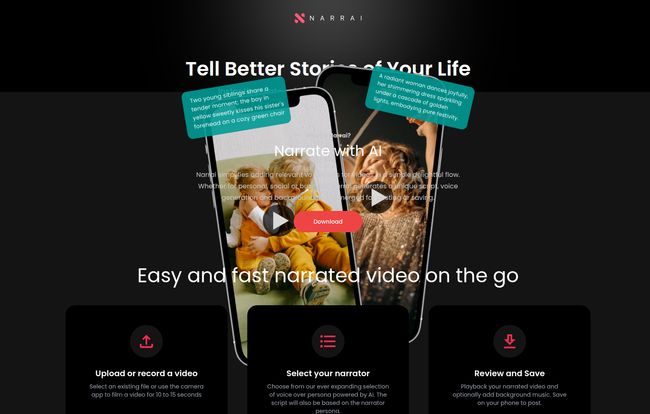
Think of Narrai as a tiny, automated storytelling machine. You feed it a short video clip, and it spits out a fully narrated version, complete with a unique script, a character voice, and even some background music. It’s designed to take a simple visual and instantly give it context, humor, or drama without you having to write a single line or say a single word.
It’s not just a text-to-speech engine; it analyzes the video to generate a relevant script. It’s a deceptively simple idea, but one that tackles a major pain point for anyone trying to create engaging short-form content on the fly.
The Narrai Workflow is Almost Laughably Easy
I’m used to video editing apps having a bit of a learning curve. You know, a dozen buttons, confusing timelines, the whole shebang. Narrai is… not that. The entire process is boiled down to three ridiculously simple steps.
Step 1: Upload or Record Your Clip
You either pick a video from your camera roll or record one directly in the app. Here’s the first big thing to know: the app is built for the short-form content world. We’re talking videos of about 10 to 15 seconds. This isn’t for your long-form YouTube documentary; it’s for that quick, punchy clip destined for the endless scroll.
Step 2: Pick Your Narrator
This is where the magic happens, and frankly, it’s the most fun part. Instead of choosing a generic robot voice, you get to pick from a cast of characters. More on these delightful weirdos in a minute.
Step 3: Review and Save
The AI does its thing, merging the script, voice, and some optional background music. You get a preview, and if you like what you see (and hear), you save it to your phone. Done. It’s that simple. Serously.
The Real Stars: Meet the AI Narrator Personas
This is Narrai’s secret sauce. The quality of a tool like this lives or dies by its voices, and they didn’t go the boring route. The narrators are distinct personalities, and they completely change the vibe of your video. The ones I could see in the app were:
- British Nature Lover: Imagine David Attenborough decided to narrate your cat knocking over a glass of water. It’s cinematic, it’s dramatic, it’s hilarious.
- Voice of God: A deep, booming voice that can make even a video of you making toast sound like an epic, monumental event.
- Movie Trailer Guy: You know the one. “In a world… where one man has to take out the trash…
Instant blockbuster vibes for any mundane task.
- Valley Girl: Adds that, like, totally awesome, ’80s mall-rat energy to your clips. It’s surprisingly funny.
- Unhappy Chef: My personal favorite. A grumpy, Gordon Ramsay-esque character who seems utterly disgusted by whatever is happening in your video. Pure gold.
Choosing a narrator isn’t just a stylistic choice; it’s a creative one. The same video of a baby trying a lemon for the first time could be a poignant nature documentary, a divine proclamation, or a culinary disaster, all depending on who you pick.
Who Is This Really For?
While anyone could have fun with this, I see a few groups getting some serious mileage out of Narrai.
- Social Media Managers & Marketers: Need to pump out quick, eye-catching content for a brand without a huge production budget? This is a fantastic tool for creating memorable, thumb-stopping ads or organic posts.
- Casual Content Creators: If you’re on TikTok or Instagram and want to stand out from the crowd of trending audio, giving your videos a unique narrative voice is a huge advantage. It helps build a recognizable style.
- People Who Just Want to Make Their Friends Laugh: Let’s be honest, turning a video of your friend tripping into a dramatic movie trailer is peak comedy. It’s a great tool for personal, shareable fun.
The Good, The Bad, and The AI
No tool is perfect, and my job is to give you the full picture. After playing around with it, here’s my honest breakdown.
What I Loved
The speed and ease of use are off the charts. The idea-to-final-video time is literally a minute or two. The character narrators are the core strength and offer genuine creative potential. For someone who struggles with creative block, having an AI partner to generate a script is a total game-changer. It gets the ball rolling.
Potential Downsides to Consider
The 15-second video limit is the most obvious constraint. While I personally think it’s a blessing in disguise—forcing you to be concise is key for social media—it won’t work for everyone. You’re also putting a lot of faith in the AI. What if the script it generates is just… weird? Or the voice inflection isn’t quite right? You give up a lot of manual control for the sake of speed. The background music selection might also feel a bit limited if you’re looking for something very specific. You’re trading granular control for convenience.
What About The Cost? A Look at Narrai’s Pricing
The official website doesn’t have a public pricing page right now, which is pretty common for new apps in the testing phase. However, looking at the screenshots of the app interface, Narrai appears to use a credit-based system. You can see next to each narrator a cost, like “3 Credits”.
This suggests you’ll either buy packs of credits or get a certain number of credits with a monthly subscription. I actually prefer this model for a tool like this. It means you only pay for what you use, which is great if you’re not creating videos every single day. I’ll be keeping an eye out for official pricing details and will update this when they’re released.
Frequently Asked Questions About Narrai
Is Narrai available on Android?
Currently, the branding and download links point to the Apple App Store. An Android version may be in the works, but for now, it seems to be an iOS-exclusive app.
Can I write my own script for the AI to read?
Based on the current workflow, the main feature is the automatic AI script generation based on video analysis. There isn’t an obvious feature to input your own text, as the tool is designed for speed and automation.
How good is the AI script generation?
It’s surprisingly clever! It seems to pick up on the main subjects and actions in a video to create a relevant, short narrative. The quality can vary, as with any AI, but its main job is to provide a fun, contextual voiceover, which it does well.
Is there a watermark on the final videos?
This information isn’t explicitly stated. Typically, apps like this offer watermark-free exports as part of a paid plan or credit purchase, while a free version might include a watermark.
Can I use the videos for commercial purposes?
This would depend on Narrai’s terms of service. For advertising or monetized content, it’s always best to check the usage rights associated with the generated audio and music to avoid any copyright issues.
Are there more narrator voices than the ones listed?
The ones shown are likely the launch characters. It’s a pretty safe bet that a successful app like this would regularly add new narrator personas to keep things fresh and interesting for users.
My Final Verdict on Narrai
So, is Narrai the secret to going viral? Well, nothing guarantees that. But is it a brilliantly fun, fast, and effective tool for making your short-form content stand out? Absolutely.
It removes some of the biggest barriers to creation: writer’s block and the awkwardness of self-narration. It injects personality and humor with a single tap. While the lack of manual control and the short video limit might not be for everyone, Narrai isn’t trying to be a full-fledged video editor. It knows exactly what it is: a fast, fun, storytelling machine for the social media age. And in my book, it totally succeeds.
If you’re a creator looking for a fresh spark or just want to make funnier videos for your friends, I’d say give it a download. It might just become your new favorite creative partner.
Reference and Sources
- Narrai Official Website & App Store Link (based on provided images)


