
Categories: AI Email Assistant, AI Grammar Checker, AI Language Learning, AI Proofreading, AI Text Generator, AI Writing Assistants
Nativish Review: AI Writing Help for Language Learners?

I mean, really tough. You can spend years learning grammar, memorizing vocabulary, and practicing with native speakers, but when it comes time to draft that all-important email or update your LinkedIn profile, the confidence just… vanishes. You start second-guessing every preposition. Is it ‘on the weekend’ or ‘at the weekend’? Does this phrase sound natural, or does it scream ‘I learned this from a textbook in 2005’?
I’ve been in the digital marketing and SEO game for years, and I’ve seen countless colleagues—brilliant people from all over the world—struggle with this exact thing. Their ideas are top-notch, but the subtle awkwardness in their writing holds them back. Standard grammar checkers help, sure. But they often miss the nuance, the little things that separate grammatically correct text from writing that actually sounds… well, native. So when I stumbled upon a tool called Nativish, which claims to be an AI writing assistant specifically for this problem, my curiosity was definitely piqued.
Visit Nativish
So, What Exactly is Nativish?
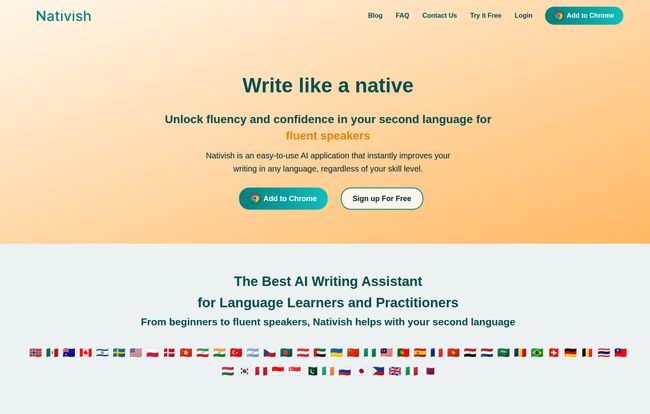
Okay, cutting through the marketing speak, Nativish is an AI-powered tool designed to be your writing co-pilot when you’re not in your native tongue. Think of it less like a stern grammar teacher with a red pen and more like that patient, fluent friend who gently says, “Hey, that’s almost perfect, but a native speaker would probably phrase it like this.” It’s designed to go beyond basic spelling and grammar to catch context-specific mistakes and awkward phrasing.
It works as a Chrome Extension, which is fantastic because it just integrates into your daily workflow. Writing an email in Gmail? It’s there. Updating your profile on LinkedIn? It’s there. Working on a document in Google Docs? You get the idea. There’s also a web app, so you can use it on your phone for those moments of inspiration or panic on the go.
Who Is This Really Built For?
While the website says it’s for everyone from beginners to expats, I think there’s a real sweet spot. If you’re an absolute beginner, it’s a great safety net. But where I see it shining is for the intermediate-to-advanced learner. You know, the person who has the fundamentals down but struggles with idiomatic expressions and natural flow. This could be:
- The International Professional: Someone who needs to send clear, confident emails to clients and colleagues without worrying if they sound unprofessional or clumsy.
- The Ambitious Student: An exchange student or someone studying abroad who needs to write essays that are graded not just on content, but on the quality of the writing itself.
- The Expat Navigating Daily Life: From writing a note to your landlord to posting in a local community group, it’s about communicating clearly and confidently.
The Nativish Experience: More Than Just a Spellchecker
Beyond Red Squiggly Lines
We’ve all got spellcheck. It’s built into everything. But Nativish aims higher. The magic, as they say, is in the context. The tool looks at your entire sentence to understand your intent. For example, you might write, “I am looking forward to hear from you.” A basic checker might not even flag that. Nativish understands the common professional phrase is “looking forward to hearing from you” and suggests the fix. It’s these subtle, but critical, adjustments that make the difference between sounding like a learner and sounding fluent.
The Real Power is in the ‘Why’
Here’s the part that really got my attention. For every suggestion it makes, Nativish provides a clear, simple explanation. This is a game-changer. Why? Because it turns a simple correction tool into a genuine learning tool. You’re not just blindly accepting changes; you’re understanding the logic behind them. Over time, you start internalizing these rules and recognizing the patterns yourself. This directly addresses the biggest fear with tools like this—the fear of becoming a mindless crutch-user. By explaining the ‘why’, Nativish actually helps you learn, reducing your reliance on it in the long run. I’ve always felt that the best tools are the ones that eventually make themselves obsolete for the user, and this feature pushes it in that direction.
Okay, But Does It Have Its Downsides?
Of course, no tool is a magic wand. Based on my experience with similar platforms, there are a few things to keep in mind. The biggest strength—its AI—is also a potential weakness. The quality of its suggestions is entirely dependent on the quality of the AI model. While it seems pretty sharp for common languages like English, Spanish, and French, I’d be curious to see how it performs with less common language pairings.
And yes, there’s the risk of over-reliance. If you use it as a substitute for learning, you’ll hinder your own progress. You have to actively engage with the explanations it provides. Use it as a guide, not a ghostwriter. Also, it’s an online tool, so if you’re writing your masterpiece in a cabin in the woods with no Wi-Fi, you’re on your own. A minor point for most of us, but worth mentioning.
What’s the Damage? A Look at the Price
This is where things are a little… vague. Right now, the Nativish website is pushing a “Try It Free” and “Sign Up For Free” model. That’s great! I love being able to kick the tires before committing. However, there isn’t a clear pricing page detailing what you get for free versus what might be in a future premium plan. My guess is they’re in a growth phase, trying to get as many users on board as possible. So for now, it seems you can get started without pulling out your credit card, which is a definite plus. Just be aware that a tiered pricing model might pop up down the road.
Frequently Asked Questions About Nativish
Is Nativish better than Grammarly for language learners?
It’s not really about ‘better’, but ‘different’. Grammarly is an excellent tool, but its core audience is native English speakers. Nativish is built from the ground up for second-language writers, focusing on the specific kinds of errors and awkward phrasings they make. For a language learner, that specialized focus could be much more beneficial.
What languages does Nativish support?
The website claims it works in “any language.” The AI is designed to analyze text structure and patterns, making it adaptable. I’d recommend testing it with your specific language pair to see how it holds up!
Can Nativish help me with formal business writing?
Absolutely. The tool can adapt to different styles, from casual to formal. It’s particularly useful for professional contexts, helping you polish emails, reports, and presentations to ensure your language is as professional as your ideas.
Is Nativish really free?
Currently, it’s available for free to try and sign up. It’s possible a paid subscription model with more advanced features will be introduced later, but for now, you can use it for free.
Will this tool make my writing sound robotic?
The goal is the opposite. By fixing awkward phrasing and suggesting more natural alternatives, it should make your writing sound less robotic and more human—like a native speaker. The key is to review the suggestions and ensure they match your intended tone.
Final Thoughts: A Worthy Co-Pilot for Your Language Journey
So, is Nativish the silver bullet for all your second-language writing woes? Probably not. But it is an incredibly promising and thoughtfully designed tool. It bridges a gap that larger, more generic tools often miss. The focus on context and, most importantly, the clear explanations, elevates it from a simple proofreader to a genuine learning aid.
For any professional, student, or expat who has ever felt that flicker of doubt before hitting ‘send’ on an email, Nativish is absolutely worth a try. It won’t replace the hard work of learning a language, but it can be a fantastic co-pilot, giving you the confidence to communicate your ideas clearly and naturally. And in today’s world, that’s a superpower.


