
Categories: AI Assistant, AI Domain Name Generator
Near Domain Review: An AI Tool for Finding .COM Names

Finding a good domain name is a special kind of digital purgatory. It just is. You spend hours, maybe days, brainstorming the perfect name for your new blog, startup, or side project. You think you’ve struck gold, a perfect two-word combo that rolls off the tongue and perfectly captures your brand’s essence, only to type it into a registrar and see those soul-crushing words: Not Available.
Worse, it was probably bought in 2003 by a squatter who’s now forwarding it to a sketchy-looking casino site. We’ve all been there. It’s a rite of passage for anyone trying to carve out a little corner of the internet. The process usually devolves into desperately adding prefixes, suffixes, or weird hyphens until your brilliant brand name looks like a randomly generated password.
So, when a new tool called Near Domain popped onto my radar, promising to use AI to find the perfect .com domain, my interest was piqued. As someone who’s spent more time than I’d like to admit staring at a domain search bar, I’m both a skeptic and an eternal optimist. Could this be the tool that finally simplifies the hunt? Or is it just another gimmick in a very crowded space? I had to take a look.
So What Exactly is This Near Domain Tool?
At its core, Near Domain is a super-focused tool built for one thing: helping you find an available .com domain for your business or website. No fluff, no upselling a million different TLDs like .biz or .info, and no complicated hosting packages being shoved in your face before you’ve even found a name.
Visit Near Domain
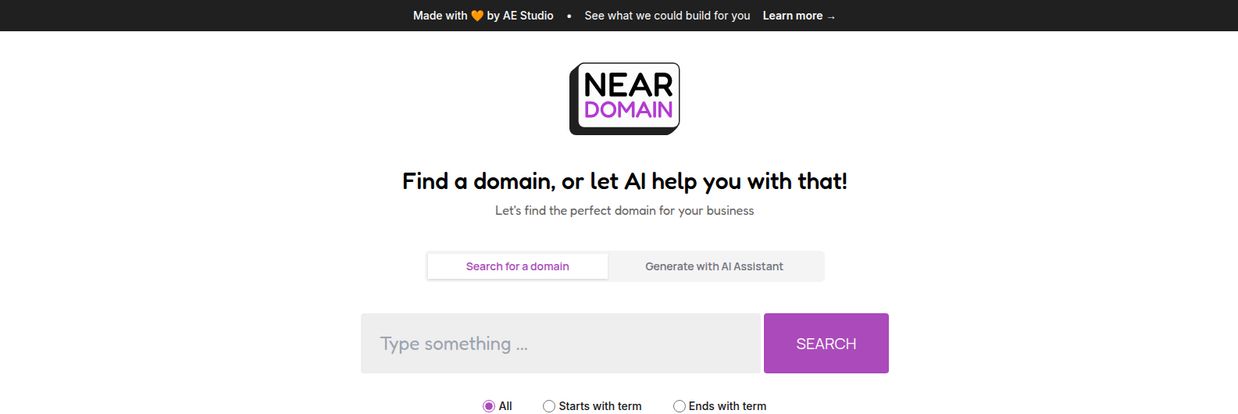
It presents you with two main paths. You can either do a traditional search for a domain, or you can use its “AI Assistant” to generate ideas for you. The whole interface is minimalist, which is a breath of fresh air, honestly. It feels less like a corporate behemoth trying to squeeze every penny out of you and more like a simple utility built to solve one specific, very annoying problem.
First Impressions and The User Experience
Landing on the Near Domain page, the first thing I noticed was the quiet. No pop-ups. No banner ads for services I dont want. Just a clean, centered search box with a clear mission: “Find a domain, or let AI help you with that!”
This simplicity is a major win in my book. So many domain registrars have become the digital equivalent of a noisy, crowded marketplace where everyone is shouting for your attention. Near Domain feels more like a quiet library where you can actually think.
The Classic Search Function
The standard search is straightforward. You type in a word or phrase, and it checks for availability. What’s neat is the inclusion of simple radio buttons: “All,” “Starts with term,” and “Ends with term.” This is a small but thoughtful feature. If you have a core brand word, say “Apex,” you can easily see available domains like `ApexDigital.com` (using “Starts with”) or `GrowthApex.com` (using “Ends with”). It’s a basic filter, but it’s presented so cleanly that it feels more useful than the convoluted “advanced search” options on other platforms.
The AI Assistant – Friend or Gimmick?
This is the real star of the show, or at least, that’s the idea. You switch over to “Generate with AI Assistant,” and presumably, it takes your core concept and spits out creative, available .com domains. I say presumably because the tool is a bit of a black box. There isn’t a ton of information about what kind of AI it’s using or how it generates its ideas. Does it use synonyms, related concepts, or industry jargon? Hard to say.
However, the concept is solid. The biggest hurdle in domain hunting isn’t the searching; it’s the ideation. Coming up with new angles when your first ten ideas are taken is exhausting. An AI that can do that lateral thinking for you is, in theory, a massive time-saver. It’s the difference between staring at a blank page and having a brainstorming partner who never runs out of coffee.
The All-Mighty .COM: Why The Focus Matters
One of the smartest decisions the creators of Near Domain made was to focus exclusively on .com domains. I know, I know, there are hundreds of new TLDs (Top-Level Domains) out there, from `.ai` to `.pizza`. And for some niche brands, they can work.
But let’s talk reality. For most businesses, .com is still the gold standard. It carries a certain weight of authority and trustworthiness. It’s what users default to typing in their browser. As SEO experts at Moz will tell you, while Google claims TLDs don’t have a direct ranking impact, user perception absolutely does. A .com domain just feels more legitimate to many people, and that user trust is a huge part of building a strong online presence. Near Domain gets this, and by narrowing its focus, it prevents you from settling for a less-desirable TLD out of frustration.
The Good, The Bad, and The… Missing?
No tool is perfect, right? After playing around with it, here’s my honest breakdown of where Near Domain shines and where it has a few rough edges.
The Strengths I’m Seeing
The biggest pro is its beautiful simplicity. Its a focused, single-purpose tool that doesn’t try to be everything to everyone. The AI-powered suggestions are a fantastic starting point for anyone experiencing creative block, and the .com-only approach is a smart, strategic choice that guides users toward a more valuable digital asset. Its basically a specialized tool for the first, most painful step of building a website.
A Few Rough Edges
The main drawback is the lack of information. As mentioned, the AI assistant’s capabilities are a bit of a mystery. I’d love to see a bit more detail on how it generates names. There also seem to be some limitations on how many keywords or terms you can feed it at once, which could be a slight hindrance for more complex branding ideas.
And now for the elephant in the room. When I tried to find a pricing page… I hit a 404. “This page could not be found.” This could mean a few things. Maybe the tool is completely free, a project by its creators, AE Studio. Maybe it’s in beta and pricing hasn’t been rolled out yet. Or maybe the link is just broken. It adds a bit of mystery to the whole thing.
So, What’s the Price Tag?
This is the million-dollar question, isn’t it? Given the 404 on the pricing page, it’s currently impossible to say for sure. My gut tells me this is likely a free tool, perhaps acting as a lead generator or a portfolio piece for the development studio behind it. If that’s the case, it’s an incredible value. If a pricing model is introduced later, its value will depend entirely on how powerful and consistent the AI recommendations are. For now, we can enjoy it for what it appears to be: a free, helpful utility.
Who Should Give Near Domain a Try?
I think this tool is perfect for a few specific groups:
- Early-Stage Startups: When you’re moving fast and just need a solid, brandable .com without the analysis paralysis.
- Bloggers and Content Creators: Stuck on a name for your new passion project? The AI can be a great brainstorming partner.
- Side-Hustlers: For launching a quick landing page or online store, this can get you from idea to available domain in minutes.
- Anyone Who’s Frustrated: If you’re tired of the endless cycle of search, fail, repeat on traditional registrars, the clean interface and creative suggestions here could be the cure.
Frequently Asked Questions about Near Domain
- Is Near Domain a domain registrar?
- No, it appears to be a search and discovery tool. Once you find a domain you like, you would still need to go to a registrar like GoDaddy, Namecheap, or Google Domains to actually purchase and register it.
- Is Near Domain free to use?
- As of this writing, there is no pricing information available, and the pricing page leads to an error. This strongly suggests the tool is currently free to use.
- How good is the AI assistant?
- The quality of AI suggestions can be subjective. It’s best used as a brainstorming partner to spark new ideas you might not have considered, rather than expecting it to deliver the one perfect name on the first try.
- Why does it only search for .com domains?
- The tool focuses on .com domains because they are generally considered the most credible, memorable, and desirable for businesses and serious online projects, which is a big plus for brand authority.
- What happens when I find a domain I like?
- The tool will show you that a domain is available. Your next step is to go to your preferred domain registrar’s website, search for that exact domain, and proceed with the purchase there.
My Final Thoughts on This Domain Finder
So, is Near Domain a revolutionary, earth-shattering new technology? Probably not. But that’s okay. It doesn’t have to be. What it is, is a well-designed, thoughtful, and refreshingly simple tool that tackles one of the most universally frustrating parts of getting online.
It’s like a sharp knife in a kitchen drawer full of clunky, multi-purpose gadgets. It does one job, but it does it with focus and elegance. For anyone on the brink of giving up and naming their new business `myawesomestartup2024.net`, I’d say give Near Domain a shot first. It might just be the brainstorming partner you need to finally land that perfect .com and get back to the real work of building something great.


