
Categories: AI Code Generator, AI Productivity Tools, AI Task Management, AI Workflow, No-Code&Low-Code
Nekton AI Review: AI Workflow Automation Made Simple?

We’ve all got them. Those soul-crushing, mind-numbing, repetitive tasks that clog up our workdays. Manually exporting a CSV file. Sending that same welcome email. Checking a website for an update. It’s the digital equivalent of watching paint dry, and it’s a thief of our most valuable resource: time.
For years, the promise of automation has been dangled in front of us. Tools like IFTTT and Zapier came along and, to be fair, they changed the game. But they often come with their own learning curves, a labyrinth of dropdowns and triggers and actions that can sometimes feel like you’re building a Rube Goldberg machine.
So when I heard about Nekton AI, a platform that claims to automate your workflows using just plain English, my inner cynic immediately sat up. “Oh, here we go again,” I thought. Another tool promising the moon. But this one had a twist: it’s powered by OpenAI and ChatGPT. Okay, now you have my attention. I had to see if it was just another drop in the ocean of AI tools, or something… different.
So, What Exactly is Nekton AI?
Imagine you hired a super-eager junior developer. You don’t have to write the code yourself, you just have to explain the task clearly. “Hey, could you build a little script that watches my Twitter for mentions of our brand, and then drops those mentions into a Slack channel?” And poof, they do it.
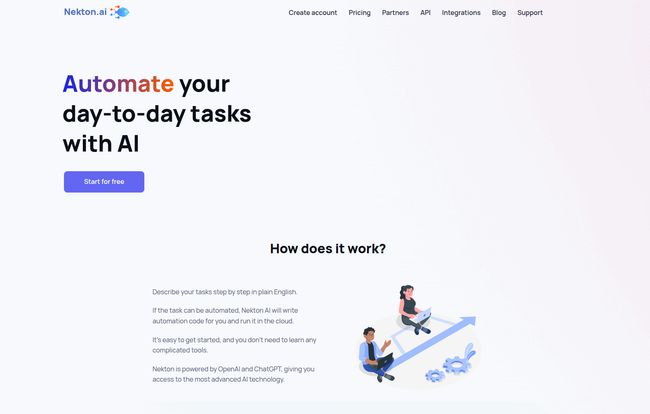
That’s Nekton AI in a nutshell. It’s a service that lets you describe a workflow—a series of steps you want to automate—in normal, everyday language. Nekton’s AI, with the brain of ChatGPT behind it, then translates your request into actual code and runs it for you in the cloud. It’s a bridge between your intention and the execution, without you needing to get your hands dirty with code. At least, not at first.
Visit Nekton
How It Works: The Magic of Plain English
The process is refreshingly simple. You literally just type what you want to do. For example, you might tell it:
“When a new row is added to my Google Sheet ‘New Leads’, send an email through Gmail to the address in Column B with the subject ‘Welcome!’ and a body that says ‘Hi [Name from Column A], thanks for signing up!'”
Nekton takes that sentence, chews on it for a moment, and generates the underlying automation to make it happen. You connect your Google and Gmail accounts, give it the thumbs-up, and it just… works. It runs on its own schedule, in the cloud, silently doing your bidding. No setting up servers, no managing cron jobs, no headaches. It feels a little bit like magic.
The Good Stuff: What I Really Like About Nekton
After playing around with it for a while, a few things really stood out to me. It’s not just another pretty interface; there’s some real substance here.
It’s Just So Easy to Start
The barrier to entry is ridiculously low. If you can write an email, you can create an automation in Nekton. This is huge. It opens up the power of custom automation to marketers, salespeople, founders, and students—basically anyone who doesn’t have “developer” in their job title. You don’t get stuck in a web of if-this-then-that logic gates. You just speak your mind. So refreshing.
A Playground for Both Beginners and Pros
This was the part that truly surprised me. At first, I thought, “Okay, this is a neat tool for non-coders.” But then I saw it: the automations Nekton creates are written in TypeScript, and you can actually view and edit the code. This is a game-changer.
For a beginner, you never have to look at the code. But for someone like me, who knows a bit of code but is too lazy to set up a whole new project for a simple script? This is perfect. The AI does 90% of the heavy lifting, writing the boilerplate and connecting the APIs. I can then jump in and tweak the logic, add a custom filter, or handle a weird edge case. It’s the best of both worlds: no-code simplicity with a low-code escape hatch for ultimate control. It’s not just a black box.
It Runs in the Cloud, So You Don’t Have To
This might seem like a small thing, but it’s not. The fact that all your automations run on Nekton’s infrastructure means you can truly set them and forget them. Your computer can be off, you can be on vacation, and your little army of digital minions will keep working for you. No maintenance, no updates, no worrying if your home server rebooted. It’s automation as a utility, like electricity or water. You just turn it on and it flows.
Let’s Be Real: Where Nekton Stumbles
No tool is perfect, of course. My cynical side did find a few things to grumble about. Nekton is very clear about its limitations, which I respect, but you need to know what they are before you jump in.
Not for Super Complex or Vague Ideas
The AI is smart, but it’s not a mind reader. If your instructions are fuzzy or overly complex, it’s going to struggle. “Build me an e-commerce business” isn’t a task for Nekton. It thrives on specific, well-defined workflows. Think “When X happens, do Y, then do Z.” It’s a tool for automating recipes, not for inventing the meal from scratch.
Your Digital Life Must Be on the Internet
Since Nekton runs in the cloud, it can only connect to services that are accessible from the public internet. This means it can’t automate tasks on your local computer or connect to a database that’s tucked away behind your company’s firewall. For most personal tasks and modern cloud-based businesses (using things like Slack, Google Workspace, Trello, etc.), this is a non-issue. But for old-school enterprise setups, it’s a deal-breaker.
Don’t Bring Your Big Data Here
Nekton is designed for what it calls “small-to-medium” amounts of data. It’s perfect for processing a few leads, handling survey responses, or scraping a couple of pages. It is not an ETL (Extract, Transform, Load) tool for processing millions of records from a data warehouse. Use the right tool for the job, and this isn’t the one for heavy-duty data crunching.
So Who Is This Tool Actually For?
After weighing the pros and cons, I’ve got a pretty clear picture. Nekton AI carves out a really interesting niche for itself.
It’s for the solo-preneur or small business owner who wears a dozen hats and needs to automate things like customer onboarding or social media monitoring without hiring a developer. It’s for the marketing manager who wants to pipe leads from a form directly into a CRM and a Slack channel. It’s for the developer who wants to quickly script a simple API integration without the ceremony of setting up a whole new dev environment.
It’s not necessarily a full replacement for a powerhouse like Zapier if you have extremely complex, multi-app workflows. But for single-purpose, highly customized tasks? It feels more intuitive and flexible, especially with that TypeScript editor waiting in the wings.
Breaking Down the Nekton AI Pricing
The pricing model is straightforward, which I always appreciate. It’s based on “flows,” where one flow is a single execution of your workflow.
- Free Plan: You get 300 flows per month for $0. This is more than enough to automate a few key daily or weekly tasks and really get a feel for the platform. It’s a genuinely useful free tier.
- Starter Plan: For $9 per month, you get 1,000 flows. This is a great step up for small teams or individuals who are starting to rely on the service for core business processes.
- Pro Plan: For $18 per month, you get a hefty 5,000 flows. This is aimed at bigger teams or power users running a ton of automations.
The pricing feels very fair, especially given the AI-powered setup. It’s also worth noting they state the platform is free for non-commercial and open-source projects, which is a fantastic gesture to the community.
My Final Thoughts on Nekton AI
I came in skeptical, but I’m walking away impressed. Nekton AI isn’t just another automation tool; it feels like a glimpse into the future of how we’ll interact with software. The plain-language interface is the real star, but the TypeScript backend gives it a surprising amount of depth and credibility.
It’s not the solution for every automation problem. It has its limitations. But for its target use cases, it’s elegant, powerful, and remarkably easy to use. It successfully lowers the barrier to creating bespoke automations, and that’s a win for everyone. I’ve already set up a few flows for my own work, and they’re humming along nicely in the background. And I didn’t have to write a single line of boilerplate code. I’m sold.
Frequently Asked Questions about Nekton AI
- What exactly counts as a “flow” in Nekton?
- A flow is a single, complete execution of one of your workflows. So if you have an automation that runs every hour to check a website, that would use 24 flows per day. It can contain multiple steps within that single execution.
- What happens if I go over my monthly flow quota?
- Based on their FAQ, you’ll likely need to upgrade your plan for your flows to continue running. Your automations would probably pause until the next billing cycle starts or until you upgrade to a higher tier.
- Can I upgrade or downgrade my plan whenever I want?
- Yes, like most modern SaaS platforms, you should be able to change your plan at any time through your account settings. The change would typically take effect at the start of the next billing period.
- Is Nekton AI safe to use with my service accounts?
- Connecting services always requires a degree of trust. Nekton uses standard and secure authentication methods (like OAuth) to connect to your accounts. However, it’s always good practice to follow the principle of least privilege: if possible, create dedicated credentials for any automation tool with only the permissions it absolutely needs to do its job.
- Can Nekton AI completely replace Zapier or Make?
- For some users, yes. For others, no. If your main use is creating specific, custom scripts that you wish you could code yourself, Nekton might be a better fit. If you rely on a massive library of pre-built, multi-step app integrations, the established players might still have the edge. They solve similar problems in different ways.
- Do I really need to know how to code to use Nekton?
- Absolutely not. The main feature is that you can create workflows using just plain English. The ability to edit the TypeScript code is an optional, advanced feature for those who want more control, but it is not required.
Conclusion
In a world overflowing with new AI tools, Nekton AI manages to stand out. It’s practical, accessible, and cleverly designed to serve both ends of the technical spectrum. It takes the esoteric world of API integrations and server-side scripts and makes it as simple as having a conversation. If you have a repetitive task that’s been bugging you for ages, I seriously recomend you give Nekton’s free plan a shot. What have you got to lose, except a few hours of boring work every week?


