
Categories: AI Agent
NodeCodeStudio Review: No-Code AI Workflows Made Easy?

I still have nightmares about a project from a few years back. It involved trying to stitch together three different APIs for a client’s reporting dashboard. Hours were lost. So much coffee was consumed. And my sanity was, shall we say, tested. It’s the kind of technical headache that makes you wish you could just draw what you want on a whiteboard and have it magically come to life. The whole no-code movement has been a godsend for people like me, and lately, the space has been getting crowded with tools promising to automate our lives.
But then I stumbled upon something a little different. A platform called NodeCodeStudio. It’s not just about simple IFTTT (If This Then That) recipes. It’s talking about building actual AI Agents and entire workflows visually. My curiosity was definitely piqued. Could this be the tool that finally lets us build complex, AI-powered systems without a computer science degree? Let’s get into it.
So, What on Earth is NodeCodeStudio Anyway?
Alright, let’s break it down. At its heart, NodeCodeStudio is a no-code development platform. Imagine you have a box of digital LEGOs. One LEGO brick can talk to an AI, another can read a spreadsheet, and another can transcribe an audio file. Your job isn’t to build the bricks themselves, but to snap them together in a logical order to create something amazing.
That’s essentially what you’re doing here. You use a visual, drag-and-drop interface to design a workflow. You connect different “nodes”—each representing a specific action or tool—to automate processes. It’s less like writing a dense novel and more like arranging pre-written chapters to tell your story. The platform aims to take the mind-numbing complexity out of building automated systems, especially ones that lean heavily on AI.
The Core Features That Actually Matter
A platform is only as good as its tools. While the website throws a lot of buzzwords around, a few features really stood out to me as being the meat and potatoes of the whole operation.
The Magic of the Visual Workflow Builder
This is the main event. Instead of a blinking cursor on a black screen, you get a canvas. You drag a node for “Get Audio from Video,” connect it to a node for “Transcribe Audio to Text,” and then maybe connect that to a node for “Summarize Text with AI.” You can literally see the flow of data and logic. For visual thinkers, this is a game-changer. It makes debugging and understanding your own creation so much more intuitive. You’re not hunting for a misplaced semicolon; you’re looking for a line that’s connected to the wrong box.
Creating Your Own Custom AI Agents
Okay, this is the part that gets me excited. The term “AI Agent” sounds a bit like science fiction, but in this context, it’s a workflow designed to perform a complex task autonomously. Think of an agent that monitors customer support emails, identifies the sentiment, pulls relevant data from a CRM, and then drafts a reply for a human to approve. With NodeCodeStudio, you can build these agents by chaining together different AI models and data sources. This goes way beyond simple automation and steps into the world of creating bespoke, intelligent helpers for your business.
Connecting Everything with APIs and Integrations
A workflow tool is useless if it lives on an island. The power comes from connecting all the different apps you already use. NodeCodeStudio is built around this idea, offering pre-built connectors and seamless API integration. The goal is to be the central hub, the conductor for your digital orchestra of tools. I saw a mention of integrating with platforms like Microsoft Copilot Studio, which suggests they’re serious about fitting into a professional enterprise ecosystem. This is critical for generating real business value.
A Peek Inside the No-Code AI App Suite
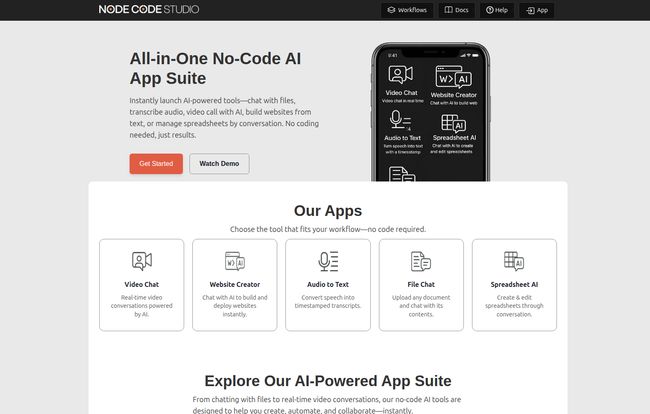
To make things even easier, NodeCodeStudio offers an “App Suite” of pre-configured tools. This is smart. It gives new users a tangible starting point instead of just a blank canvas. Based on their site, you can instantly launch things like:
- Video Chat: Real-time conversations powered by AI.
- Website Creator: Build a site by just chatting with an AI. Wild.
- Audio to Text: A straightforward transcription tool.
- File Chat: Upload a document (like a PDF or Word doc) and ask it questions. I can see this being huge for research.
- Spreadsheet AI: Manage and edit spreadsheets through a conversational interface. No more complex formulas? Sign me up.
These apps are basically powerful demonstrations of what you can ultimately build and customize yourself within the workflow editor.
Visit NodeCodeStudio
Also Read: Assisterr AI Review: No-Code SLMs for Web3?
The Good, The Bad, and The Node-y: An Honest Look
No tool is perfect, right? Let’s be real for a second. While I’m genuinely optimistic about NodeCodeStudio, a balanced view is always best.
On the plus side, the upsides are significant. The speed of development is the most obvious win. What might take a developer a week to code could potentially be prototyped in an afternoon. This makes it incredibly accessible for marketers, entrepreneurs, and small business owners who have great ideas but lack the coding expertise. The focus on custom AI agents is also a major differentiator from more generic automation platforms.
However, there are a few caveats to consider. With any no-code platform, you’re trading some level of customization for convenience. If you need a truly unique, hyper-specific function that a pre-built node doesn’t cover, you might hit a wall that a traditional coder could just build their way through. You’re also reliant on the platform’s library of connectors. If they don’t have an integration for that one obscure app your business depends on, you might be out of luck. Finally, while it’s “no-code,” it’s not “no-learning.” You’ll still need to invest time in understanding the interface, the logic of nodes, and how to structure a workflow effectively.
Let’s Talk Money: The NodeCodeStudio Pricing Situation
So, what’s all this going to cost? Well, here’s where things get a bit awkward. I went to check their pricing page and… womp womp. 404 – Page Not Found. Yep, the link is currently broken. It’s a small hiccup, maybe a sign of a new platfrom still getting its footing.
But here’s the good news: the homepage prominently features a “Get Started Free” button with the magic words, “no credit card required.” This tells me they likely operate on a freemium model. My educated guess would be a free tier that lets you build a limited number of workflows or perform a certain number of tasks per month. Paid tiers would probably unlock more advanced features, higher usage limits, and perhaps more premium integrations. For now, you can at least try it out without pulling out your wallet, which is always a plus in my book.
Frequently Asked Questions about NodeCodeStudio
What exactly is a ‘no-code’ platform?
A no-code platform allows you to build applications and automate processes using visual interfaces, like drag-and-drop editors, instead of writing traditional computer code. It empowers non-technical users to create their own digital tools.
What is an AI Agent in this context?
Think of an AI Agent as an automated workflow with a brain. It’s a series of connected tasks that can use artificial intelligence to perform actions, make simple decisions, and process information to achieve a specific goal, like summarizing reports or managing customer inquiries.
Is NodeCodeStudio good for complete beginners?
It’s designed to be accessible, but there will be a learning curve. If you’re familiar with flowchart logic or have used other automation tools like Zapier or Make, you’ll likely pick it up quickly. A complete novice might need to watch a few tutorials to get the hang of the node-based system.
Can I connect my own apps and tools?
Yes, that’s a core feature. NodeCodeStudio is built for API integration, allowing it to connect with a wide variety of third-party services. The ease of connection depends on whether they have a pre-built connector or if you need to configure a more generic API call.
Do I need to be an AI expert to use it?
Not at all. The platform abstracts away the complexity of the underlying AI models. You don’t need to know how a Large Language Model works; you just need to know what you want it to do (e.g., “summarize this text” or “analyze this sentiment”).
My Final Verdict
So, is NodeCodeStudio the real deal? I think it has some serious potential. It’s tapping into two of the biggest trends in tech right now: no-code development and applied AI. By combining them in a visual, workflow-centric package, it’s carving out a really interesting niche for itself.
It’s not going to replace entire development teams, but it was never meant to. Instead, it empowers a whole new class of creators—the marketers, the ops managers, the founders—to build the intelligent tools they’ve been dreaming of. Despite the broken pricing page (I’m sure they’ll fix it!), the free entry point makes it a no-brainer to try. If you’ve ever felt that frustration of a great idea being blocked by a technical wall, you should definitely give NodeCodeStudio a look. It might just be the sledgehammer you need.
Reference and Sources
- NodeCodeStudio Homepage: https://nodecodestudio.com/
- NodeCodeStudio Product Information: Based on analysis of the homepage and available documentation links in the site’s footer.


