
Categories: AI Assistant, AI Flashcard Maker, AI Text-to-Speech
NoteKnight Review: An AI Flashcard Maker Worth a Look?

I still get a phantom cramp in my hand thinking about it. Late nights, surrounded by a mountain of textbooks and a rainbow of highlighters, painstakingly copying definitions onto what felt like a million tiny index cards. The year was… well, let’s just say it was a while ago. We had digital tools, sure. But they were mostly just digital versions of those same painful index cards. A bit faster, maybe, but not really smarter.
For years, Quizlet has been the undisputed king of that digital castle. It’s the tool we all know, the one we all used. But as I’ve watched the AI boom transform everything from content creation to coding, I’ve been waiting for it to properly tackle the world of studying. I think that moment might finally be here, and its name is NoteKnight.
I’ve been playing around with it for a while now, and honestly, it feels like a genuine step forward. So, grab a coffee, and let’s get into whether this shiny new AI flashcard maker is just a pretender to the throne or a real contender.
So, What on Earth is NoteKnight?
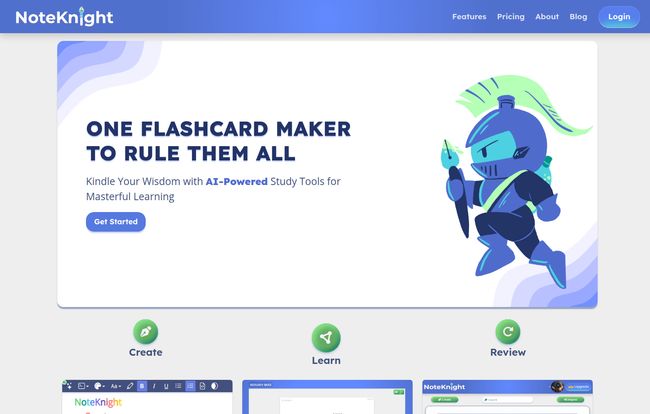
At its heart, NoteKnight is an AI-powered flashcard maker and study platform. Think of it as your traditional flashcard app, but with a brain. Instead of you doing all the grunt work of summarizing, defining, and creating questions, NoteKnight’s little AI-powered squire does a lot of the heavy lifting for you. It’s positioned as a Quizlet alternative, and it doesn’t shy away from that comparison. The whole vibe is clean, modern, and built around a central idea: making you study smarter, not just harder. The little knight mascot is a nice touch, too; gives it some personality.
The Magic Wand: Unpacking NoteKnight’s AI Features
This is where things get interesting. It’s the AI that really separates NoteKnight from the old guard. It’s not just a gimmick; these features are genuinely useful and target the most tedious parts of the study process.
AutoScribe: Your Personal Scribe for Instant Flashcards
Okay, this is the one. If there’s a killer feature, AutoScribe is it. You can literally upload your lecture notes, a PDF of a chapter, or even a presentation, and the AI will scan the material and generate a full set of flashcards for you. In seconds.
Let that sink in. All those hours you’d spend condensing notes? Gone. I tested this with a dense article about Google’s latest algorithm updates, and it pulled out the key concepts and jargon with surprising accuracy. Of course, it’s not 100% perfect—no AI is—and you’ll want to give the deck a quick once-over. But as a starting point, it’s an incredible time-saver. It turns an hour of prep work into a two-minute review job.
Visit NoteKnight
The Integrated AI Assistant: More Than Just a Card Flipper
Here’s another cool trick. Let’s say a flashcard pops up with a term you kind of know, but don’t really understand. On a normal app, you’d have to open a new tab and Google it. With NoteKnight, you can just ask the AI Assistant for an explanation right there. It provides context, simplifies complex ideas, and helps you grasp the ‘why’ behind the answer, not just the ‘what’. This is a massive leap towards active learning rather than just rote memorization. It’s like having a little tutor living inside your flashcard deck, ready to help when you get stuck.
A Picture’s Worth a Thousand Words (or a Passing Grade)
Finally, something that feels so obvious but is often a paid add-on elsewhere: image support. For anyone studying subjects like anatomy, engineering, art history, or even just complex diagrams, text-only flashcards are basically useless. NoteKnight integrates image support, allowing you to create much richer, more effective study materials. This is a premium feature, bundled into their NOBLE plan, but for visual learners, it’s non-negotiable.
Beyond the AI: Smart Study and Practical Tools
While the AI gets the headlines, the platform is solid on the fundamentals too. It has what it calls Smart Study Modes, which are essentially different ways to test yourself—games, text-to-speech, and hints. The text-to-speech is a fantastic addition for auditory learners or for when you want to study while doing the dishes or going for a walk. We love multitasking!
It’s also fully mobile-friendly, and the organizational tools are straightforward. You can create folders for different subjects or exams, keeping your digital workspace tidy. A small thing, but anyone who’s ever had a desktop cluttered with 50 different study docs knows how important good organization is for your sanity.
Let’s Talk Money: NoteKnight Pricing
Alright, the all-important question: how much is this going to cost? We’re all on a budget, I get it. The good news is, NoteKnight has a pretty generous free plan. Here’s a quick breakdown:
| Plan | Price | Key Features |
|---|---|---|
| Free | $0 | Basic Flashcards, Text Editing, Folders, Sharing, Games, Hints. |
| NOBLE (Yearly) | $1.99 /mo (billed as $23.99/year) | All free features + Images, AutoScribe, AI Explanations, AI Assistant, Ad-Free. |
| NOBLE (Monthly) | $4.99 /mo | All free features + Images, AutoScribe, AI Explanations, AI Assistant, Ad-Free. |
My take? The free tier is more than enough to get a feel for the platform’s basic functions. But the real power, the stuff that makes NoteKnight special, is in the NOBLE plan. The yearly price, which works out to less than two bucks a month, is a steal. That’s less than a single fancy coffee for a whole year of smarter studying and an ad-free experience. For any serious student, I think it’s a worthwhile investment.
The Other Side of the Coin: Where NoteKnight Could Improve
No tool is perfect, and it would be dishonest to pretend otherwise. While I’m pretty high on NoteKnight, there are a few things to keep in mind. First, the best features are locked behind the NOBLE paywall. That’s just business, but it’s something to be aware of if you’re strictly looking for a free tool.
Second, the effectiveness of the AI, especially AutoScribe, really depends on the quality of your input material. The old saying “garbage in, garbage out” absolutely applies here. If your notes are a chaotic mess, the AI is going to struggle. Lastly, there’s a small risk of becoming too reliant on the AI. It’s a tool to assist you, not replace the act of learning. You still have to put in the mental effort to engage with the material.
My Final Verdict: Should You Join the NoteKnight Ranks?
So, is it time to hang up your old flashcard app? In my opinion, for a lot of people, the answer is yes. If you’re a high school or college student drowning in reading material, a professional studying for a certification, or just a lifelong learner who wants to absorb information more efficiently, NoteKnight is a powerful ally.
It takes the most soul-crushing part of studying—the creation of materials—and automates it, freeing you up to focus on the actual learning. It’s a smart, well-designed tool that genuinely feels like the next evolution in study-tech. While Quizlet is a familiar old friend, NoteKnight is the exciting new colleague who has all the cool new ideas that make your job easier.
I say give the free version a spin. Upload some notes to AutoScribe and see what it spits out. If you find yourself thinking, “Wow, that just saved me an hour,” then upgrading to NOBLE is probably a no-brainer.
Frequently Asked Questions about NoteKnight
- Is NoteKnight really free to use?
- Yes, it has a robust free plan that includes unlimited flashcards, folders, text editing, and basic study games. The more advanced AI features like AutoScribe and the AI Assistant are part of the paid NOBLE plan.
- Can I import my flashcards from Quizlet?
- Yes! NoteKnight has an import feature that makes it easy to bring your existing study sets over from Quizlet. They’re clearly aiming to make the switch as painless as possible.
- How accurate is the AutoScribe AI?
- In my experience, it’s impressively accurate for well-structured notes or text. It does a great job of identifying key terms and definitions. However, for very messy or handwritten notes, its effectiveness might decrease. It’s best to always give the generated deck a quick review.
- Is the NOBLE plan worth the money?
- If you’re a serious student who spends a lot of time creating study materials, I’d say absolutely. The time saved by AutoScribe alone can easily justify the cost, which is quite low on the yearly plan.
- Who is NoteKnight best for?
- It’s ideal for students at any level (high school, university), professionals studying for exams (like the PMP, LSAT, etc.), and anyone who needs to learn and retain large amounts of information efficiently.
Time to Study Smarter
The days of manual, tedious study prep are numbered. Tools like NoteKnight are leading the charge, using AI not as a replacement for our brains, but as a powerful assistant to help them work better. It’s about reclaiming your time and making the learning process more engaging and less of a chore. After all, the goal isn’t to be the best flashcard maker; it’s to ace the test. And this little knight might just be the ally you need to do it.


