
Categories: AI Audio Enhancer, AI Instrumental Generator, AI Music Generator
NotePerformer 5 Review: Is It Worth It for Composers?

If you’re a composer, arranger, or even a music student, you know the pain. You spend hours, days, slaving over a score in Sibelius, Dorico, or Finale. Every dynamic is perfect, every articulation is placed with a surgeon’s precision. You hit play, ready for the glorious sound of your masterpiece, and what do you get? A robot orchestra. Lifeless, clunky, soul-crushing MIDI playback that sounds like a Casio keyboard from 1992 having a very bad day.
We’ve all been there. It’s the moment that makes you question your life choices. For years, the solution was to spend a fortune on gargantuan sample libraries and then another week programming MIDI controllers to make a simple crescendo sound… well, simple. It’s exhausting.
Then along came a little piece of software from Sweden that promised to change everything. I’m talking about Wallander Instruments’ NotePerformer. And with its latest iteration, NotePerformer 5, the question is more pressing than ever: does it actually deliver on its promise to give us realistic playback, right out of the box?
So, What Exactly Is NotePerformer 5?
This is the first thing we need to clear up. NotePerformer isn’t a massive, multi-terabyte sample library like something from Spitfire Audio or EastWest. You don’t load it up in Kontakt and play it with a MIDI keyboard (though you can, with some caveats). Think of it less as a library and more as an AI-powered interpreter. It hijacks the playback of your notation software and, instead of just playing back the raw MIDI data, it reads your score like a human musician would.
It sees a crescendo and knows how to build it naturally. It sees a staccato mark and plays it with the right kind of bite, depending on the instrument. It understands slurs, hairpins, and articulations, and it performs them with what it calls “intelligent musical phrasing.” It’s a pretty bold claim, but honestly, it’s not far off. It comes with its own full orchestral sound library built right in, so you don’t need anything else to get going.
Visit NotePerformer
The Sound: From Unseasoned Tofu to a Decent Steak
Okay, let’s talk about the sound. Is it going to replace a meticulously crafted mockup made with a $5,000 orchestral template? No. But that’s not the point. The point is to turn your score into a musically coherent and listenable piece of audio with zero extra effort.
The default playback in most notation software is like unseasoned, boiled tofu. It’s technically food, but there’s no joy in it. NotePerformer is like a well-cooked steak. It might not be a Michelin-starred A5 Wagyu experience, but it’s satisfying, full-bodied, and tastes like real music. The strings have a natural swell, the brass has bite without sounding like a general MIDI brass stab, and the woodwinds have a warmth that’s genuinely surprising.
The included library is impressive, covering everything you’d expect in a modern symphonic orchestra. You’ve got your standard strings, brass, woodwinds, and percussion, but also extras like a choir, pipe organ, acoustic guitar, and even a full big band sax section. This makes it a fantastic all-in-one tool for arrangers who need to quickly mock up pieces in different styles.
Getting Started: A Breath of Fresh Air
If you’ve ever installed a complex VST library, you know the potential for a full-day headache involving license centers, activation codes, and hunting for missing files. I’ve been there, and I have the scars to prove it.
NotePerformer’s installation is, and I don’t say this lightly, a dream. You download the installer, you run it, and… that’s pretty much it. It automatically finds your compatible notation software (Sibelius, Dorico, Finale) and integrates itself. The next time you open a score, you just select NotePerformer as your playback device, and it works. All the sounds load almost instantly. No fuss, no configuration nightmare. It’s how all software should be.
Compatibility and System Needs
It plays nice with the big three, but you need to be on a relatively modern version. Here’s a quick rundown:
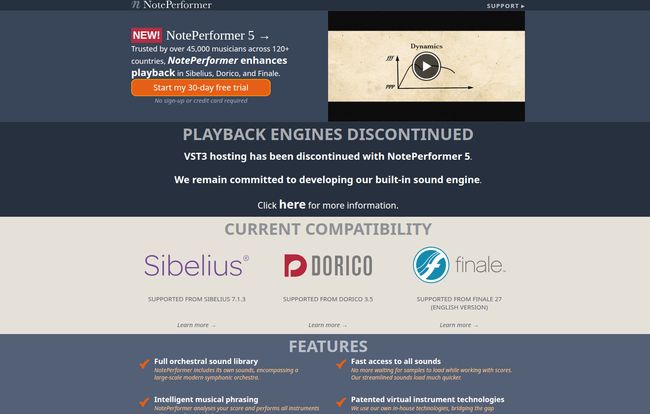
- Software: Sibelius 7.1.3+, Dorico 3.5+, or Finale 27+
- Operating System: macOS 10.9 (Mavericks) or higher / Windows 7 or higher
- Hardware: An Intel Core 2 Duo, Apple M1, or faster CPU, 4 GB of RAM, and about 2 GB of hard drive space.
Basically, if your computer was made in the last decade, you’re probably good to go.
Let’s Talk Money: The NotePerformer 5 Price Tag
Price is always a major factor, especially for students and working musicians. I’ve always felt NotePerformer hits a sweet spot. It’s not cheap freeware, but it’s a fraction of the cost of high-end orchestral libraries.
Here’s how the pricing breaks down:
| License Type | Price | Best For |
|---|---|---|
| Single-User License | $129 (Perpetual) | Most individuals, students, and professionals. Buy it once, own it forever. |
| Rent-to-Own | $10.75 / month | Those on a tight budget. You pay monthly until you hit the full price, then you own it. |
| Site License | Starts at $200 for 5 seats | Schools, universities, and studios with multiple users. |
I’ve got to say, the rent-to-own model is brilliant. It makes the tool so much more accessible. And a $129 perpetual license in today’s world of endless subscriptions feels like a bargain for what it does.
The Not-So-Great Stuff (Because Nothing’s Perfect)
Alright, it’s not all sunshine and perfectly phrased melodies. There are a few downsides you should be aware of. For me, these aren’t dealbreakers, but for your workflow, they might be.
First, NotePerformer 5 removed VST3 hosting. The previous version allowed you to host your own VST instruments within NotePerformer, blending its smart playback with your favorite high-end sounds. That’s gone. The developers say they’re focusing on their own sound engine, which is fair, but it’s a big loss for power users who had built complex hybrid setups.
Second, there’s a one-second delay when you press play. The software needs that moment to analyze the score ahead of the cursor to perform its magic. You get used to it, but it can be a little jarring at first, especially if you’re doing quick spot-checks.
Finally, the live recording from a MIDI keyboard is limited. It works fine in Dorico and recent versions of Sibelius, but there’s no support for it in Finale. If your primary workflow is playing parts directly into your score, this could be a major frustration.
My Final Verdict: Who Should Buy NotePerformer 5?
So, here’s the bottom line. Who is this for?
NotePerformer 5 is an absolute game-changer for:
- Music Students: Who need to submit decent-sounding recordings of their assignments without breaking the bank or learning complex audio production.
- Composers and Arrangers: Who write for concert bands, orchestras, or big bands and need quick, intelligent, and inspiring mockups to check their work or send to clients.
- Music Educators: Who want to create better-sounding rehearsal tracks for their ensembles.
It’s probably not the right tool for:
- Hardcore Film & Game Composers: If your job demands ultimate control over every sonic detail and you live inside a massive DAW template, NP5 is probably too automated for you.
- Producers Focused on Pop/Electronic Music: The sound library is orchestrally focused. It’s not designed for making your next synth-pop hit.
For me, its value is in its immediacy. It closes the gap between what I write on the page and what I hear in my head. It lets me focus on composing, not on being a MIDI programmer. It removes the friction, and in a creative field, that is worth its weight in gold.
Frequently Asked Questions
- Can I try NotePerformer 5 before I buy it?
- Absolutely. They offer a very generous free 30-day trial with full functionality. I highly suggest you grab it and see how it fits into your workflow.
- Is the $129 a one-time fee or a subscription?
- It’s a one-time purchase for a perpetual license. You buy it, you own it. There are no recurring fees unless you opt for the rent-to-own plan.
- Will NotePerformer 5 replace my expensive sample libraries like Spitfire or VSL?
- No, and it’s not trying to. Think of it as a different tool for a different job. It’s for fast, intelligent mockups directly from your score. High-end libraries are for detailed, hands-on production work. Many composers use both—NP5 for writing and sketching, and their big libraries for final production.
- Is it hard to install?
- Not at all. It’s one of teh easiest installations you’ll ever do. It’s pretty much a one-click process that automatically finds your notation software.
- What’s the biggest downside of NotePerformer 5?
- For advanced users, it’s the removal of VST3 hosting. For day-to-day users, it’s probably the one-second playback lag, which you do get used to over time.
- Can I use it on more than one computer?
- Yes, the single-user license allows you to install it on as many computers as you like for your own personal use.
Conclusion
NotePerformer 5 isn’t just an upgrade; it’s a statement. It’s a tool that respects a musician’s time and creative energy. It bridges that frustrating gap between the notes on the page and a performance with life and nuance. While it has a few drawbacks and won’t replace a high-end production setup, it does something arguably more important: it makes the process of composing more fluid and more joyful. It gets the technology out of the way so you can just write music. And for $129, that’s not just a good deal; it’s a creative investment that pays for itself the first time you hear your score come to life.


