
Categories: AI Assistant, AI Web Scraping, No-Code&Low-Code
Octoparse Review: No-Code Web Scraping Made Easy?

I’ve been in the SEO and digital marketing trenches for years, and if there’s one constant, it’s the thirst for data. We live and breathe it. Competitor pricing, lead generation, market trends, social media sentiment… it’s the fuel for every campaign. But getting that fuel? Historically, that’s been the messy part.
I remember the bad old days. You either spent soul-crushing hours manually copy-pasting data into endless spreadsheets (we’ve all been there at 2 AM, right?), or you had to beg your dev team to whip up a custom script. A script that, inevitably, would break the second a website changed a single line of its HTML. It was a constant, frustrating battle.
Then, the no-code movement started to bubble up, promising to give these powers to the rest of us. And that brings me to the tool on my mind today: Octoparse. It’s been making waves, and I’ve been getting a lot of questions about it. Does it live up to the hype? Is it really “scraping for anyone”? Let’s get into it.
So, What Exactly is Octoparse?
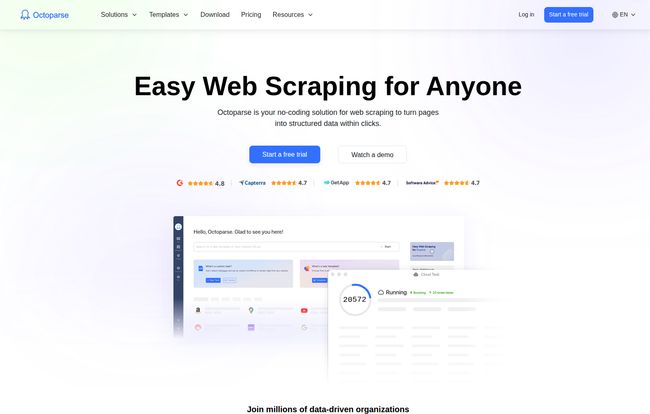
In the simplest terms, Octoparse is a visual web scraping tool. Think of it less like coding and more like showing a very smart, very fast robot what you want. You literally open up a website inside the Octoparse application and click on the data you want to grab—product names, prices, reviews, phone numbers, you name it. You build a visual workflow, a set of instructions, and then unleash the bot to do the work for you.
It turns messy, unstructured web pages into clean, organized spreadsheets. All without writing a single line of Python or JavaScript. It’s a pretty compelling pitch, especially for those of us who are more marketers than developers.
Visit Octoparse
The Good Stuff: Why I’m Genuinely Impressed
I’m naturally skeptical of tools that promise the world, but Octoparse has a few features that made me nod in appreciation. It gets some of the hardest parts of data extraction right.
A Truly Visual, No-Code Experience
This is the main event. The workflow designer is surprisingly intuitive. You click an element on a page, and Octoparse intelligently suggests actions. For example, if you click on the first product in a list, it asks, “Do you want to grab the text from all similar elements on the page?” Yes, Octoparse, yes I do. It automates pagination (clicking the “Next” button), handling infinite scroll, and even logging into sites. It’s less like writing a novel and more like assembling high-tech LEGOs.
Preset Templates are a Legitimate Game-Changer
Let’s be honest, most of us are scraping the same handful of sites over and over. Google Maps for local business info, Amazon for product data, Twitter for social trends, Indeed for job listings. Octoparse comes with a library of pre-built templates for these popular sites. You just plug in your search term (like “plumbers in Chicago”) and hit go. This lowers the barrier to entry from “a few hours of work” to literally a few minutes. That’s a massive win.
The Cloud is Your 24/7 Workhorse
This is a feature you don’t appreciate until you need it. With their paid plans, you can push your scraping tasks to the cloud. What does that mean? It means the task runs on Octoparse’s servers, not your own computer. You can set it to run on a schedule, turn your laptop off, go on vacation, and the data will be waiting for you when you get back. It also means you’re not using your own IP address, which brings me to my next point…
Beating the Anti-Scraping Gatekeepers
Anyone who’s tried scraping at scale has run into the twin terrors: IP blocks and CAPTCHAs. Websites are smart, and they don’t always love being scraped. They’ll block your IP address if you make too many requests too quickly. Octoparse’s paid plans tackle this head-on with automatic IP rotation. It cycles through a pool of different IP addresses, making your scraper look more like a regular human user. It also has features to help solve those annoying “I’m not a robot” puzzles. This is a pro-level feature that they’ve made accessible to everyone.
Let’s Be Real: The Not-So-Perfect Parts
Okay, it’s not all sunshine and structured data. No tool is perfect, and it’s important to go in with your eyes open. My experience turned up a couple of things you should be aware of.
The Free Plan is More of a Tease
I love a good free plan, but Octoparse’s is quite restrictive. You’re limited to 10 tasks and you can’t use the cloud scraping feature. This means all scraping happens on your computer, which is slower and risks your IP. The data export is also limited. It’s perfect for a test drive, to see if you like the feel of the tool, but you’ll hit a wall very quickly on any serious project. It’s a classic freemium model: a great taste that leaves you wanting the main course.
There’s Still a Learning Curve
While it’s “no-code,” that doesn’t mean it’s “no-brain.” To scrape complex, JavaScript-heavy websites, you still need to understand the basic logic of how a website is put together. Sometimes the point-and-click selector gets confused, and you have to manually tweak the XPath (a way of telling the scraper exactly where to look). It’s not hard, but there’s a definite 1-2 hour period of fiddling and watching tutorials before you feel truly confident. Don’t expect to master it in ten minutes.
Show Me the Money: A Breakdown of Octoparse Pricing
Alright, the all-important question: what does this thing cost? The pricing is tiered, and what you choose really depends on your needs. For a detailed look, you should check their official pricing page, but here’s my quick take on it.
- Free Plan: As mentioned, it’s a trial. Good for small, one-off tasks and getting a feel for the interface.
- Standard Plan ($99/month): In my opinion, this is the real starting point. You get cloud extraction, a decent number of concurrent tasks, and the all-important IP rotation. This is the sweet spot for freelancers, small marketing agencies, and businesses that need reliable data without breaking teh bank.
- Professional Plan ($249/month): This is for when data becomes a core part of your operations. You get way more tasks, faster scraping speeds, and more scheduling options. If you’re running a medium-sized e-commerce business and monitoring hundreds of competitors daily, this is probably where you’ll land.
- Enterprise Plan (Contact for price): This is the “call us” plan. Big data for big companies. You get it all, plus dedicated support and custom solutions.
They also offer a Crawler Service, where their team will just build and manage the crawlers for you. It’s a great “done for you” option if you have the budget but not the time.
Who is Octoparse Actually For?
So who gets the most value here? Based on my experience, it’s a perfect fit for a few key groups:
- Marketers and SEOs: For tracking rankings, analyzing competitor content, and pulling backlink data.
- E-commerce Store Owners: Absolutely essential for price monitoring, tracking product availability, and gathering customer reviews from sites like Amazon or eBay.
- Sales and Lead Generation Teams: For building prospect lists from directories like Yelp, Google Maps, or professional networks.
- Researchers and Journalists: For gathering data from public records, news sites, or social media to spot trends and support stories.
If you’re a developer who is fluent in Python and loves building things from scratch, you might still prefer your own scripts. But for the 90% of us who aren’t, Octoparse is a powerful bridge to the world of automated data extraction.
Also Read: CodeAI Review: Your New AI Coding Assistant?
Final Thoughts: Is Octoparse Worth It?
So, we land back at the original question. Is Octoparse the answer to all your data woes? It might just be. It successfully lowers the barrier to entry for web scraping from a developer-level skill to something an ambitious marketer or business owner can handle.
It’s not a magic wand—you still have to put in a little effort to learn the ropes. But it automates the most tedious and technically challenging parts of the job. For me, the value proposition is clear: if you need web data to make better decisions, and you value your time more than the monthly subscription fee, then Octoparse is absolutely worth a serious look. Start with the free trial, run it through its paces on a project, and see if it doesn’t make you feel like you suddenly have a data superpower.
Frequently Asked Questions
- Do I need to know how to code to use Octoparse?
- Nope! That’s its main selling point. It’s a visual, point-and-click system. Having a basic understanding of how web pages are structured can help with complex sites, but you won’t be writing any code.
- Can Octoparse scrape any website?
- It can handle the vast majority of websites, including modern, dynamic sites that use JavaScript to load content. However, some extremely complex sites or those with very aggressive anti-scraping technology can still pose a challenge. It’s always best to test it on your target site with the free trial.
- Is web scraping legal?
- This is a big one. Generally, scraping publicly available data is considered legal. However, you must be ethical. Don’t scrape private data behind a login you don’t have permission for, respect `robots.txt` files, and don’t overload a website’s server. Always respect user privacy and terms of service. I am not a lawyer, so please consult with one for official legal advice.
- How does Octoparse handle getting blocked?
- The paid plans use a pool of cloud-based IP addresses that rotate automatically. This makes your scraping activity look like it’s coming from many different users, which significantly reduces the chance of being blocked. They also have CAPTCHA solving features built-in.
- What’s the difference between the desktop app and the cloud?
- You build your scraper using the desktop app. With the Free plan, you also run the scraper on your desktop. With the paid plans, you can send that scraper to the cloud to run on Octoparse’s servers. The cloud is faster, more reliable, and runs 24/7 without you needing to have your computer on.


