
Categories: AI API, AI Productivity Tools, AI Sales, AI Sales Assistant, AI Workflow, AI Writing Assistants
Offorte Review: Better Proposals, Less Hassle?

Let’s talk about proposals. No, don’t run away. I know, I know. For most of us in the agency world, freelance game, or B2B sales, the word “proposal” brings on a mild sweat. It’s that necessary evil that stands between you and that sweet, sweet new project. It’s the final boss of the sales process, and most of us are fighting it with a cobbled-together sword made of Google Docs and frantic copy-pasting.
I’ve been there. Spending hours tweaking a Word doc that refuses to format correctly. Exporting to PDF, emailing it into the void, and then starting the agonizing waiting game. Did they open it? Are they stuck on the pricing page? Did it go straight to spam? It’s a black box. And it’s a massive time suck.
For years, I’ve been on the hunt for tools that genuinely give me time back without adding a ton of complexity. So when I started seeing talk about Offorte, a proposal software built in Europe with a focus on automation, my curiosity was piqued. Their pitch is simple: create beautiful, smart proposals that help you win more deals. But we’ve heard that before, haven’t we? So I decided to take a proper look, cut through the marketing copy, and figure out if it’s actually worth your time and money.
The Agony and Ecstasy of Proposal Writing
Before we get into the nuts and bolts of Offorte, let’s just sit with the pain for a second. The classic proposal workflow is, frankly, broken. You find a template you made two years ago, change the client’s name (and pray you don’t miss one), wrestle with images and tables, and then send it off. It’s a static, lifeless document.
Sending a PDF proposal is like sending a message in a bottle. You toss it into the ocean and hope it washes up on the right shore. You have no idea if it was ever seen, how it was received, or if it’s currently sitting at the bottom of a digital ocean. This is the core problem that platforms like Offorte aim to solve.
So What Exactly Is Offorte?
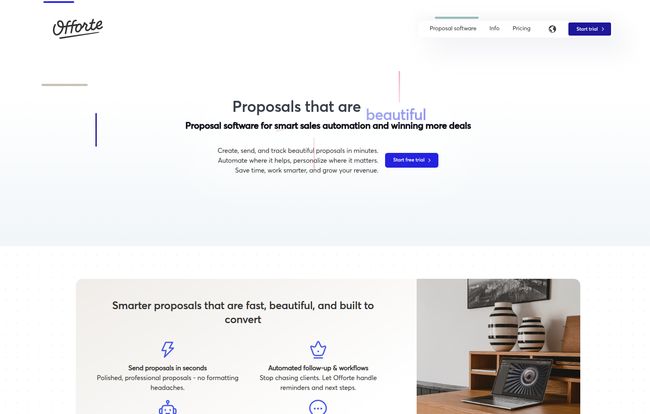
At its heart, Offorte is a dedicated platform for building, sending, and—most importantly—tracking your business proposals. Instead of a clunky file attachment, you send your client a link to a slick, interactive, web-based proposal that looks incredible on any device. Think of it less like a document and more like a personalized microsite for your deal.
It’s designed to take the guesswork and the manual labor out of the entire process. From beautiful templates that make you look like a design pro to automated follow-ups that chase clients so you don’t have to. It’s about working smarter, not just harder.
Visit Offorte
The Features That Actually Matter
A feature list is just a list. What I care about is how those features solve my real-world problems. Here’s my breakdown of what stands out in Offorte.
Creating Proposals That Don’t Look Like They’re from 2005
First impressions count, right? Sending a proposal that looks like a generic invoice from the dawn of the internet isn’t going to wow anyone. Offorte’s strength is in its presentation. You can start with their ready-to-use templates and then customize them to death with your own branding, colors, and fonts. This isn’t just about slapping your logo on something; it’s about creating a document that feels like an extension of your brand.
You can also embed rich media like videos (hello, personal introductions!) and image galleries. It transforms a boring quote into an engaging story. This is how you stand out when the client has three other proposals sitting in their inbox.
The End of “Just Following Up” Emails
This, for me, is the real magic. Remember that message-in-a-bottle problem? Offorte solves it with real-time tracking and analytics. The moment your client opens the proposal, you get a notification. You can see what sections they’re spending the most time on, which is pure gold. If they’re lingering on the project timeline but breezed past the case studies, you know what to talk about in your follow-up call. It’s like having sales superpowers.
And then there are the automations. You can set up Offorte to automatically send a reminder email if the proposal hasn’t been viewed in three days. Or send a thank you note once it’s been signed. This small feature saves a suprising amount of mental energy and ensures no lead ever falls through the cracks because you got busy and forgot to follow up.
Connecting to Your Existing Workflow
The last thing any of us need is another isolated tool that doesn’t talk to anything else. Offorte gets this. They offer integrations with various CRMs and an API for custom connections. This means your proposal activity can feed directly into your client records in a system like HubSpot or Pipedrive. When a proposal is signed, the deal stage can be automatically updated. It’s about creating a connected system, not another data silo.
My Honest Take: The Good, The Bad, and The Pricey
Alright, let’s get real. No tool is perfect, and Offorte is no exception. After digging in, here’s my unfiltered perspective.
The good stuff is pretty obvious. The streamlined process is a lifesaver. What used to take me half a day can now be done in under an hour, and the result looks ten times more professional. The tracking is a genuine game-changer for anyone in sales. It turns a guessing game into a data-driven conversation. Plus, the digital signing feature is seamless for clients, which removes friction and gets you to ‘yes’ faster.
On the flip side, there are a few things to consider. If you’re a complete technophobe, there might be a slight learning curve. It’s not crazy steep, but you’ll need to invest an hour or two to get comfortable with the editor and settings. Also, some of the best features—like the custom domain and deeper integrations—are reserved for the higher-tier plan. This is pretty standard for SaaS products, but it’s something to be aware of.
Let’s Talk Money: Offorte Pricing Explained
Price is often the deciding factor, so let’s break it down. Offorte offers two main tiers, and they give you a discount for paying annually. The prices I’m quoting here are based on that annual billing.
| Plan | Price (Billed Annually) | Who It’s For | Key Features |
|---|---|---|---|
| Professionals Standard | $14.00 /month | Solo freelancers & small businesses | 1 user, unlimited proposals, standard templates and functionalities. |
| Professionals & Teams Premium | $32.50 /month (per user) | Growing agencies & sales teams | 5+ users, custom domain, integrations & API, automations, team features. |
Prices are subject to change. Please check the Offorte website for the most current information.
In my opinion, the Standard plan is perfect for the individual consultant or a small one-person business. It gives you the core benefits of professional, trackable proposals without a hefty price tag. The Premium plan is really for teams. If you have multiple people sending proposals and need to connect everything to your CRM, that’s the one to look at. The good news? They offer a 14-day free trial with no credit card required, so you can actually try it before you buy.
Who Is This Tool Really For? (And Who Should Skip It)
So, who should sign up for that free trial right now? I’d say any B2B business, agency, or freelancer who sends out more than two or three proposals a month. If proposal writing feels like a chore and you know you’re losing deals because your follow-up is inconsistent, Offorte could pay for itself very quickly.
Who should probably pass? If you send one proposal every six months, or if your business relies on simple, one-line quotes, this is probably overkill. You can stick with your trusty email for that. But for anyone serious about professionalizing their sales process and closing more deals, it’s a very compelling option.
Frequently Asked Questions about Offorte
- Can I use my own domain with Offorte?
- Yes, you can! This feature, which makes your proposal links look super professional (e.g., proposals.yourcompany.com), is available on the Professionals & Teams Premium plan.
- Do my clients need to install anything to view the proposal?
- Absolutely not. That’s the beauty of it. They just click a link and the proposal opens in their web browser. It’s totally frictionless for them.
- How does Offorte compare to competitors like PandaDoc?
- That’s a great question. While tools like PandaDoc are powerful, they can also be quite complex. In my experience, Offorte hits a sweet spot of having all the essential features while maintaining a cleaner, more intuitive interface. Its focus feels very much on the proposal creation and tracking experience, which some might prefer over an all-in-one document solution.
- How steep is the learning curve, really?
- Honestly, if you’ve ever used a tool like Squarespace or Canva, you’ll feel right at home. The drag-and-drop editor is intuitive. I’d set aside one solid afternoon to build your first template, and after that, you’ll be flying.
- Is the 14-day free trial really free?
- Yep. Based on their site, there are no hidden costs and no automatic renewal into a paid plan. It seems like a genuine opportunity to test drive the platform and see if it works for your business. What have you got to loose?
Final Thoughts: Is Offorte Worth the Investment?
Look, I’m always skeptical of tools that promise to revolutionize my workflow. Most of them just add another subscription to my credit card bill. But Offorte feels different. It tackles a very specific, very common pain point and solves it elegantly.
It’s not just about making proposals prettier. It’s about making them smarter. The time you save on formatting and follow-up is time you can spend talking to clients. The insights you gain from the analytics can be the difference between a ‘yes’ and a ‘no.’ For my money, if your business depends on winning projects through proposals, investing in a tool like Offorte isn’t just a cost—it’s a strategic advantage.


