
Categories: AI Agent, AI Assistant, AI Reply, AI Social Media, AI Social Media Post Generator
Olly AI Review: Your New Social Media Sidekick?

Social media is a beast. A hungry, relentless beast that demands constant feeding. And for those of us trying to build a brand, a business, or just a meaningful presence, that feeding schedule can feel like a second full-time job. You’ve got to post, reply, engage, like, share… rinse and repeat. Every. Single. Day. I’ve been in the digital marketing trenches for years, and the burnout is real.
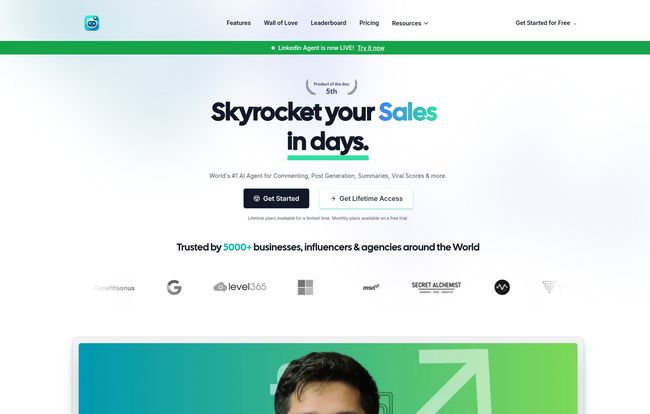
So, whenever a new tool pops up promising to be my AI-powered sidekick, my ears perk up. But my skepticism meter also goes into overdrive. I’ve seen a lot of duds. Recently, a tool called Olly.social kept crossing my feeds. It’s a Chrome extension that claims to be an AI agent for your social media, handling comments, predicting virality, and even generating posts. The promise? To skyrocket your sales and engagement “in days.”
Big claims. So I decided to roll up my sleeves, install it, and see if Olly is just another shiny object or if it’s the witty, data-savvy intern I’ve always wanted living in my browser.
Visit Olly Social
So, What Exactly is Olly?
In a nutshell, Olly is an AI-powered Chrome Extension designed to take over the more tedious parts of social media engagement. It plugs directly into platforms like LinkedIn, Twitter (or X, whatever we’re calling it this week), Reddit, and Facebook. It’s not just a content scheduler. It’s designed to be interactive. Its main gigs are generating thoughtful comments, giving you a ‘virality score’ on posts, and helping you craft similar content to things that are already performing well.
The idea is to move beyond the generic “Great post!” or “Thanks for sharing!” comments that scream “I am a bot or a very lazy human.” Instead, it tries to help you create genuine, personalized interactions that actually build connections. A lofty goal, for sure.
The Features That Actually Caught My Eye
A features list is just a list until you see how it works in practice. Some of Olly’s features are standard fare for AI tools, but a few really stood out to me.
AI Comments with a Dash of You
This is the core of Olly. You can highlight a post, and Olly suggests several comments. But the real magic is in the customization. You can create Custom AI Personalities. For example, I can have a “Professional SEO Blogger” personality that talks about keyword research and SERPs, and a “Slightly Snarky Tech Enthusiast” persona for my Twitter replies. It learns from your prompts and past comments, so over time, it starts to sound more like you. This is a massive step up from generic AI responses.
The Virality Score: A Crystal Ball for Content?
This was the feature I was most curious about. Olly analyzes a post and gives it a score, predicting its potential to go viral. It’s not just a vanity metric; the tool explains why it thinks a post will or won’t work. This is gold for content strategy. It helps you understand the patterns behind successful content in your niche, so you can stop throwing spaghetti at the wall and hoping it sticks. Is it 100% accurate? Of course not. No tool can perfectly predict human behavior. But it’s a surprisingly useful guide for refining your content angles.
Automation and Control: Bring Your Own AI
Okay, this is for the nerds in the room (and I say that with love). Olly lets you choose your AI engine. You can use popular models like GPT-4, Claude, or Gemini. But what’s really impressive is its support for local models through Ollama. This means if you have the technical chops, you can run models like Llama 3 or Gemma 2 right from your own machine. This gives you incredible control over cost, privacy, and performance. For agencies or power users, this flexibility is a huge selling point. The data is stored locally on your computer, which is a big win for privacy.
Who Is This Tool Actually For?
I don’t think Olly is for everyone. If you’re just casually scrolling through Facebook, you don’t need this. But for specific groups, it could be a game-changer.
- Solopreneurs and Personal Brands: If you’re a one-person show, time is your most valuable asset. Olly can genuinely give you back hours each week, allowing you to stay visible and engaged without being chained to your phone.
- Marketing and SMM Agencies: Juggling multiple client accounts is a nightmare. The ability to create different AI personalities for each brand is brilliant. It helps maintain a unique voice for each client, ensuring consistency at scale.
- Sales Professionals on LinkedIn: LinkedIn engagement is crucial for social selling. Leaving smart, insightful comments on prospects’ posts is a powerful way to get on their radar. Olly makes this process faster and more efficient.
The All-Important Question: What’s The Price?
Pricing is always where the rubber meets the road. I was pleasantly surprised here. Olly has a pretty accessible structure, including a free plan that’s actually useful.
| Plan | Price | Key Features |
|---|---|---|
| Free Forever | $0 | 5 Free Comments / Day. It’s a great way to test the waters without commitment. |
| Monthly | $9.99 / month | Unlimited access to all features, for one user, plus some LLM credits. This is the most popular choice. |
| Lifetime | $49.99 (one-time) | (Heads up: their site says this is ‘Deprecating Soon’). Pay once, get everything forever. A fantastic deal if you’re in it for the long haul. |
A quick note on billing: The cost can also depend on the AI model you choose to use. If you hook it up to a premium API like OpenAI’s GPT-4, you’ll be billed by them for your usage. This is standard practice, but something to be aware of.
My Honest Take: The Good and The Not-So-Good
No tool is perfect. After playing around with Olly for a while, here’s my unfiltered breakdown.
What I loved? It’s a massive time-saver, no question. The personalized interactions feel a step above the competition. The virality score is more than a gimmick, and the free-forever plan is generous. That lifetime deal is also ridiculously good value, especially since they’re hinting it won’t be around forever.
But there are a few things to keep in mind. The results and the quality of suggestions can obviously vary depending on your industry. A comment for a B2B tech post is very different from one on a lifestyle influencer’s Instagram. Also, some of the more advanced features, like the Custom Comment Panels, are currently only supported for LinkedIn. I’m hoping they roll that out to other platforms soon. And as mentioned, you need to watch your usage if you’re using a paid AI model. Those costs can creep up if you’re not careful.
Frequently Asked Questions about Olly
How do I even start using Olly?
It’s pretty simple. You head over to the Olly.social website, find the option to add it to Chrome, and install the extension. After that, you’ll need to create a quick account, and you’re good to go.
Is Olly actually free to use?
Yes, it has a ‘Free Forever’ plan. With this plan, you can generate up to 5 comments per day. It’s a great way to get a feel for the tool before deciding if you want to upgrade to a paid plan for more features and unlimited use.
What social media platforms does it work on?
Olly supports a wide range of platforms, which is a huge plus. The list includes LinkedIn, Facebook, Instagram, Reddit, Twitter/X, Product Hunt, YouTube, and even places like HackerNews and Medium.
What AI models can I use with Olly?
You have a lot of flexibility. It supports models from OpenAI (like GPT-3.5 and GPT-4), Anthropic’s Claude models, Google’s Gemini, and open-source models like Llama-3 and Gemma 2 if you run them locally through Ollama.
Will using a tool like this get my account banned?
This is the million-dollar question with any automation tool. Because Olly works with you to generate comments rather than just spamming mindlessly, the risk is much lower. It’s designed to augment your activity, not replace it with robotic behavior. As with any tool, the key is to use it smartly. Review the suggestions, add your own touch, and engage authentically. Don’t just set it to auto-comment ‘Awesome!’ on 500 posts a day.
Final Thoughts: Is Olly Worth It?
So, is Olly the magic bullet for social media success? No. Because there’s no such thing. But is it a powerful, well-designed, and surprisingly affordable tool that can save you a ton of time and make your online engagement smarter? Absolutely.
I came in skeptical, but I’m walking away impressed. That little AI intern living in my browser has earned its keep. It helps cut through the noise and focus on what matters: building actual connections, just a little more efficiently. If you feel like you’re drowning in the social media churn, I’d say giving Olly’s free plan a spin is a no-brainer. You might just get a few hours of your life back.


