
Categories: AI Note Taker, AI Notes Generator, AI Recording, AI Speech-to-Text, AI Summarizer, AI Transcription, AI Writing Assistants, Audio To Text AI
OneAudio Review: Is This AI Note Taker a Game-Changer?

As someone who lives and breathes content, my life is a constant stream of ideas, interviews, meetings, and those brilliant 2 AM voice notes that feel like pure genius until you have to decipher them the next day. The biggest bottleneck? Turning all that messy, chaotic audio into something usable. For years, this meant hours of painstaking manual transcription, hitting pause, rewind, play, and slowly losing my will to live. It’s a soul-crushing task.
We’re in the middle of a massive AI explosion right now, and frankly, it’s getting noisy. A new ‘game-changing’ tool pops up every other day, promising to solve all our problems. Most of them are… well, underwhelming. So when I stumbled upon OneAudio, another AI platform for summarizing and transcribing audio, my skepticism was dialed up to eleven. But I’m always on the hunt for something that can genuinely give me back my time. So, I jumped in. And I’ve got some thoughts.
So, What Exactly is OneAudio?
At its core, OneAudio is an AI-powered tool designed to be your personal audio assistant. You feed it an audio file—either by recording directly in the app or uploading one—and it gets to work. It uses OpenAI’s GPT 4.1 model to not only transcribe the audio into text but also to create clean, structured summaries. Think of it as the CliffsNotes for your own brain dumps, client calls, or university lectures.
It’s not just about getting a wall of text. The whole point is to convert that raw audio into actionable notes, emails, articles, or even social media posts. It’s built for creating, managing, and organizing your ideas without the headache of doing it all by hand.
Who Should Give OneAudio a Try?
I can immediately see a few groups of people whose ears should be perking up right now. If you find yourself nodding along to any of these, you’re the target audience:
- Content Creators & Journalists: You conduct interviews, right? Imagine turning a 45-minute interview into a perfect transcript and a bullet-pointed summary of key quotes in minutes. Yes, please.
- Students: Recording lectures and trying to pull out the important themes for exam prep? This could be your new best friend. No more trying to type as fast as the professor speaks.
- Business Professionals: If your calendar is a back-to-back horror show of Zoom meetings, OneAudio can be your secret weapon. It can take meeting notes automatically, so you can actually participate instead of just typing.
- The Everyday Brain Dumper: If you’re like me and think best while talking, this is a way to capture those fleeting thoughts on a walk or during your commute and have them neatly organized for you later.
Basically, if audio is a significant part of your information intake or creative process, this is something you should be looking at.
Putting OneAudio to the Test: A Real-World Walkthrough
Theory is great, but I’m a hands-on kind of guy. I needed to see if it could handle my real-world, slightly-caffeinated, and often rambling style of communication.
The User Interface: Beautifully Simple
The first thing I noticed upon landing on their site was the cleanliness. There’s a big, inviting button that says “Press to start recording.” No confusing menus, no clutter. It’s a design choice that screams, “We know you’re busy, let’s just get to it.” I appreciate that. In a world of overly complex SaaS dashboards, simplicity is a feature in itself.
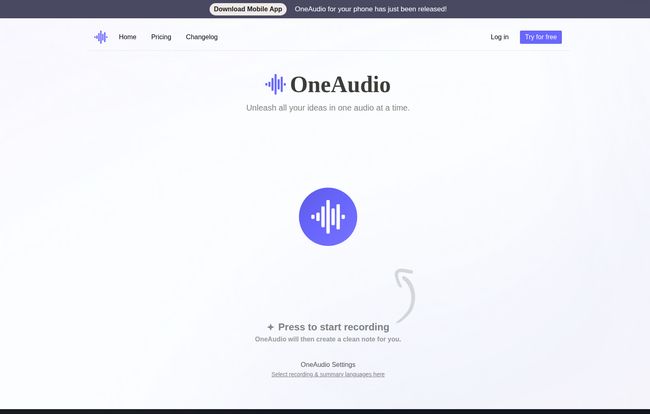
Visit OneAudio
The Magic of AI Summarization and Transcription
I decided to give it a test run with a 5-minute voice note where I brainstormed ideas for this very article. I rambled, I went off on tangents, I said ‘um’ more times than I’d like to admit. I hit stop, and the AI went to work.
A few moments later, I had two things: a full, word-for-word transcript and a separate, structured summary. The transcript’s accuracy was impressive. It caught most of my industry-specific jargon and even handled my less-than-perfect microphone quality pretty well. Was it 100% flawless? No, a few words were slightly off, but it was miles ahead of the gibberish I’ve gotten from other services. It was maybe 95% of teh way there, which is more than enough for my needs.
But the summary… that’s where the magic really happened. It didn’t just chop up my sentences. It genuinely understood the main points I was trying to make and organized them into logical sections. My chaotic brainstorm was suddenly a coherent outline. It felt like watching a magician turn a pile of random objects into a perfectly built model airplane. This is the stuff that actually saves you mental energy.
The Features That Actually Matter
A lot of tools are packed with features you’ll never use. OneAudio seems to focus on a few core things and do them well.
- Audio Summarization: As I said, this is the star of the show. It’s the difference between having a raw transcript and having actionable intelligence.
- Note Management: Once your notes are generated, you’re not stuck. You can edit them, share a link with a colleague, and—a feature I love—bookmark specific notes. This is great for creating a swipe file of your best ideas or important meeting follow-ups.
- AI Rewrite: This is available on the paid plans and it’s pretty nifty. You can take a summary and tell the AI to rewrite it as a professional email, a blog post intro, or a series of tweets. It’s a great little content multiplier.
- Uploading Files: Crucially, you’re not limited to recording in the app. You can upload existing audio files (WAV, MP3, etc.), which is a must-have for anyone with a backlog of interviews or meetings.
Let’s Talk Money: OneAudio Pricing Breakdown
Ah, the all-important question. What’s this going to cost? OneAudio has a tiered pricing structure that seems pretty standard for this kind of service, and they do offer a 7-day money-back guarantee, which lowers the risk of trying a paid plan.
| Plan | Price (Monthly) | Who It’s For | Key Features |
|---|---|---|---|
| Free | $0 | The curious beginner or very light user. | Up to 10 minutes of audio/month, 5 saved notes. A good way to test the waters. |
| Plus | $6 | Content creators, students, and most professionals. | 1,200 minutes/month, unlimited notes, audio uploads, AI rewrite. This feels like the sweet spot. |
| Amplify | $24 | The power user, agencies, or teams. | Unlimited minutes, longer recording times. For those who live and breathe audio. |
My take? The Free plan is a taster, not a meal. 10 minutes isn’t a lot, but it’s enough to see if you like the tech. The $6 Plus plan is incredibly well-priced for the value it offers. 1,200 minutes is a lot of audio (20 hours!), making it perfect for most individual users.
The Good, The Bad, and The AI
No tool is perfect. Let’s break down the highs and lows from my experience.
The Good Stuff
The high word recognition accuracy is a huge win. The summaries are clean, structured, and genuinely useful, not just a bunch of random sentences. I found the interface incredibly easy to use, which means you’ll actually use it instead of letting it become another forgotten subscription. The mobile app is a fantastic addition for capturing ideas on the go, and the pricing, especially the Plus plan, feels very fair for what you’re getting.
The Not-So-Good Stuff
Let’s be real, the 10-minute limit on the free plan is quite restrictive. It’s enough for a test, but not for any real work. Also, some of the coolest features, like the AI rewrite and uploading your own files, are locked behind the paywall. This is a common business model, so I can’t fault them too much for it, but it’s something to be aware of. You need to pay to get the full, powerful experience.
My Final Verdict: Is OneAudio Worth Your Time?
After spending some quality time with it, I’m genuinely impressed. OneAudio isn’t just another me-too AI tool. It’s a well-designed, focused platform that solves a very real, very annoying problem.
If you’re a content creator, marketer, student, or anyone who regularly deals with audio, I think OneAudio is absolutely worth it. The time and mental friction it saves are easily worth the price of a couple of coffees a month for the Plus plan. It turns the tedious task of processing audio into a simple, almost enjoyable, creative act.
It has earned a spot in my personal productivity stack. It’s a specialized tool that does its job exceptionally well, and in the current climate of AI hype, that’s a refreshing thing to see.
Frequently Asked Questions about OneAudio
- What is OneAudio used for?
- It’s primarily used for transcribing audio to text, summarizing audio content into structured notes, and managing those ideas. It’s great for meeting notes, interview transcripts, lecture summaries, and brainstorming.
- How accurate is the transcription?
- In my experience, it’s very accurate. It uses OpenAI’s GPT 4.1 model and boasts high word recognition. It’s not 100% perfect, but it’s close enough for most professional and creative needs, requiring only minor edits.
- Can I upload existing audio files?
- Yes, but this feature is available on the paid plans (Plus and Amplify). You can upload common audio formats like MP3 and WAV.
- Is there a free trial for OneAudio?
- There’s a permanent Free plan that lets you process up to 10 minutes of audio per month. It’s a great way to test the core functionality before committing to a paid plan.
- What AI model does OneAudio use?
- All plans, including the free one, currently use the OpenAI GPT 4.1 model to power the transcription and summarization features.
- Is OneAudio available on mobile?
- Yes, the website mentions that a mobile app for your phone has just been released, which is a big plus for capturing ideas and recording audio when you’re away from your desk.
Closing Thoughts
In the frantic race to generate more traffic and stay ahead, we often forget that our most valuable resource isn’t budget or backlinks—it’s time. Tools that give us back our time are worth their weight in gold. OneAudio does exactly that. It takes a tedious, time-consuming process and makes it fast and efficient. It clears a major roadblock in the creative and professional workflow, and for that, it gets a strong recommendation from me.


