
Categories: AI Agent, AI API, AI Assistant, AI Code Generator, AI Developer Tools, AI Productivity Tools, AI Project Management, AI Workflow
Onetab AI Review: A Dev’s Take on This All-in-One Tool

You’ve got your chat app pinging away, your project management board with a million cards, GitHub with that PR you’ve been meaning to review, a separate doc for meeting notes, and probably a few Stack Overflow tabs for good measure. It’s organized chaos, right? We call it “context switching,” but what it really is, is a productivity vampire, sucking the life out of our deep work sessions.
For years, the industry has been obsessed with the “best-of-breed” approach. Use the best tool for chat, the best for version control, the best for task management. It sounds good in theory, but in practice, it’s a nightmare of integrations, notifications, and subscriptions. I’ve lost count of the number of times a critical decision made in a Slack thread got lost and never made it to the Jira ticket. It’s a tale as old as time… or at least as old as SaaS.
So, when I first heard about Onetab AI, I was skeptical. Another “all-in-one” platform? Sure. But this one felt a little different. It wasn’t just for project managers or marketers. It was built from the ground up for developers and product teams. And it had AI baked into its core. My curiosity was officially piqued.
Visit Onetab AI
So, What Is Onetab AI, Really?
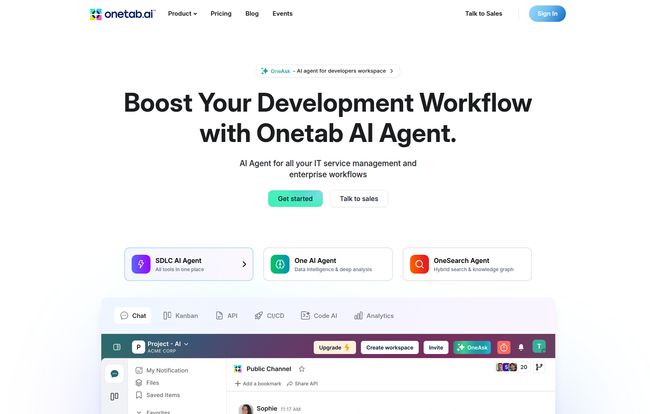
At its heart, Onetab AI is a unified workspace that tries to wrangle all that chaos into a single, cohesive environment. Think of it as a central nervous system for your development projects. It’s not just a collection of tools slapped together; it’s an integrated platform where your chat, code, tasks, and documentation all live and talk to each other. The big promise? To finally kill the context-switching beast and let you get back to actually building things.
The secret sauce, and what makes it more than just a fancy dashboard, is OneAsk. This is their custom AI agent that sits on top of everything. It’s designed to be your workspace co-pilot, helping you find information, automate tedious tasks, and connect the dots between a conversation in chat and a commit in your repository. This is where things get interesting.
A Look at the ‘One’ Suite of Tools
Onetab AI is built around a series of interconnected modules, each starting with “One.” It’s a bit on the nose, but hey, it gets the point across. Let’s break down the most important parts.
Taming the Communication Beast
You get One Chat and One Docs. This is huge. Instead of having project discussions in Slack or Teams, they happen right next to your Kanban board and code. The documentation tool, One Docs, is like having Confluence or Notion built-in, meaning your project specs and wikis are never more than a click away. No more excuses for outdated documentation!
The Modern PM’s Dream
One Kanban gives you that familiar card-based visual workflow, but its power is in its integration. You can link tasks directly to code branches, CI/CD pipelines, and chat threads. One Report and One Analytics pull data from across the entire platform, giving you a real-time view of project velocity and bottlenecks without having to manually export data from three different services.
For the Devs in the Room
This is where Onetab AI really shows its stripes. With One Code AI, One CI/CD, One API, and One Database, they’re bringing core development infrastructure into the fold. The CI/CD automates your build and deployment pipelines, while One Code AI offers automation for repetitive coding tasks. It’s an ambitious move, trying to integrate parts of the workflow that have traditionally been dominated by giants like GitHub Actions, Jenkins, and Postman.
The AI in the Room: Let’s Talk OneAsk
This is the star of the show. OneAsk is like having a junior dev and a project manager on call 24/7. You can ask it things like, “What’s the status of the new login feature?” and it can pull information from Kanban cards, chat logs, and even commit messages to give you a summary. Or you can tell it, “Create a new branch for ticket #123 and assign it to me.” It’s about reducing the mental load and administrative overhead that plagues every single development team.
The Good, The Bad, and The Realistic
Alright, no tool is perfect. After spending some time with it, here’s my unfiltered take.
The biggest win, hands down, is the unified experience. It’s like going from a messy garage with tools scattered everywhere to a perfectly organized workshop where everything has its place. The reduction in friction is palpable. The AI assistance is genuinely useful, especially for summarizing progress and automating boilerplate tasks. Team collaboration feels more connected because all the context lives in one place. It just… flows.
But let’s have a reality check. Placing all your bets on a single platform creates dependency. If Onetab has an outage, your entire workflow is down, not just your chat. Some might also argue that a dedicated, best-of-breed tool will always outperform a jack-of-all-trades module. Is One Kanban as powerful as a fully tricked-out Jira instance? Maybe not. There’s also a bit of a learning curve, and getting a whole team to switch their ingrained habits is never easy. And, of course, the price might be a factor for smaller teams.
Let’s Talk Money: Onetab AI Pricing
Pricing is always a big question, so here’s the breakdown. They seem to follow a pretty standard SaaS model, which I appreciate for its transparency. It’s not one of those “call us for a demo and we’ll invent a price” schemes.
| Plan | Price | Best For |
|---|---|---|
| Kickoff | $0 / Free forever | Individuals or small teams just starting out. It’s surprisingly generous for a free tier. |
| Business+ | $19.99 / seat / month | Growing teams that need more storage, unlimited Kanban boards, and more robust features. |
| Growth+ | $29.99 / seat / month | Scaling teams that require more repositories, advanced features like SSO, and more workspaces. |
| Enterprise+ | Contact Sales | Large organizations with custom security, support, and deployment needs. |
When you add up the individual costs of Slack, Jira, Confluence, and GitHub Pro seats, teh Business+ plan actually starts to look pretty competitive. It’s an investment in efficiency.
My Final Verdict: Is Onetab AI Worth the Hype?
So, is it time to close all your other tabs? I think for many teams, the answer is a resounding yes. If you’re a startup or a mid-sized product company constantly feeling the pain of tool fragmentation, Onetab AI could be a revelation. The fact that they recently secured $3.3M in seed funding shows that investors are also betting on this consolidated approach.
It’s not for everyone. A massive enterprise with decades of legacy tooling isn’t going to switch overnight. A solo freelancer might find it to be overkill. But for that huge segment in the middle—teams that are agile, growing, and sick of paying the “integration tax”—Onetab AI presents a very compelling future. A future with fewer tabs, less confusion, and more time spent on what matters.
Frequently Asked Questions
- What is Onetab AI in simple terms?
- It’s an all-in-one platform for software development teams that combines chat, project management, code repositories, documentation, and AI assistance into a single application to reduce complexity.
- Who is Onetab AI best for?
- It’s ideal for startups, mid-sized companies, and any development team that feels overwhelmed by juggling multiple tools like Slack, Jira, GitHub, and Confluence.
- Is Onetab AI free to use?
- Yes, they have a “Kickoff” plan that is free forever. It has some limitations on storage and the number of repositories but is a great way to test out the platform.
- How does the AI in Onetab AI actually work?
- The AI agent, OneAsk, is built on a custom Large Language Model (LLM). It connects to all the data within your workspace (chats, docs, code, tasks) to answer questions, automate workflows, and provide summaries.
- Can Onetab AI completely replace tools like Jira and Slack?
- For many teams, yes. It has its own integrated chat and Kanban boards that are designed to replace the core functions of those standalone apps. Teams with extremely complex, customized setups in Jira might find some advanced features missing, however.
- Is my data secure and private on Onetab AI?
- According to their website, data security is a priority. Their pricing page mentions that data is end-to-end encrypted, which is a critical feature for any team handling sensitive code and information.
Conclusion
The trend is clear: 통합 (tonghab), as they say in Korean, or integration, is the name of the game. We’re moving away from a scattered collection of apps toward more intelligent, consolidated workspaces. Onetab AI is a bold and impressive contender in this new arena. It’s not just another tool; it’s a different way of thinking about how developer teams should work. If you’re tired of the tab-switching dance, I’d say give their free plan a spin. What do you have to lose? Except, maybe, a few dozen browser tabs.


