
Categories: AI Audio Editing, AI Audio Enhancer, AI Text-to-Speech, AI Vocal Remover
Online Audio Converter Review: The Best Free Tool?

Let’s talk about a familiar pain point. You’ve got this one weird audio file. Maybe it’s a .WMA file from a client who seems to be stuck in 2005, or a .FLAC you downloaded because you’re an audiophile, but now you need to pop it on your iPhone. For years, the answer was to fire up some clunky, resource-hogging desktop software, wait for it to load, and then navigate a maze of menus that looked like an airplane cockpit. Fun times.
I’ve been in the SEO and content game for a long time, and my work constantly involves wrangling media files. Podcasts, video clips for social, soundbites for presentations… you name it. So when I find a tool that makes my life genuinely easier, I feel compelled to shout about it. Today, that tool is the Online Audio Converter from 123apps. It’s one of those things that’s so simple, you almost wonder if there’s a catch. So, I spent some time with it to find out.
What Exactly is This Thing?
Think of the Online Audio Converter as a digital Swiss Army knife for your sound files. It’s not a full-blown audio editor like Audacity or Adobe Audition. It’s not trying to be. Instead, it’s a fiercely dedicated, browser-based tool designed to do one thing exceptionally well: convert audio from one format to another. And because it lives entirely in your browser (Chrome, Firefox, whatever), there’s nothing to download or install. That, for me, is already a massive win.
It promises to handle over 300 different file formats, which is… a lot. It can even pull the audio right out of a video file, which is a feature I find myself using more and more often. All without asking for your credit card upfront. So far, so good.
Visit Online Audio Converter
A Ridiculously Simple Workflow
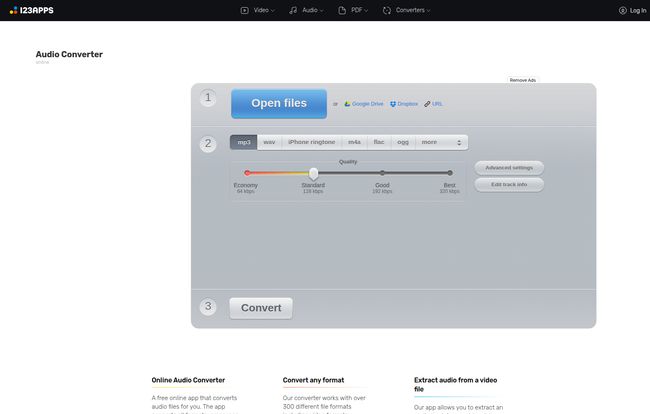
The user interface is what I’d call refreshingly minimal. You’re greeted with a big, clear three-step process. No fluff.
- Open Files: You hit the big blue button and can grab a file from your computer. Or, even better, you can link it directly from Google Drive, Dropbox, or a URL. This is brilliant for a cloud-based workflow. No more downloading just to re-upload.
- Choose Your Format & Settings: A simple slider lets you pick your output format (MP3, WAV, M4A for Apple stuff, FLAC for the purists, etc.) and the quality. You can choose from standard bitrates like 128kbps up to a crisp 320kbps for MP3s.
- Convert: You click the button, a progress bar does its thing, and then a download link appears. Done.
Honestly, my grandma could use this. It’s that straightforward. The design doesn’t try to be clever; it just gets out of your way and lets you do what you came to do.
The Features That Actually Matter
Simplicity is great, but a tool is only as good as its features. Here’s where I was pleasantly surprised.
More Formats Than You Can Shake a Stick At
I wasn’t kidding about the 300+ formats. It handles all the usual suspects, but also some obscure ones I haven’t seen in years. It’s like a universal translator for audio. Have a weird OGG file? Need to make an iPhone ringtone (m4r)? No problem. This versatility means you’re unlikely to ever be stuck with an incompatible file again.
Pulling Audio from Video Like a Pro
This is a killer feature. How many times have you watched a YouTube video or a company webinar and thought, “I just want that audio”? Instead of using shady YouTube-to-MP3 websites that are littered with pop-ups, you can just point this tool to the video file (once you have it) and it yanks the audio track right out. It’s perfect for creating podcast episodes from video interviews or grabbing soundbites for social media reels.
Getting Nerdy with Advanced Settings
Just when I thought it was purely for beginners, I found the ‘Advanced settings’ button. Clicking it reveals more granular control. You can change the bitrate, sample rate, and channels (mono or stereo). There are also a few nifty effects, like adding a gentle fade-in or fade-out. There’s even an option to ‘Remove voice,’ which I tried on a song. It’s not magic—it uses a common technique that removes center-panned vocals—but for a free, quick tool, it’s a fun and sometimes useful inclusion for making quick instrumental tracks.
Batch Processing and Tag Editing
If you have a whole album or a folder of voice memos to convert, you can upload them all at once. The app will process them in a batch and then bundle them into a single .ZIP file for easy download. A huge time-saver. Plus, you can click ‘Edit track info’ to change the artist name, album, title, and genre before you convert. This is essential for keeping your music library organised and something many other free online tools just ignore.
The Big Question: What’s the Catch?
Alright, nothing this convenient is ever truly free. There’s always a trade-off. With 123apps, the business model is a classic freemium one. The free version is incredibly functional, but it has its limits. I dug into their pricing page to get the details.
| Feature | Free Plan | Premium Plan |
|---|---|---|
| Cost | ¥0 (Free) | ¥34 per month (~$4.70 USD) |
| Files per Day | 70 | Unlimited |
| Max File Size | 4 GB | 10 GB |
| Ads | Yes | No |
| Speed | Fast | Faster |
So, the limitations are pretty clear. The free plan has ads (they’re not terribly intrusive, but they’re there) and you’re limited to 70 operations and a 4GB file size per day. For most people, that is more than enough. I mean, who is converting more than 70 audio files in a single day on a regular basis? If you are, you’re probably a professional who could justify the tiny monthly cost of the Premium plan, which removes all those limits and gives you a bit of a speed boost.
So, Who is This For?
This isn’t a one-size-fits-all solution, but it fits a lot of sizes.
In my opinion, the free version is perfect for students, casual users, or professionals who only need to convert a file once in a blue moon. If you just need to convert that one weird file for a presentation, it’s a no-brainer. Quick, easy, and costs nothing.
The Premium version starts to look really attractive for podcasters, social media managers, video editors, and musicians. If your job involves constantly converting batches of files, extracting audio from video interviews, or handling large audio files, the sub-$5 monthly fee is a steal. It removes the daily friction and gets rid of the ads, making for a smoother, faster workflow. It’s a small price to pay to reclaim your time and sanity.
Is It The Best? My Final Verdict
So, back to the original question. Is the Online Audio Converter from 123apps the best? Well, ‘best’ is subjective. But for the vast majority of everyday audio conversion tasks, its pretty darn close. It strikes a fantastic balance between simplicity and power. It doesn’t intimidate new users, yet it has enough advanced features tucked away to satisfy more demanding folks.
It has certainly earned a permanent bookmark in my browser. It’s reliable, fast, and it hasn’t let me down yet. In a world of overcomplicated and expensive software, this focused, effective little tool is a breath of fresh air.
Frequently Asked Questions
- Is the Online Audio Converter safe to use?
- Yes. It operates over a secure HTTPS connection. The site states that your files are automatically deleted from their servers a few hours after you are done working with them, ensuring your privacy.
- Do I need to install any software?
- Nope. That’s one of its biggest advantages. The entire tool runs in your web browser, so there’s nothing to download or install on your computer.
- What is the maximum file size I can upload?
- The free plan allows files up to 4 GB, which is very generous. The Premium plan increases this limit to 10 GB.
- Can I really convert a video file to an MP3?
- Absolutely. You can upload many common video formats (like MP4, MOV, AVI), and the tool will extract the audio track and convert it to the audio format of your choice, such as MP3 or WAV.
- How does the batch conversion work?
- You can select and upload multiple files at the same time. The tool will process them all in one go. Once finished, it provides a single .ZIP archive containing all your converted files, which simplifies the download process.


