
Categories: AI API, AI Developer Tools, Large Language Models (LLMs), Open Source AI Models
Open Source AI Gateway: The LLM Traffic Cop You Need

Building cool stuff with Large Language Models is the fun part. The not-so-fun part? The chaos that happens behind the scenes. One minute you’re celebrating a slick new feature, the next you’re staring at a surprise five-figure bill from OpenAI, or your main provider has an outage right during a demo. We’ve all been there. It’s the wild west of API management, and we’re all just trying not to get bucked off.
For a while now, I’ve been saying that what we really need is a sort of air traffic controller for our LLM calls. A single point of entry that can intelligently route requests, cache common queries to save cash, and switch to a backup when one provider inevitably goes down. It seems someone was listening.
I stumbled upon this neat project, simply called Open Source AI Gateway for Developers, and it looks like it’s trying to solve exactly that problem. It’s a self-hosted, production-ready gateway designed to sit between your application and the herd of LLM providers you’re trying to tame. Think of it as a universal remote for OpenAI, Anthropic, Gemini, and even local models via Ollama. I had to take a look.
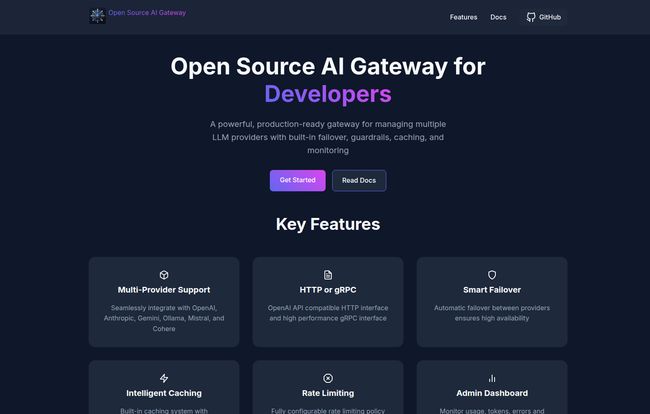
Visit Open Source AI Gateway
So, What Exactly Is an AI Gateway Anyway?
Before we get into the nitty-gritty of this specific tool, let’s quickly clarify what an AI gateway even is. In the simplest terms, it’s a management layer. Instead of having your application make direct calls to five different LLM APIs—each with its own key, its own quirks, and its own billing system—your app makes one single call to the gateway.
The gateway then takes that request and becomes your smart assistant. It can check if it’s seen that exact request before and just return a cached response (cha-ching, money saved). It can see that your primary model provider is slow and automatically reroute the request to a backup. It can enforce spending limits, block sketchy prompts, and log everything for analysis. It brings order to the LLM chaos. It’s not just a convenience; for any serious application, it’s becoming a necessity.
A Look at the Key Features
Okay, so this tool talks a big game. Let’s see what’s actually under the hood. The feature list is pretty much a developer’s wish list for managing AI services.
One Gateway to Rule Them All
The headline feature is, of course, the multi-provider support. It natively speaks to OpenAI, Anthropic, Gemini, Ollama, Mistral, and Cohere. This is huge. Vendor lock-in is a real fear, and being able to switch providers without rewriting your entire application logic is a superpower. You can A/B test models for performance on specific tasks or just have a cheaper model as a fallback. Freedom is a beautiful thing.
Keeping Your App Alive and Your Wallet Happy
This is where things get really interesting for anyone running a service at scale. The gateway has Smart Failover and Rate Limiting built right in. The failover is your insurance policy; if your main provider has a hiccup, it automatically switches to a backup. Your users might not even notice a thing. The rate limiting is the bouncer at your club’s door. It prevents a single user (or a rogue script) from spamming your service and running up an insane bill. You set the rules.
Stop Burning Cash with Intelligent Caching
I’m gonna say it again because it’s that important. Caching saves money. A lot of money. If ten different users ask your chatbot the same common question, you shouldn’t have to pay for ten separate LLM API calls. This gateway has an Intelligent Caching system with a configurable TTL (Time-to-Live). It stores the results of common prompts and serves them up instantly, cutting down on both latency and cost. This feature alone could justify the setup time.
The Control Room and the Bodyguard
You can’t manage what you can’t measure. The gateway comes with an Admin Dashboard to monitor usage, tokens, and errors, giving you a bird’s-eye view of your AI operations. For deeper analysis, it also supports Enterprise Logging with integrations for tools like Splunk, Datadog, and Elasticsearch. On the security front, it provides Content Guardrails for filtering and safety measures, plus a clever System Prompt Injection feature. This allows you to automatically insert a base prompt (like “You are a helpful assistant”) into every request, ensuring consistent behavior across all your models.
Getting Your Hands Dirty: Is it Easy to Set Up?
The landing page presents a tidy three-step process: Configure, Run, Use. And honestly, for anyone comfortable with modern DevOps, it looks pretty standard.
- Configure: You create a
config.tomlfile where you plug in your API keys and define your provider settings. This is the brains of the operation. - Run: You spin it up with a single
dockercommand. Yes, it requires Docker, which might be a hurdle for some but is a daily driver for many of us. - Use: You start making API requests to your new gateway’s endpoint instead of directly to OpenAI or Anthropic.
Now, I have to be a little cheeky here. When I went to click their “Read Docs” button, I was greeted by a classic GitHub Pages 404. It happens to the best of us! While it’s a minor hiccup and something I’m sure they’ll fix, it’s a good reminder that with open-source, especially newer projects, you might have to roll up your sleeves and read the code or the main README on their GitHub page directly.
Also Read: Nexa AI: Your Key to Fast On-Device AI Apps?
The Good, The Bad, and The Dockerfile
No tool is perfect, right? From my perspective as someone who lives and breathes this stuff, here’s the breakdown.
The advantages are clear: it’s open-source (Apache 2.0 license, which is very permissive), it’s provider-agnostic, and its core features—caching, rate limiting, failover—directly address the biggest pain points of building with LLMs. It gives a small team the kind of infrastructure control that usually only large companies can afford to build in-house.
But there’s always a catch. The main “con” is that you are the one responsible for it. This isn’t a managed SaaS product. You have to host it, maintain it, update it, and secure it. The initial configuration, while seemingly straightforward, could get complex depending on your specific needs. This is not a tool for someone who has never touched a command line or doesn’t know what Docker is.
So, Who Is This Really For?
After looking it over, I have a pretty clear idea of the ideal user. This AI gateway is perfect for:
- Startups and small companies building AI-powered features who need to control costs and ensure reliability from day one.
- Larger organizations wanting to centralize and standardize how their different teams access LLMs.
- Individual developers and tinkerers who love self-hosting and want a powerful tool to manage their personal projects without being tied to a single AI ecosystem.
Who is it not for? If you’re just building a simple proof-of-concept with one model and very low traffic, this is probably overkill. If your team has zero DevOps or infrastructure experience, the self-hosting and maintenance aspect could become a major distraction.
Frequently Asked Questions
- Is this Open Source AI Gateway really free?
- The software itself is free, yes. It’s open-source. However, you are responsible for the costs of hosting it, which means paying for the server or cloud instance where the Docker container runs. So, free as in puppy, not as in beer.
- What LLM providers does it support?
- According to their site, it supports OpenAI, Anthropic, Gemini, Ollama (for local models), Mistral and Cohere right out of the box.
- Do I absolutely need to know Docker to use this?
- Pretty much, yes. The primary deployment method shown is via a Docker container, so a basic understanding of Docker is a prerequisite to get it running.
- How does the gateway actually save me money?
- The two primary ways are through Intelligent Caching, which avoids paying for repeated identical API calls, and Rate Limiting, which prevents abuse and helps you stay within budget by controlling the flow of requests.
- Why use this instead of just calling the OpenAI API directly?
- For a simple app, calling the API directly is fine. But once you need reliability (failover), cost control (caching/rate limiting), flexibility (switching providers), or observability (logging/dashboard), a gateway becomes essential. It adds a crucial management and control layer.
- Is it truly production-ready?
- The project’s homepage claims it is “production-ready.” In the world of open-source, this usually means the core functionality is stable. However, as with any self-hosted tool, the responsibility for thorough testing and ensuring it’s robust enough for your specific production environment falls on you.
My Final Thoughts
Honestly, I’m pretty excited about tools like this. They represent the maturation of the AI development space. We’re moving beyond simple API wrappers and into the realm of real, professional-grade infrastructure. This open-source AI gateway isn’t a magic bullet, and it demands a certain level of technical skill. But for the right team, it’s a powerful enabler.
It’s the difference between having a bunch of power tools scattered on your garage floor versus having a fully organized workshop with a central power system and safety cutoffs. It turns a chaotic hobby into a professional operation. If you’re getting serious about building with LLMs, this is definitely a project to star on GitHub and take for a spin.
Reference and Sources
- Project GitHub Repository: https://github.com/portkey-ai/gateway


