
Categories: AI API, AI Charting, Open Source AI Models
OpenAI API Cost Tracker: A Free Tool to Stop Bill Shock

You’re experimenting with a new idea, maybe a cool little app powered by GPT-4, or you’re running some heavy data analysis using embedding models. You’re in the zone, things are working, and you feel like a genius. Then, the end of the month rolls around. You cautiously open your OpenAI billing page, peek through your fingers, and… yikes. The bill is way higher than you expected. It’s a familiar pain for anyone playing in the AI sandbox.
The official OpenAI dashboard is fine, I guess. It gives you a decent overview. But I’ve always found it a bit clunky for figuring out the daily damage. Which specific model is drinking my credits? Was it that one script I ran on Tuesday afternoon, or a slow, steady bleed from my new chatbot feature? Getting that granular, day-to-day insight can be a pain.
So, you can imagine my curiosity when I stumbled across a minimalist, no-fluff tool designed to solve this exact problem.
Introducing Ke’s OpenAI API Cost Tracker
It’s called the OpenAI API Cost Tracker (or ‘Ke’s OpenAI Cost’ on the page itself), and it does exactly what it says on the tin. It’s a dead-simple, open-source web tool that shows you the cost proportion of various models in your OpenAI API usage for any specific day. No sign-up, no credit card, no fancy onboarding sequence. Just a single page with a single purpose.
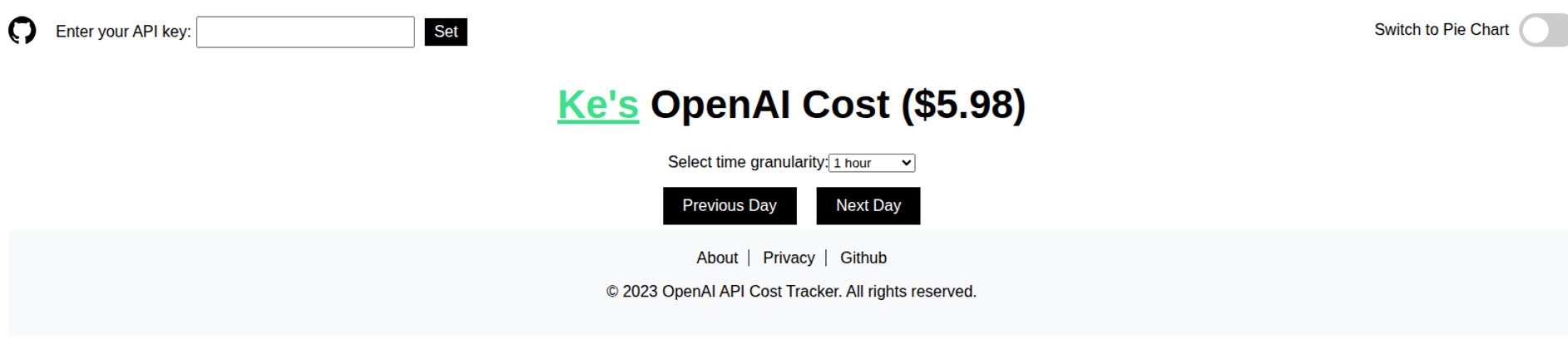
When you land on the page, you’re greeted with a stark, clean interface. It’s not going to win any design awards, but that’s not the point. Its beauty is in its simplicity.
Visit OpenAI API Cost Tracker
You get a field to enter your API key, a couple of buttons to navigate between days, and a toggle to switch your view. That’s it. It’s the definition of a purpose-built utility.
How It Works and What I Liked
Using it is almost comically easy. You copy your OpenAI API key, paste it into the box, click ‘Set’, and bam—your daily cost breakdown appears. The tool pulls your usage data for the day and presents it in two helpful ways.
First, there’s the time-based line graph. You can set the granularity from one to 24 hours, which is perfect for pinpointing exactly when a cost spike occurred. Did your costs jump at 3 PM? That was probably when you ran that big batch processing job. This view is fantastic for correlating your development activity with your spending in near real-time.
But for me, the real magic is the Pie Chart view. With one click, you get a simple, color-coded chart showing exactly which model is responsible for what percentage of your daily cost. Is gpt-4-turbo eating 80% of your budget? Or is it the thousands of tiny calls to the Whisper API for audio transcription that are adding up? This is the kind of insight that helps you make smart decisions about optimizing your application. Maybe that fancy GPT-4-powered summary can be downgraded to GPT-3.5 for non-critical tasks. This chart tells you where to look first.
The Elephant in the Room: Your API Key
Okay, let’s talk about the big, flashing warning sign here. To use the tool, you have to paste your secret OpenAI API key into a stranger’s website. My internal security alarm went off immediately, and yours should too. Handing over API keys is generally a huge no-no.
However, there’s a major redeeming quality: the tool is completely open-source. The developer has a link to the project’s GitHub repository right on the page. This means that you, or anyone with the technical know-how, can read every single line of code to verify what it’s doing. The code shows that the API key is sent directly to OpenAI’s servers from your browser and is not stored or logged on any intermediate server. It’s about as transparent as you can get.
In my experience, this changes the calculation. Am I going to paste my main, production-level key with a million-dollar credit line into it? Probably not. But for a quick check with a development key that has strict usage limits? I feel comfortable enough, given the open-source nature. The ultimate power move, of course, is to just clone the repository and run it locally on your own machine. Then you get all the benefits with zero risk.
What’s Not to Like? A Few Caveats
This tool is a scalpel, not a Swiss Army knife. And that comes with some limitations. For one, its laser-focused on daily tracking. You can’t use it to see your monthly trends, compare week-over-week spending, or generate a report for your boss. It’s for quick, in-the-moment checks, not historical analysis.
It’s also purely a cost tracker. You won’t get any performance metrics like token count per minute, API latency, or error rates. If you need a full-blown observability platform, you’ll have to look at more complex solutions like Helicone or roll your own with Grafana. This tool has one job, and it does it well, but that’s all it does.
And the user interface… its functional. It’s for an engineer who wants data, not for a marketing presentation. If you need something with more polish, this ain’t it.
Is This OpenAI Cost Tracker Right For You?
So, who is this for? I’d say it’s perfect for a few groups of people. Indie developers and hobbyists who are building cool projects and need to keep a close eye on their burn rate will love its simplicity. Small teams or freelancers who want a daily pulse check without the overhead of a complex monitoring system would also find it incredibly useful. It’s the digital equivalent of a mechanic quickly plugging in a diagnostic tool to read a code.
On the other hand, large enterprises or companies with stringent security policies will likely need to look elsewhere (or self-host it). If you need detailed historical reporting, user-level cost attribution, or enterprise-grade support, this free tool isn’t going to cut it.
And the best part? It’s completely free. I went looking for a pricing page or a potential ‘pro’ version, but the link I found was dead. As of now, it appears to be a passion project offered to the community at no cost. You really can’t argue with that price tag.
Final Thoughts on This Handy Little Tool
In a world of increasingly bloated software and complex dashboards, there’s something refreshing about a tool that does one thing and does it well. The OpenAI API Cost Tracker is exactly that. It solves a common, nagging problem for developers with a simple, elegant, and transparent solution.
While the need to use your API key requires a degree of caution, the open-source nature provides a huge amount of reassurance. For a quick, daily snapshot of where your OpenAI credits are going, I think it’s a fantastic little utility to have bookmarked. Just remember the golden rule of the internet: trust, but verify (the source code).
Frequently Asked Questions
- What is the OpenAI API Cost Tracker?
- It’s a free, open-source web tool that allows you to see a daily breakdown of your OpenAI API usage and costs. It can visualize the spending by the hour or as a pie chart showing which models (like GPT-4, Whisper, etc.) are costing you the most.
- Is it safe to enter my OpenAI API key?
- The tool is open-source, meaning its code is public and can be inspected. The code shows that your key is sent directly from your browser to OpenAI’s API and is not stored or logged by the tool’s server. For maximum security, you can create a separate key with strict usage limits for testing or even host the tool on your own machine.
- How much does this tool cost?
- It is completely free to use. It’s an open-source project provided to the community by the developer.
- What OpenAI models can it track?
- It can track costs for all major models available through the API, including the GPT series (GPT-4, GPT-3.5-Turbo), DALL-E image generation models, Whisper for audio transcription, and various text-embedding models.
- Can I see my costs for the entire month?
- No, the tool is designed for daily cost analysis only. You can navigate day-by-day using the ‘Previous Day’ and ‘Next Day’ buttons, but it does not provide a monthly aggregate view.
- Where can I find this tool?
- You can find the tool’s source code and usually a link to the live version on its GitHub repository. A quick search for “Ke’s OpenAI Cost Tracker” should get you there.
Reference and Sources
- OpenAI API Cost Tracker GitHub: https://github.com/keenan-ke/openai-cost-tracker
- Official OpenAI Pricing Page: https://openai.com/pricing
- Alternative API Management Tool (Helicone): https://www.helicone.ai/


