
Categories: AI API, AI Speech Synthesis, AI Text-to-Speech, AI Voice Generator
OpenAI TTS WebUI Review: Free Realistic Voices?

You need a voiceover for a quick video, an audio version of your blog post, or maybe just some placeholder audio for a project. So you turn to the internet, type in “free text to speech,” and what do you get? A tidal wave of robotic, soulless voices that sound like a GPS navigator from 2007 having a very bad day.
It’s a frustrating cycle. The good tools cost a fortune, and the free ones… well, they sound free. For years, I’ve been looking for that mythical sweet spot: high-quality, natural-sounding voices that don’t require me to sell a kidney. And I think I’ve finally stumbled upon something pretty close. It’s called the OpenAI Text To Speech WebUI, and it’s a bit of a game-changer.
But like all good things in life, there’s a little asterisk attached. Let’s get into it.
So What Is This OpenAI TTS WebUI Thing Anyway?
Think of it like this: OpenAI has built this incredibly powerful, state-of-the-art engine for creating realistic human speech (their Text-to-Speech API). It’s amazing, but it’s just the engine. To use it, you typically need to be a developer who can write code to talk to it. It’s like having a Formula 1 engine sitting in your garage with no car built around it. Impressive, but not very useful for your daily commute.
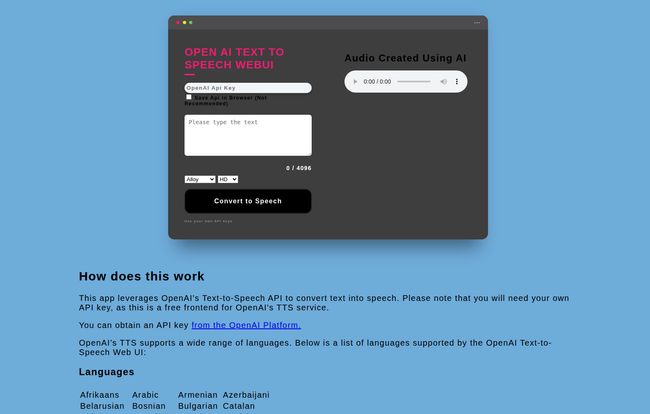
The OpenAI Text To Speech WebUI is the simple car built around that engine. It’s a no-frills, straightforward webpage that acts as a front-end, giving you a steering wheel, a gas pedal, and a place to type your destination. It doesn’t do anything fancy on its own; it just connects your text directly to OpenAI’s powerful brain and plays back the audio for you. Simple. Effective.
All you have to do is pop in your text, choose a voice, and hit convert. The catch? You have to bring your own gas. In this case, the “gas” is your own OpenAI API key.
Visit OpenAI Text To Speech WebUI
Getting Yourself Set Up
Getting started is surprisingly painless. The interface is about as simple as it gets. You’ve got a box for your OpenAI API key, a big text area for whatever you want to say (up to 4096 characters), and a few dropdowns. That’s it. No complicated menus, no confusing settings. Just the essentials.
If you don’t have an OpenAI API key, you’ll need to head over to their platform and create one. It’s a quick process, and they usually give you some free credits to start, which is more than enough to play around with this tool extensively.
Meet the Voices: Alloy, Echo, Fable, and Friends
This is where the magic happens. You’re not just getting one generic voice. You get to choose from a lineup of six distinct personalities: Alloy, Echo, Fable, Onyx, Nova, and Shimmer. I’ve spent a bit of time with each, and they genuinely have different vibes. Onyx has this deep, commanding tone that’s perfect for documentary-style narration. Nova, on the other hand, is more upbeat and conversational, great for ads or explainer videos. It’s a far cry from the usual “Male Voice 1” and “Female Voice 2” options. You can also pick between High and HD quality, which is a nice touch for when you need that extra bit of audio crispness.
Global Reach That’s Actually Impressive
One of the first things that jumped out at me was the massive list of supported languages. From Afrikaans to Vietnamese and everything in between. We’re talking about dozens of languages. For anyone working with international audiences, this is a huge win. It’s not just an afterthought; it’s a core feature that makes the underlying OpenAI model so powerful.
The Good, The Bad, and The API Key
Alright, let’s break it down. No tool is perfect, but this one gets a lot right.
What I Genuinely Like About It
The main advantage is the sheer quality for the cost. You are getting access to one of the most advanced TTS models on the planet, essentially for free (we’ll get to the API costs in a bit, don’t worry). The voices are miles ahead of other free options. They have inflection, they pause naturally, they don’t sound like they’re reading a phonebook. The simplicity is another big plus. I didn’t need to read a manual or watch a tutorial. I just… used it.
A Few Things to Keep in Mind
Of course, there are trade-offs. The big one is the reliance on the OpenAI API. If their service is down or slow, so is this tool. You are also at the mercy of their pricing model. The most significant point, however, is a matter of security.
A Quick and Important Word on Security
The tool has a little checkbox that says “Save API Key in Browser.” I’m going to give you some friendly, professional advice here: do not check that box. Ever.
Your API key is like a password to your OpenAI account, an account that is linked to your credit card. Saving it in your browser’s local storage is like taping your house key to your front door with a sign that says “Please Don’t Steal My Stuff.” It’s just not a secure practice. Someone with access to your computer or a malicious browser extension could potentially grab it. It takes two seconds to copy and paste the key each time you use the tool. Please, just do that. It’s a minor inconvenience for a major security gain.
The Underdog Story Behind the Tool
One of the things I found charming about this tool is its origin story. The creator is a digital marketer working at a company called Focus Gulf, which, according to their site, is an industrial equipment supplier in Saudi Arabia. He built this because he needed realistic voiceovers for product videos and found the existing options either too expensive or too robotic.
This is a classic case of “scratching your own itch.” Someone had a problem, found a clever solution, and decided to share it with the world for free. You have to respect that. In a funny twist, when I tried to check out the Focus Gulf website mentioned on the tool’s page, I was greeted with a “404 Page Not Found” error. A perfect, human reminder that even when we build cool new things, we sometimes forget to check our old links. Happens to the best of us!
So, How Much Does It Actually Cost?
This is the million-dollar question. The WebUI itself is 100% free. The creator isn’t charging you a dime. However, you’re using OpenAI’s API, and they charge for usage. The good news? It’s incredibly cheap.
According to OpenAI’s pricing page, their standard TTS model costs something like $0.015 per 1,000 characters. To put that in perspective, this entire article is about 9,000 characters. It would cost me roughly 14 cents to convert this whole post to audio. The HD model is double that, at $0.030 per 1,000 characters. For most people making short videos or audio clips, we’re talking about pennies. Literally.
Is This the Right TTS Tool For You?
So, should you use it? My take:
- Yes, absolutely, if: You’re a content creator, developer, or marketer on a budget who wants top-tier voice quality without a monthly subscription. If you’re comfortable with grabbing an API key and are mindful of the security, this tool is a diamond in the rough.
- Maybe look elsewhere if: You want a fully integrated, all-in-one platform with customer support, team features, and you’d rather pay a flat monthly fee than deal with API keys and pay-as-you-go pricing. For large enterprises, a dedicated service might be a better fit.
For me, it’s found a permanent spot in my digital toolbox. It’s the perfect bridge between clunky free tools and expensive subscription services.
Frequently Asked Questions
- Is the OpenAI Text To Speech WebUI really free?
- The tool itself is free to use. However, it requires an OpenAI API key, and you will be billed by OpenAI for your usage based on the number of characters you convert. The costs are very low for typical use.
- Where do I get an OpenAI API key?
- You can get an API key by signing up for an account on the OpenAI Platform. New accounts often come with free starting credits.
- Are the voices really better than other free tools?
- In my personal experience, yes. Significantly. The voices generated by OpenAI’s model are far more natural, with better inflection and pacing than almost any other free TTS service I’ve tried.
- Is it safe to save my API key in the browser?
- No. It is strongly recommended that you do not use the ‘save API key’ feature. Your API key provides access to your account, and saving it in the browser poses a security risk. It’s much safer to paste it in for each session.
- Can I use the generated audio for commercial purposes?
- According to OpenAI’s policies, you own the output you create with their services, including audio from the TTS API. This means you can generally use it for commercial projects. However, it’s always a good idea to review their latest Terms of Use to ensure compliance.
- What’s the difference between High and HD quality?
- The standard ‘High’ quality voice is excellent for most applications and is very cost-effective. The ‘HD’ quality voice is optimized for higher fidelity and sounds even more crisp and clear, but it costs twice as much per character via the API.
A Final Thought
The OpenAI TTS WebUI is a fantastic example of the creator community at its best. It solves a common problem with elegance and simplicity, democratizing access to a genuinely powerful technology. It won’t be the perfect solution for everyone, but for a huge number of us, it’s exactly what we needed without even knowing we were looking for it. Give it a try, just remember to be smart with that API key!
Reference and Sources
- OpenAI API Key Management: https://platform.openai.com/api-keys
- Focus Gulf (Creator’s Company): http://focusgulf.com
- OpenAI Pricing: https://openai.com/pricing
- OpenAI Platform: https://platform.openai.com/
- OpenAI Terms of Use: https://openai.com/policies/terms-of-use


