
Categories: AI Agent, AI Assistant, AI Chatbot, No-Code&Low-Code, Open Source AI Models
OpenAssistantGPT Review: No-Code AI Chatbots for Your Site

Trapped in the digital purgatory of a customer support chat, typing ‘human operator’ over and over, only to be met with a cheerfully useless bot that offers you a link to a FAQ page you’ve already read. It’s a special kind of modern torture.
For years, I’ve been pretty cynical about website chatbots. They felt like a clunky, cost-cutting measure that just annoyed customers. But the ground is shifting. Fast. With the explosion of powerful large language models, we’re finally seeing AI assistants that are… well, actually helpful. The kind that can understand context, access specific information, and solve problems without making you want to throw your laptop out the window.
That’s why I was so intrigued when I stumbled upon OpenAssistantGPT. The promise is huge: “Build your own AI chatbot with no code.” A bold claim, and one I’ve heard before. But this one felt different, especially with its emphasis on being open source and tapping directly into OpenAI’s Assistant API. So, I did what any self-respecting SEO and tech geek would do. I spent a weekend kicking the tires. And I’ve gotta say, I’m pretty impressed.
So, What is OpenAssistantGPT, Really?
Think of it like this: The OpenAI Assistant API is a beast of a car engine—incredibly powerful, but you can’t just bolt it to a skateboard and expect to get anywhere. You need a chassis, a dashboard, wheels, and a steering wheel. That’s OpenAssistantGPT. It’s the user-friendly car built around that powerful engine.
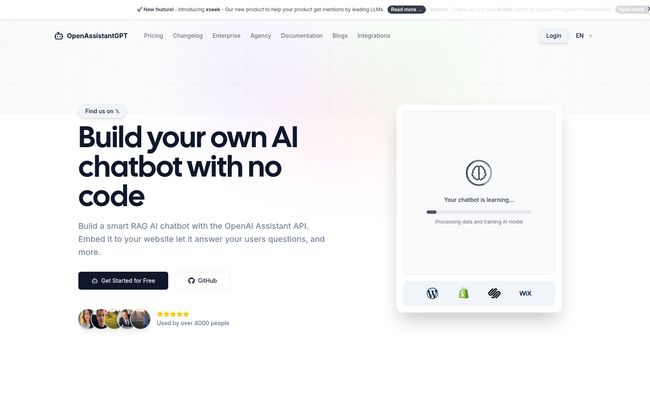
It’s an open-source platform that lets you create a smart, RAG-powered AI chatbot. RAG, for the uninitiated, stands for Retrieval-Augmented Generation. In plain English, it means the chatbot isn’t just pulling answers from its general knowledge; it’s retrieving information from your specific documents and data. You feed it your product manuals, your company knowledge base, your support docs, and it becomes an expert on your business. You can literally just give it a URL to crawl and it gets to work. Magic.
And the open-source part? That’s a massive green flag for me. It means there’s a community, there’s transparency, and for the more technically inclined, you can peek under the hood on their GitHub. You’re not just locked into a mysterious black box.
The Standout Features That Matter
A tool is only as good as its features, right? Here’s what caught my eye and made me think this platform is more than just another flash in the pan.
Powered by the Real Deal (OpenAI Assistants)
This isn’t some knock-off, proprietary AI model trained on who-knows-what. OpenAssistantGPT uses OpenAI’s Assistants API, which means you get access to top-tier models like GPT-4 and the newer, zippier GPT-4o. This is the difference between a chatbot that can barely understand a question and one that can handle nuanced, multi-turn conversations. It’s the S-tier of conversational AI, and it’s the core of this whole platform.
More Than Just Talk: AI Agent Actions & Web Search
Okay, this is where it gets really cool. Answering questions from a document is one thing. But with AI Agent Actions, your chatbot can actually do things. It can query external APIs. Imagine a customer asking, “What’s the status of my order?” Instead of giving a generic answer, the bot could ping your Shopify API, retrieve the real-time status, and tell the customer their package is out for delivery. This turns a simple Q&A bot into a functional, interactive agent. The Web Search feature also means your bot isn’t stuck in the past; it can pull in the latest information from the internet to answer questions about current events or recent developments.
Your Data, Your Chatbot (and It’s Easy to Feed)
The whole RAG concept lives or dies by how easy it is to give the AI your data. OpenAssistantGPT nails this. You can upload files directly—think PDFs, CSVs, even images—or just point its web crawler at your website or knowledge base and let it learn. This simplicity is everything. You don’t need to be a data scientist to create a highly specialized expert bot for your brand. It just works.
Visit OpenAssistantGPT
The Business Impact: Does It Actually Move the Needle?
I’m always a bit skeptical of big, shiny marketing numbers. But the ones on OpenAssistantGPT’s site—a 35% reduction in support tickets, a 60% improvement in resolution time, and $25,000 in annual cost savings—actually feel plausible. Why? Because it’s not about replacing humans. It’s about triage.
An effective AI assistant handles the repetitive, tier-1 questions that clog up your support queues. “What are your business hours?” “What’s your return policy?” “How do I reset my password?” The bot handles these instantly, 24/7. This frees up your human agents to tackle the complex, high-touch issues where their skills are truly needed. The result isn’t just cost savings; it’s higher employee morale and much, much better customer satisfaction. Nobody likes waiting 20 minutes for an answer a bot could have provided in two seconds.
Let’s Talk Money: The OpenAssistantGPT Pricing
Pricing can make or break a tool like this. I was pleasantly surprised by how accessible OpenAssistantGPT is. It feels like they’ve priced it for everyone from solo creators to massive companies.
Here’s a quick breakdown:
- Free Plan ($0): This is an incredibly generous free tier. You get one chatbot, a crawler, and 500 messages a month. It’s the perfect, no-risk way to test the platform, build a proof of concept, or run a bot on a personal blog. Seriously, a no-brainer to try.
- Basic Plan ($18/month): This is the sweet spot for most small to medium businesses. The limits jump up significantly (9 chatbots, etc.), but the killer feature is unlimited messages. For less than the cost of a few pizzas, you get a full-featured AI assistant. That’s an insane value proposition.
- Pro Plan ($54/month): Aimed at larger businesses and agencies. You get even more of everything, plus crucial features like custom domains and the ability to remove the ‘Powered by OpenAssistantGPT’ branding. If you’re managing bots for clients, this is the plan for you.
- Enterprise Plan (Custom Pricing): For the big leagues. This plan includes everything, plus enterprise-grade security like SAML/SSO authentication and a Service Level Agreement (SLA).
Frankly, the pricing is one of its strongest selling points. The barrier to entry is virtually nonexistent.
The Good, The Bad, and The Code
No tool is perfect. In the spirit of a real review, here’s my honest take on the pros and the few cons I see.
The Good Stuff
The biggest pro is the sheer accessibility of it all. It takes the insanely complex world of AI APIs and makes it a simple, no-code experience. The open-source angle is a huge trust signal for me, and the fact that it delivers measurable business results makes it an easy sell to any manager or client. And that price point… it’s just so competitive.
The Not-So-Bad Stuff
The main ‘con’ is also its main strength: its reliance on the OpenAI Assistant API. You’re getting the best engine, but you’re also tied to OpenAI’s uptime and API credit costs. It’s a trade-off I’m willing to make, but one to be aware of. Also, while it is a “no-code” platform, if you want to push the AI Agent Actions to their absolute limit, you’ll benefit from understanding how APIs work. You don’t need to be a coder, but a little technical literacy goes a long way for the advanced features.
Frequently Asked Questions
Is OpenAssistantGPT just a wrapper for ChatGPT?
Not exactly. While it uses OpenAI’s technology, it specifically uses the Assistant API, which is designed for building tools like this. The key difference is the RAG capability—it’s your data that makes the chatbot smart and relevant to your business, not just the general knowledge of a model like ChatGPT.
Do I really need to be a developer to use this?
For 95% of use cases, absolutely not. If you can fill out a form and click a button, you can build a chatbot. The ‘no-code’ claim holds up for creating, training, and deploying the bot. The only time you’d need technical knowledge is for setting up complex API calls with the Agent Actions feature.
Can this replace my human customer service team?
Nope, and it shouldn’t. Think of it as your team’s most efficient assistant. It handles the frequent, easy questions, which frees up your human experts to provide amazing service on the tricky issues that require a human touch. It’s about augmentation, not replacement.
How does it learn about my specific business?
Two main ways: You can upload files (like PDFs, text files, spreadsheets) directly, or you can simply give it the URL of your website, blog, or help center, and it will ‘crawl’ the content to build its knowledge base.
Are there any hidden costs?
Besides the OpenAssistantGPT subscription fee, you’ll also need an OpenAI API key. Your usage of the API will incur costs from OpenAI directly. For most small-to-medium traffic sites, these costs are typically very low, but it’s an important factor to be aware of. It’s a pay-for-what-you-use model on top of the platform fee.
Final Thoughts: A Genuinely Useful Tool
It’s not every day that a tool comes along that makes me genuinely excited. OpenAssistantGPT is one of them. It democratizes powerful AI, putting it in the hands of small business owners, marketers, and solo entrepreneurs who don’t have a team of developers on standby.
It bridges the gap between the raw potential of AI and practical, real-world application. It’s well-designed, fairly priced, and built on a foundation of transparency with its open-source code. If you’ve been on the fence about adding an AI assistant to your site, or if you’ve been burned by clumsy chatbots in the past, I’d strongly suggest giving this a look. The free plan is sitting right there. What have you got to loose?


