
Categories: AI Image Generator, AI Models, AI Video Generator, AI Workflow
OpenCreator Review: An All-in-One AI Tool for Creators?

If you’re a content creator in this wild, wild west of AI, your workflow probably looks a lot like mine did. It’s organized chaos. You’ve got one tab open for a killer AI image generator, another for a text-to-video tool, a third for a voice cloner, and about twelve different subscriptions slowly draining your bank account. My browser’s tab bar looks like a bad game of Tetris most days.
Every week, it seems like a new, must-have AI tool drops. And while it’s exciting, it’s also… exhausting. Juggling logins, learning new interfaces, and trying to make all these disparate tools talk to each other is a full-time job in itself. So when I heard about a platform claiming to be a “unified Gen-AI workstation for content creators,” my curiosity was definitely piqued. That platform is OpenCreator.
The Absolute Chaos of Modern Content Creation
We’ve all been there. You generate a fantastic image with Midjourney or Stable Diffusion. Great! Now you want to animate it. Okay, open up Runway or Pika Labs. Now you need a script and a voiceover. Fire up ChatGPT for the script and another tool for the AI voice. Before you know it, you’ve spent half your day just moving assets between platforms, not actually creating. It’s a mess.
This fragmentation is a huge bottleneck. It stifles creativity and adds a layer of technical frustration that nobody asked for. I’ve always felt there had to be a better way—a central command station, if you will. And that’s the exact problem OpenCreator says it solves.
What Exactly is OpenCreator?
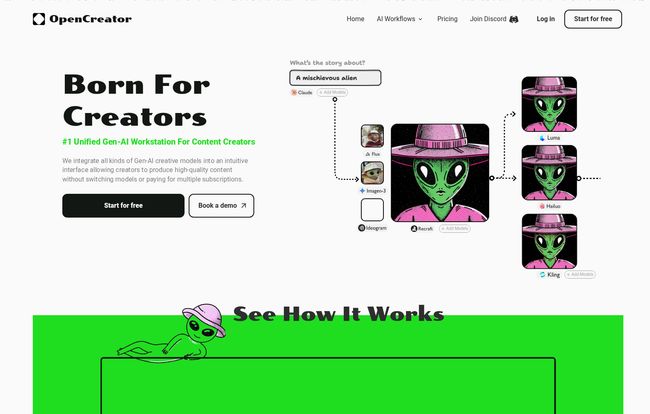
OpenCreator bills itself as the first unified Gen-AI workstation. In simple terms, it’s a single platform that integrates a whole bunch of the best AI models out there into one cohesive interface. Think of it less as a new AI model and more as a master conductor for an orchestra of AIs. You get access to powerhouse models for images, video, audio, and text, all under one roof.
The tagline on their site is “Born For Creators,” and honestly, it feels that way. The whole idea is to streamline the creative process so you can move from idea to finished content without all the digital gymnastics. No more downloading and re-uploading. No more managing ten different monthly bills. Just one place to do it all.
Visit OpenCreator
Not Just Another AI Wrapper
Now, I know what some of you are thinking. “Oh, great, another wrapper app.” I was skeptical too. We’ve seen plenty of platforms that just put a pretty face on OpenAI’s API and call it a day. But OpenCreator feels different. The focus here is on workflows. For instance, you can build a sequence where you generate an image, give it a voice, and then create a video from it, all within the same environment. That’s the magic sauce.
My Favorite OpenCreator Features (The Good Stuff)
After playing around with it for a bit, a few things really stood out to me. Its not just about having everything in one place; it’s about how it all works together.
The All-in-One AI Model Playground
This is the main event. OpenCreator pulls in heavy hitters that we all know and use. We’re talking about models like:
- For Images: Stable Diffusion, Ideogram, Recraft
- For Video: Runway, Luma
- For Text & More: OpenAI’s models
Having these integrated means you can experiment on the fly. Maybe an image from Stable Diffusion isn’t quite right? You can try a prompt in Ideogram without leaving the project. It’s like having a Swiss Army knife for AI creation; the right tool is always just a click away.
The AI Workflows are a Game-Changer
This is what truly sets it apart for me. The concept of AI Workflows allows you to chain commands and models together. The example on their site—Image to Voice to Clone to Video—is a perfect illustration. This is the kind of stuff that usually requires some serious technical know-how or a bunch of Zapier-style integrations. Here, it’s built right in. They even offer templates for common tasks like creating a music video from lyrics or generating a trailer from a script. Huge time saver.
Let’s Talk About OpenCreator’s Pricing
Alright, the all-important question: what’s this going to cost? The pricing model is a mix of subscriptions and a credit-based, pay-as-you-go system, which I’m a big fan of. It feels fair and transparent. They claim the models are “factory priced,” meaning they aren’t adding a huge markup on the cost of using the underlying AI models. This is a refreshing change from some other platforms out there.
There’s even a free trial that gives you 200 credits to mess around with, which is enough to get a real feel for the platform.
A Quick Breakdown of the Plans
| Plan | Price (Monthly) | Credits | Key Features |
|---|---|---|---|
| Starter | $10 (often discounted to $5) | 5,000 | 5 project limit, Commercial license |
| Creator | $30 (often discounted to $24) | 20,000 | Unlimited projects, Buy more credits |
| Pro | $90 (often discounted to $72) | 80,000 | Priority support, Early beta access |
| Enterprise | Custom | Custom | Team collaboration, Custom workflows |
In my opinion, the Creator plan seems like the sweet spot for most solo creators and YouTubers. The credit amounts feel generous, and having unlimited projects is a must if you’re producing content regularly.
Some Things to Keep in Mind
No tool is perfect, right? One of the potential downsides is that OpenCreator is dependent on these external AI models. If Runway has a bad day, well, the video generation in OpenCreator will have a bad day too. You’re trading direct access for convenience. For most of us, that’s a trade worth making.
There might also be a slight learning curve to get the most out of the advanced workflow features. It’s simple on the surface, but to really become a power user, you’ll need to invest some time. But what good tool doesn’t require that?
So, Is OpenCreator Worth It for You?
After everything, here’s my take. If you’re a content creator who feels the pain of juggling multiple AI tools and subscriptions, then yes, absolutely. OpenCreator is a massive step in the right direction.
It’s for the YouTuber who wants to streamline their B-roll creation. It’s for the social media manager who needs to pump out high-quality visual content fast. It’s for the solo creator who wants to punch above their weight without hiring a whole production team. It brings a sense of order to the AI chaos, and for that alone, it’s earned a permanent spot in my toolkit.
Frequently Asked Questions about OpenCreator
- What happens if I run out of my monthly credits?
- Based on their pricing page, it looks like on the ‘Creator’ plan and above, you have the option to buy more credits if you run out before your next cycle. On the Starter plan, you’d likely need to upgrade or wait for the refresh.
- Can unused credits roll over to the next month?
- The FAQ on their site addresses this. Typically with subscription models like this, credits expire at the end of the billing period. It encourages consistent use, so it’s best to choose a plan that matches your expected output.
- Is OpenCreator actually cheaper than subscribing to each tool individually?
- For a heavy user, almost certainly. If you only use one specific AI tool once a month, then a direct subscription might be cheaper. But if you’re using 3+ of the integrated models regularly, the combined cost and convenience of OpenCreator will likely offer much better value.
- Is there a steep learning curve?
- For basic content generation, it’s very intuitive. If you’ve used any AI image generator before, you’ll feel right at home. The learning curve really only applies to mastering the multi-step, custom AI Workflows, which is an advanced feature anyway.
- Where is my data stored when I use the platform?
- Their FAQ mentions user data storage. Generally, platforms like this will store your generated content and project files on their secure servers to make them accessible within your account. For specifics, you should always check their privacy policy.
- Who should I contact if I have a question?
- They have a contact email and a Discord community mentioned on the site. For paying customers, especially on the Pro plan, there’s priority support available.
Final Thoughts
OpenCreator isn’t just another tool; it’s a smart solution to a problem that’s been bugging the creator community for a while now. By bringing the best of Gen-AI into a single, workflow-focused environment, it lets us get back to what we do best: creating. It’s a huge relief, and I’m genuinely excited to see how it grows and what other models they integrate in the future. It’s definitely one to watch.
Reference and Sources
- The official website for pricing and features: OpenCreator.io
- Information on integrated models like Stable Diffusion, OpenAI, and Runway.


