
Categories: AI Background Remover, AI Image Generator, AI Image Upscaler, Image to Image
Openjourney Review: A Free AI Art Generator?

Remember 2022? It felt like the entire internet simultaneously discovered AI art generation. It was a digital gold rush. Every day, a new, jaw-dropping image created by Midjourney or Stable Diffusion would flash across my feed. As an SEO and content guy, I was hooked. The potential for creating unique blog headers, social media posts, and ad creatives was immense. But so was the learning curve… and the cost.
You either had to be a Discord wizard, wrestling with command prompts and crowded servers, or you had to be ready to open your wallet. That’s why when I stumbled upon Openjourney, my interest was piqued. It promised the best of both worlds: a powerful suite of AI tools, but with a friendly face and—get this—a genuinely usable free tier. Skeptical? I was too. So I did what I do best: I jumped in headfirst to see if it’s all hype or the real deal.
So, What’s the Big Deal About Openjourney?
At first glance, you might lump Openjourney in with the dozens of other text-to-image generators out there. And you wouldn’t be totally wrong. At its core, it lets you type in a prompt and get a cool AI-generated picture back. Simple. But that’s like saying a smartphone is just for making calls. It completely misses the point.
Openjourney isn’t just one tool; it’s a whole toolbox. We’re talking:
- Standard Text-to-Image Generation
- Image-to-Image Editing (upload a pic, have the AI riff on it)
- ControlNet (turn your crude sketch into art)
- Upscaling & Image Clarification
- Face Restoration & Face Swapping
- One-click Background Removal
It’s like they looked at all the little pain points creative professionals face and built a specific AI solution for each one. All wrapped up in a clean web interface (though the Discord option is still there for the purists).
Visit Openjourney
Getting Started: My First Impressions
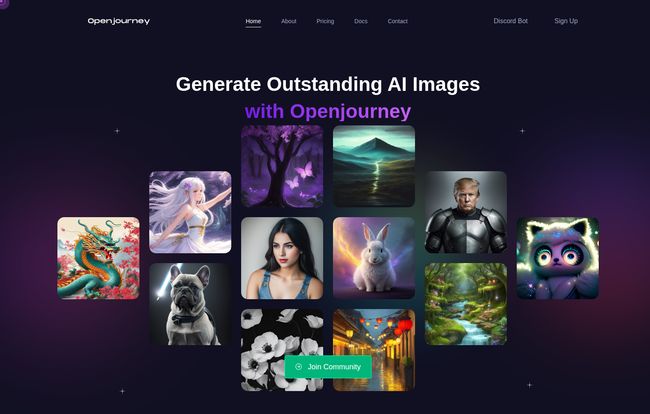
The signup was painless. No weird hoops to jump through. The platform itself has that slick, dark-mode aesthetic that’s so popular right now, and for good reason—it’s easy on the eyes. As someone who has spent way too many hours squinting at bright white screens, I appreciate this.
What really struck me was the lack of chaos. If you’ve ever used an AI art bot on a public Discord server, you know what I mean. It’s a firehose of other people’s creations, your own work getting lost in the flood. The Openjourney web platform is your space. It’s calm. It’s focused. And that, my friends, is a huge win for productivity.
A Look at the Feature Toolkit
Let’s get into the nitty-gritty. Because a pretty interface dont mean a thing if the tools can’t deliver.
From Text Prompts to Digital Masterpieces
The main event, of course, is the image generation. The quality is solid. Is it going to produce a hyper-realistic, 16K masterpiece that will win a fine art competition on its first try? Maybe not every time. But for bloggers, marketers, and social media managers who need high-quality, unique, and—most importantly—royalty-free images, it’s fantastic. The ability to quickly generate a concept, tweak it, and have a usable asset in minutes is a game-changer.
The Magic of Image-to-Image and ControlNet
This is where Openjourney starts to pull away from the pack. Image-to-image is fun, but ControlNet is where the real power lies for creators. It allows you to upload a simple sketch, a stick figure, or even a pose, and guide the AI’s composition. It’s the cure for the AI’s occasional stubbornness about composition. You’re not just a prompter anymore; you’re a director. This gives you a level of artistic control that’s often missing in simpler tools.
The ‘Fix-It’ Crew: Upscaling, Restoration, and More
These utility features are the unsung heroes. Ever find a great-but-low-res image? The Upscaler helps. Got an old family photo that’s seen better days? Face Restoration can work wonders. And the one-click background remover? It’s surprisingly accurate and saves me a tedious trip to Photoshop for quick jobs. These aren’t just novelties; they’re practical problem-solvers.
The Good, The Bad, and The “Bits”
No tool is perfect, right? Let’s be real. While there’s a lot to love about Openjourney, there are a few things to keep in mind.
On the plus side, the platform is incredibly user-friendly, it’s updated regularly with new features, and the community seems genuinely supportive. The biggest pro for me? Royalty-free use. That means the images you create are yours to use commercially without worrying about licensing headaches. That is HUGE.
Now for the reality check. The service relies on third-party infrastructure (as you can see from partners like Google Cloud and Replicate on their site), so if those have an outage, Openjourney might too. It’s the nature of the cloud-based beast. The free tier, while generous, operates on a credit system using “Bits.” You’ll get a certain amount to play with, but for heavy use, you’ll burn through them. Also, a critical point: images are only stored on their CDN for a week. So, download your keepers! Don’t treat it as a permanent cloud storage solution.
Let’s Talk Money: Openjourney Pricing Explained
Okay, the all-important question: what’s the damage? The great news is you can start for free. But if you get serious, you’ll want to look at the paid plans. They use a credit system called “Bits” for generating images, which feels a bit like tokens at an arcade.
Here’s a simple breakdown of their subscription tiers:
| Plan | Price (Monthly) | Key Features |
|---|---|---|
| Free | $0 | Limited Bits, access to basic tools. Perfect for trying it out. |
| Basic | $10 | 500 Bits, No Ads, No Watermark, Uncensored Generation. Great for hobbyists. |
| Pro | $20 | 1000 Bits, Early Access, Lower Bit Price. For serious creators and freelancers. |
| Pro + | $50 | Unlimited Everything, High Priority Queue, 24/7 Support. For agencies and power users. |
In my opinion, the value here is pretty clear. The $10 Basic plan is a fantastic entry point for anyone who moves beyond casual use, removing the main limitations of the free tier. The Pro plan is aimed squarely at professionals who rely on this for their workflow.
So, Who Is Openjourney Really For?
After playing around with it for a while, I can see this being a go-to tool for a wide range of people. It’s for the blogger who needs a featured image in a pinch. It’s for the social media manager trying to create a month’s worth of unique visual content. It’s for the indie game developer concepting characters. It’s for the digital artist who wants to integrate AI into their workflow without being completely at its mercy (thanks, ControlNet). It’s an accessible, multi-purpose platform that lowers the barrier to entry for creative AI.
My Final Verdict on Openjourney
So, is Openjourney the perfect, be-all-end-all AI art platform? No, because that doesn’t exist. Every tool has its strengths. But it is an incredibly compelling, versatile, and accessible option that gets a whole lot right. It successfully bridges the gap between being easy for beginners and powerful enough for pros.
The combination of a clean UI, a suite of genuinely useful tools beyond simple image generation, and a fair pricing model (starting with free!) makes it a strong contender in a very crowded market. My advice? Go give the free tier a spin. You’ve got nothing to lose and a whole world of creative potential to gain.
Frequently Asked Questions
- Is Openjourney really free to use?
- Yes, it has a free tier that allows you to use the platform’s tools. However, it comes with limitations, primarily a finite number of “Bits” (credits) to generate images and other tasks. For more extensive use, you’ll need a paid plan.
- What are “Bits” in Openjourney?
- Bits are the credit system used by Openjourney. You spend Bits to perform actions like generating an image, upscaling, or using other AI tools. Paid plans give you a monthly allowance of Bits, often at a better rate.
- Can I use the images I create for commercial purposes?
- Yes! According to their site, images generated are royalty-free. This is a massive advantage for content creators, marketers, and businesses who need unique visuals without complex licensing.
- Do I need to use Discord for Openjourney?
- Nope. While they do have a Discord bot, one of the main attractions is their dedicated web platform, which provides a much more streamlined and private user experience.
- How does Openjourney compare to a tool like Midjourney?
- Think of it this way: Midjourney is often seen as a specialist focused on producing the highest-fidelity artistic images. Openjourney is more of a versatile multi-tool. It offers very good image generation plus a whole suite of other practical AI tools like background removal and face restoration, all in one accessible platform.
- Where are my created images stored?
- This is an important one: your images are stored on Openjourney’s CDN for about one week. It is not a permanent storage solution. Be sure to download any images you want to keep!


