
Categories: AI Developer Tools, Large Language Models (LLMs), Open Source AI Models
OpenPlayground: The Open-Source LLM Testing Sandbox

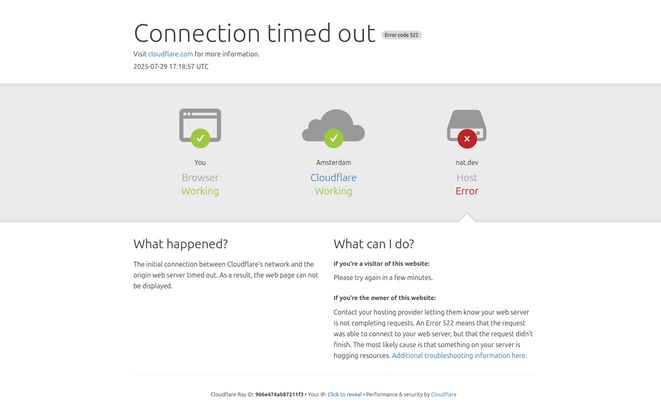
So, the other day I went to check in on a cool little project I’ve been following, hosted over at nat.dev. And what did I find? A big ol’ Cloudflare error. The dreaded “Connection timed out.” Ugh. As anyone who’s spent more than five minutes working on the web knows, seeing Error 522 is like your server just ghosting you. Cloudflare can reach it, but the server itself isn’t responding. A real digital cold shoulder.
It got me thinking, though. Just because a hosted version of a tool is down, does that mean the tool itself is gone? Not necessarily. Especially not in the wonderful world of open-source software. The tool in question is OpenPlayground, and it’s one of those projects that genuinely gets me excited about where AI development is heading. So, let’s talk about what it is, and why you should care, even if its main website is currently taking a nap.
So, What Exactly is OpenPlayground?
Imagine you’re a chef. You wouldn’t test a brand new, potentially bizarre spice blend in the main course for a hundred paying customers, right? Of course not. You’d have a little test kitchen—a place to experiment, mix, and taste without any real-world consequences. That’s exactly what OpenPlayground is for Large Language Models (LLMs).
It’s an open-source sandbox environment built for developers, researchers, and the endlessly curious to test-drive different AI models. Instead of just using a single, polished interface like ChatGPT, OpenPlayground lets you pop the hood. It’s designed to let you pit different GPT models against each other, tweak their settings, and really understand how they tick. Think of it as your personal laboratory for AI text generation.
Visit OpenPlayground
Why an Open-Source Playground Matters
Okay, I know what some of you are thinking. “We already have playgrounds from OpenAI and other big companies. Why bother with this one?” And that’s a fair question. But the magic word here is open-source.
When a tool is open-source, it means you’re not just a user; you’re a potential owner. You can see the code. You can change the code. You can host it on your own server, keeping your experiments private and secure. There’s no black box. Proprietary platforms are great, but you’re always playing in their sandbox, by their rules. With a tool like OpenPlayground, you get to build your own sandbox. For developers who value transparency and control, that’s a massive deal. It’s the difference between renting an apartment and owning a house with a workshop in the back.
The Core Features (Or What You Could Do When It Was Up)
Since the official site is down for the count at the moment, we have to piece things together a bit. But based on its mission and the nature of these tools, here’s the kind of functionality that makes OpenPlayground so compelling.
Comparing Models Side-by-Side
This, for me, is the killer feature. You can enter a single prompt and see how different models respond simultaneously. Want to know if GPT-4 is really worth the extra API cost over GPT-3.5-Turbo for your specific task? Or how a model from Anthropic stacks up against one from Cohere? This is how you find out. You get a direct, apples-to-apples comparison of tone, accuracy, creativity, and verbosity. It’s an invaluable tool for making informed decisions about which model to integrate into your own applications.
A Tinkerer’s Dream Environment
OpenPlayground isn’t just about the models; its about controlling them. You get to play with all the knobs and dials. We’re talking about adjusting parameters like:
- Temperature: How creative or deterministic the output is.
- Top P: Another method for controlling the randomness of the model’s predictions.
- Max Tokens: Limiting the length of the response.
- Presence & Frequency Penalties: Influencing whether the model repeats itself or introduces new topics.
Having this level of control is fundamental for anyone trying to fine-tune an AI’s personality for a chatbot, a content generator, or any other application. It’s where the real art of prompt engineering begins to blend with technical configuration.
Self-Hosting and Control
I touched on this before, but it’s worth repeating. Because the code is publicly available (on GitHub), you don’t have to rely on nat.dev being online. You can pull the code, spin it up on your own server (or even your local machine), and have a completely private instance. This is huge for companies working with sensitive data or for developers who just want total sovereignty over their toolchain.
The Good, The Bad, and The Code
No tool is perfect, and we have to be realistic here. Let’s break it down, conversation-style.
On one hand, the advantages are crystal clear. It’s free (as in beer and as in freedom), its a fantastic learning environment, and it offers a degree of customization you just won’t find in most commercial offerings. It’s a platform built by developers, for developers, and that ethos shines through.
However, there are hurdles. This isn’t a simple, plug-and-play solution for the non-technical. To really use it, especially the self-hosting part, you probably need to be comfortable with things like Git, command-line interfaces, and maybe even a bit of server admin. The limited information and the current website outage are also a testament to the nature of some open-source projects—they can be brilliant but sometimes lack the round-the-clock support and polish of a billion-dollar corporation. It’s a trade-off.
What About the Price?
This is a quick one. The OpenPlayground software itself is free because it’s open-source. You can download it, use it, modify it, all without paying a dime.
But—and this is an important but—the AI models are not free. To use OpenPlayground, you need to plug in your own API keys from providers like OpenAI. Every time you run a prompt, you are making an API call that will be billed to your account. So while the playground is free, the playing inside it has costs. It’s a common point of confusion, so keep that in mind!
Is OpenPlayground Still a Viable Project?
So, back to the original problem: the website is down. Does this mean the project is dead? I doubt it. In the open-source world, the heart of a project isn’t its website; it’s the code repository. The first place any developer would look for signs of life is the project’s GitHub page. A quick search points us to a repository by Nat Friedman, the person behind nat.dev.
That’s where you’ll find the latest code commits, see if people are reporting issues, and get a real sense of the project’s health. The website being down could be anything from a simple server glitch to the creator being busy with other things. The code, however, lives on. So yes, I’d say its still very much a viable project for anyone willing to grab the code themselves.
Frequently Asked Questions about OpenPlayground
- Is OpenPlayground free to use?
- Yes, the software itself is free and open-source. However, you will need to pay for the API calls you make to the underlying language models from companies like OpenAI.
- Do I need to be a programmer to use it?
- While you could use the hosted version when it’s online, to get the most out of OpenPlayground—especially self-hosting—some technical knowledge is definitely required. It’s built with developers in mind.
- What’s the difference between this and OpenAI’s official playground?
- The main differences are control and transparency. OpenPlayground is open-source, so you can see the code and host it yourself. The official OpenAI Playground is a proprietary tool hosted by OpenAI.
- Where can I find the code for OpenPlayground?
- The most likely place is on GitHub. The primary repository for this project is maintained by Nat Friedman and can typically be found at github.com/nat/openplayground.
- Why is the nat.dev website down?
- The error message shown in screenshots is a Cloudflare 522 error, which indicates a connection timeout between Cloudflare and the website’s host server. This could be due to server maintenance, a temporary bug, or a sign that the hosted instance is no longer a priority. The best place for updates would be the project’s GitHub page.
Final Thoughts on the LLM Sandbox
Tools like OpenPlayground are more than just neat utilities; they are a critical part of the AI ecosystem. They democratize access to powerful technology and empower developers to build, test, and understand the next generation of AI applications. While the temporary outage of its main showcase site is a bummer, it doesn’t diminish the value of the underlying project.
The spirit of open-source means the tool is resilient. It lives in its code repository, ready for anyone with the skills and curiosity to bring it to life. So here’s to the tinkerers, the builders, and the open-source creators. Your work is what truly pushes the boundaries of what’s possible.
Reference and Sources
- OpenPlayground Code: Nat Friedman’s OpenPlayground Repository on GitHub
- Understanding the Error: Cloudflare’s Explanation of Error 522
- What are LLMs: A Primer on Large Language Models from TechTarget


