
Categories: AI Reel Generator, AI Repurpose, AI Short Video Generator, AI Tiktok Video Generator, AI Video Generator, AI Youtube Video Maker, Long Video To Short Video AI
Opus Clip Review: Is This AI Video Tool Worth It?

If you’re a content creator, you’re tired. I’m tired. We’re all tired. The content treadmill never stops, and just when you think you’ve mastered long-form video for YouTube, the world tells you that you also need to be on TikTok, Reels, and Shorts. Every. Single. Day. It’s a bit much, right?
For ages, my workflow was a chaotic mess. I’d finish a long podcast episode or a detailed video tutorial, and then face the monumental task of slicing it up into bite-sized pieces for social media. It was a time-suck. A soul-crushing, creativity-draining time-suck. I’d spend hours scrubbing through timelines, trying to find that one golden nugget that might, just might, go viral. Most of the time, I’d just give up and not post anything.
Then I started hearing the buzz about generative AI video tools. One name kept popping up in my feeds and private marketing groups: Opus Clip. The promise was seductive: one long video in, ten viral clips out. Automatically. It sounded too good to be true. So, naturally, I had to see for myself. I dove in, credit card in hand (well, I started with the free plan), to see if this thing was legit or just more AI hype. Here’s what I found.
What Exactly is Opus Clip? (And Why Should You Care?)
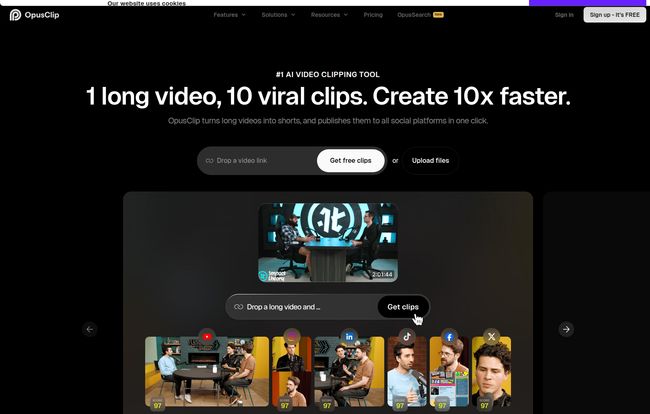
Think of Opus Clip not as a simple video cutter, but as a smart assistant. An assistant who has a PhD in virality and an insatiable appetite for your long-form content. You feed it a link to your latest YouTube video, webinar, or podcast episode, and it gets to work. It doesn’t just randomly chop your video into 60-second chunks. No, that would be too simple.
It analyzes the entire video—the transcript, the visual cues, the context—to identify the most compelling, hook-worthy, and valuable segments. It then packages them up into ready-to-post short-form clips, complete with captions, and even a rating of its viral potential. It’s designed to take you from a one-hour video to a week’s worth of social content in minutes. For content creators drowning in editing tasks, that’s not just a feature; it’s a lifeline.
The Core Features: Breaking Down the “AI Magic”
Opus Clip has a whole suite of features, but a few really stand out as the workhorses of the platform. These are the things that genuinely made me go, “Okay, this is different.”
The “Virality Score”: AI as Your Hype Man
This was the feature I was most skeptical about. After the AI processes your video, it presents you with a list of clips, each with a score out of 100. It’s supposedly judging the clip’s potential based on its hook, pacing, and value proposition. In my experience, it’s surprisingly decent. I found that clips it rated above 85 generally had a strong, clear point or a compelling question at the start. It’s not a crystal ball—a 95 score doesn’t guarantee a million views—but it’s an incredible starting point. It forces you to see your own content through an algorithmic eye, which is a pretty useful perspective to have these days.
AI Captions and B-Roll: More Than Just Words on a Screen
Automatic captions are table stakes now, but Opus Clip does them well. It generates them quickly, highlights keywords with color, and even sprinkles in relevant emojis. It makes the text pop, which is everything for retaining attention on mobile. But the real star of the show, available on the Pro plan, is the AI B-roll. This is the good stuff.
If you have a talking-head video, the AI can automatically find and insert relevant stock footage to illustrate what you’re saying. Talking about traffic generation? It might show a bustling city street. Mentioning growth? A time-lapse of a growing plant. It’s not always perfect, but the time it saves from manually searching and splicing in stock clips is just… immense. For a solo creator, this alone can make the subscription worthwhile.
Visit Opus Clip
Auto Reframe and Filler Word Removal: The Unsung Heroes
These features aren’t as flashy, but my god, they are useful. The Auto Reframe is brilliant. The AI uses face detection to ensure the main speaker is always perfectly centered in the vertical 9:16 frame. No more awkward, chopped-off heads or manual keyframing. It just works. It also handles filler words, cutting out those pesky “ums,” “ahs,” and long pauses to make the final clip sound tighter and more professional. These are the little things that add up to a huge time saving.
The All-Important Question: How Much Does Opus Clip Cost?
Alright, let’s talk money. AI tools can get pricey, but Opus Clip’s pricing structure seems pretty well thought out for different types of users. Here’s a quick breakdown as of my last check:
- Free Plan ($0/month): This is your test drive. You get 60 minutes (credits) of video processing a month. The clips will have a watermark and they expire after a few days, but it’s more than enough to see if you like the workflow.
- Starter Plan (~$15/month): This bumps you up to 150 credits, removes the watermark, and gives you access to the editor and auto-posting features. A solid choice for solo creators who are starting to get serious about short-form content.
- Pro Plan (~$29/month, but cheaper if you pay yearly): This is the sweet spot in my opinion. You get a big chunk of credits (3,600 per year), team access, multiple brand templates, and the all-important AI B-roll and export to professional editors like Premiere Pro. The yearly deal makes it incredibly competitive.
- Business Plan (Custom Pricing): For the big agencies and brands who need custom integrations, dedicated support, and all the enterprise-level security trimmings.
Honestly, the value in that Pro plan is pretty hard to argue with, especially if you calculate the hours you’d otherwise spend editing. My time is worth more than that an hour, that’s for sure.
The Good, The Bad, and The AI
No tool is perfect, and it’s important to go in with clear eyes. After a month of heavy use, here’s my honest take on the pros and cons.
What’s great? The time saving is staggering. It’s not an exaggeration to say it can turn 8 hours of editing work into 30 minutes of reviewing and tweaking. It helped me discover killer moments in my own videos that I had completely forgotten about. And for boosting my presence on Reels and Shorts, it has been a game-changer. My output has easily tripled.
What’s not so great? It’s a credit-based system, so if you’re a high-volume creator, you might feel the pinch. The AI, while impressive, isn’t a mind-reader. Sometimes it misses sarcasm or cuts off a sentence in a weird place. You still need to do a final human review. I’ve found the best results come from videos where one person is clearly speaking. Group podcasts or chaotic vlogs can sometimes confuse it. So, a bit of manual oversight is still needed. It’s a powerful assistant, not a full replacement for a human editor.
Who is Opus Clip Really For? (And Who Should Skip It?)
So, who should jump on this? If you’re a podcaster, a YouTuber who creates educational content or commentary, a coach who runs webinars, or a social media manager for a brand that does video, you need to try this. Seriously. It’s built for you.
Who might not need it? If your content is highly artistic, with complex visual storytelling and non-linear edits, this AI might be too blunt of an instrument. It’s built for dialogue-driven content. Also, if you exclusively create 30-second videos from scratch and have zero long-form content to pull from, then obviously this isn’t the tool for your workflow.
Frequently Asked Questions
Is Opus Clip actually free to use?
Yes, there’s a free plan that gives you 60 processing credits per month. It’s a great way to test it out, but the clips have a watermark and you can’t edit them within the platform. To get the full experience and remove the watermark, you’ll need a paid plan.
How accurate is the Opus Clip Virality Score?
It’s surprisingly good as a guide. I’ve found it’s a solid indicator of a clip’s structural quality (like having a strong hook). But it’s not a guarantee of going viral—no tool can promise that. Think of it as an educated suggestion, not a magic formula.
Can I edit the clips that Opus Clip creates?
Absolutely. On the paid plans (Starter and up), you get access to a powerful editor. You can tweak the captions, change the highlighted keywords, adjust the start and end points of the clip, and even change the B-roll footage. This human touch is often what takes a good clip and makes it great.
What kind of videos work best with Opus Clip?
Opus Clip shines with dialogue-heavy, single-speaker videos. Think podcasts, educational videos, product reviews, webinars, and speeches. It can handle multiple speakers, but it performs at its best when it can clearly follow one main narrative thread.
Does Opus Clip support languages other than English?
Yes, according to their site, it supports over 20 languages for transcription and captioning, including Spanish, French, German, and Portuguese. This is a huge plus for international creators.
My Final Verdict: Is Opus Clip a Must-Have?
After a month, Opus Clip has earned a permanent spot in my creator toolkit. It’s not perfect, but it’s damn good. It doesn’t replace the need for a content strategy or human creativity, but it acts as a massive force multiplier. It takes the most tedious part of content repurposing and automates it, freeing you up to focus on the bigger picture.
It’s a bit like switching from washing your clothes by hand to using a washing machine. You still have to sort the colors and fold them afterward, but it has eliminated the most laborious step. For me, it has shifted my mindset from, “How can I possibly create more?” to “What other value is hiding in the content I’ve already made?” And for any busy creator, that shift is priceless.


