
Categories: AI Documents Generator, AI Productivity Tools, AI Report Generator, AI Report Writing, AI Speech-to-Text
Opusense Review: AI Site Reports That Save Hours?

If you’re an engineer, an inspector, or a consultant who spends any time on-site, you know the drill. You spend hours, maybe even days, meticulously inspecting every beam, pipe, and foundation. You take hundreds of photos, scribble notes on a pad that’s probably seen better days, and dictate observations into your phone until your voice is hoarse.
And that’s the easy part.
The real soul-crushing work begins back at the office. The endless nights spent transcribing notes, cropping and labeling photos, and wrestling with Microsoft Word to format everything into a professional-looking site inspection report. I’ve been there. I’ve lost weekends to that report-writing purgatory. It’s a time-suck, a creativity killer, and honestly, it’s the part of the job most of us dread.
So when I stumble across a tool that claims to eliminate that pain entirely, my ears perk up. The tool is called Opusense, and it’s making some pretty bold claims about using AI to automate the whole darn process. But does it live up to the hype?
Visit Opusense
So, What Exactly is Opusense?
Imagine having a personal assistant who shadows you on-site. This assistant is a lightning-fast typist, an expert photo organizer, and happens to be a mind-reader who knows exactly how you like your reports formatted. That’s the elevator pitch for Opusense.
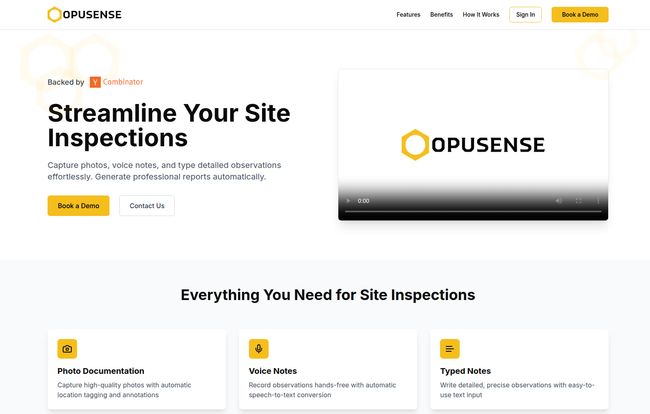
It’s an AI-powered platform built specifically for the construction and engineering crowd. You feed it your raw field data—photos from your phone, quick voice notes about a potential issue, or typed observations—and its AI engine gets to work, churning out a fully-formatted, ready-to-review site report. We’re not talking about a messy data dump. We’re talking about a polished document that looks like you spent ten hours on it, not ten minutes.
How It Actually Works in the Real World
I’m always skeptical of ‘magic’ solutions, so I looked into their process. It’s refreshingly straightforward and seems to be built on a pretty smart foundation. It’s not just a generic template filler; it’s designed to become an extension of your own process.
First, The Template Handshake
This is the part that got my attention. You don’t have to adapt to their format. They adapt to yours. You start by uploading one of your existing, completed report templates. Your logo, your specific section headings, your fonts, your particular way of phrasing things. You give the AI your gold standard, and it uses that as the blueprint for everything that follows.
Then, The AI Goes to School
Once you’ve submitted your template, the AI studies it. It learns your structure, your formatting preferences, and even your unique communication style. This isn’t just about matching fonts; the platform claims its AI can mimic your phrasing and professional voice. This is a big deal. The last thing anyone wants is a report that sounds like it was written by a robot and erodes the brand identity you’ve worked so hard to build.
Capturing Reality On-Site
This is business as usual, but faster. While you’re on-site, you just capture your observations using the Opusense system. Snap a photo, and it’s automatically tagged and ready. See a non-compliance issue? Record a quick voice note: “Minor cracking observed on the southeast corner of the retaining wall, recommend further evaluation.” Don’t have a free hand? No problem. The speech-to-text is automatic. Need to add more detail? Type it in. All this data is funneled into the system, ready for the magic to happen.
Finally, The Review and Export
After your site visit, Opusense presents you with a generated draft. Your photos are in place, your notes are transcribed and integrated, and everything is formatted according to the template you provided. You give it a final once-over, make any tweaks you see fit, and then export it directly to a .docx file. That means you can still open it in Microsoft Word for any final, tiny adjustments. No proprietary formats, no being locked into their ecosystem. Simple.
The Benefits That Genuinely Stand Out
Okay, so the process is slick. But what does that mean for your bottom line and your sanity? The benefits listed on their site are pretty standard for an automation tool, but when you think about them in the context of this specific industry, they become pretty powerful.
- Efficiency and Cost Savings: These two go hand-in-hand. Think about it. If you’re a consultant billing by the hour, how many hours are you currently writing off or under-billing for report writing? If you’re a project manager, how much more time could your team spend on-site or on higher-value tasks if they weren’t chained to their desks writing reports? The cost savings aren’t just about time; they’re about reallocating your most valuable resource—your team’s expertise—to where it counts.
- Seriously Improved Accuracy: When you’re transcribing notes hours or days after a site visit, details get missed. It’s just human nature. A scribbled note might not make sense anymore, or you might forget the exact location of a photo. By capturing data in real-time and letting the AI handle the compilation, you minimize those unforced errors. The little details are what separate a good report from a great one, and this helps nail them down.
- Scalability That Doesn’t Break You: Got a huge project coming up? Or maybe your firm is growing fast? Manually scaling up reporting is a nightmare. It usually means more late nights, more stressed-out team members, and a higher chance of inconsistent quality. A tool like Opusense handles increased volume without breaking a sweat. The process is the same for a 5-page report as it is for a 50-page one.
So, How Much Does Opusense Cost?
Ah, the million-dollar question. As of writing this, Opusense doesn’t list its pricing publicly on the website. This is pretty common for B2B SaaS tools targeting enterprise clients or professional firms. It usually means pricing is customized based on your team size, usage volume, and specific needs.
Instead of a ‘Buy Now’ button, they have a ‘Book a Demo’ call-to-action. My advice? Don’t let that scare you off. A demo is a great chance to see if the tool is a genuine fit and to ask the tough questions. It’s a much better approach than a one-size-fits-all price that might not work for your specific use case. Plus, it’s backed by Y Combinator, which is a massive seal of approval in the tech world. They dont back flimsy products.
A Few Lingering Questions
No tool is perfect, and as an old hand in this game, I’m naturally a bit cynical. While the website doesn’t list any cons, I can anticipate a few hesitations. How steep is the learning curve for the AI to truly nail my unique style? Is it smart enough to handle really complex, multi-part inspections with tons of cross-referencing? These are the kinds of questions I’d bring to a demo. The promise is incredible, but the proof, as they say, is in the pudding—or in this case, the final exported report.
Frequently Asked Questions About Opusense
Who is Opusense designed for?
It’s built for any professional who conducts site inspections and needs to create detailed reports. This primarily includes engineers (civil, structural, MEP), building inspectors, general contractors, and environmental consultants.
Does Opusense really work with my company’s existing report format?
Yes, and this is one of its main selling points. The process starts with you uploading your current template. The AI learns your branding, layout, fonts, and section structure to ensure the final output is consistent with your company’s identity.
How does the AI learn my writing style?
The AI analyzes the language and phrasing used in the sample reports you provide. It identifies common terminology, sentence structures, and the overall tone to replicate your unique professional voice, making the reports sound like they were written by you, not a generic program.
What kind of data can I input on-site?
Opusense is multi-modal. You can use your smartphone to take photos (which are automatically organized), record voice notes (which are transcribed to text), and type out detailed notes for more complex observations.
Is my project data secure with Opusense?
While you should always confirm specific security protocols during a demo, platforms like this, especially those backed by major investors like Y Combinator, typically employ robust security measures to protect sensitive client and project data. It’s a foundational requirement for doing business in this space.
How much does Opusense cost?
Pricing is not publicly listed. You need to book a demo with their team to get a custom quote based on your organization’s size and needs. This tailored approach is common for specialized, high-value professional software.
Is Opusense the Future of Site Reporting?
Look, I’ve seen a lot of ‘game-changing’ tech come and go. But Opusense feels different. It’s not trying to reinvent the wheel; it’s just trying to get rid of the terrible, bumpy road we’ve all been forced to travel on. It focuses on a very real, very specific pain point that has plagued the engineering and construction industries for decades.
The idea of turning a day of chaotic field notes into a pristine, client-ready report with a few clicks is… well, it’s the dream, isn’t it? If it works as advertised, this isn’t just a time-saver. It’s a workflow revolution. It’s more time for design, more time for client management, and maybe, just maybe, a chance to get your weekends back. And that’s a trend I can definitely get behind.


