
Categories: AI Document Extraction, AI Github, AI Knowledge Management, AI OCR, AI PDF, AI Search Engine, Open Source AI Models
Papermerge DMS Review: Tame Your Paper Chaos for Good

My desk used to be a paper graveyard. A chaotic mix of invoices, old bank statements, letters from who-knows-who, and that one mysterious receipt I was sure I’d need for taxes. It was organized chaos at best, and a full-blown fire hazard at worst. I’ve been on a mission for years to go fully paperless, but just scanning things into a folder on Google Drive doesn’t really solve the problem. It just moves the mess from a physical drawer to a digital one. How do you find anything?!
I’ve tried everything. Complicated naming conventions that I forget a week later. A dozen different apps that promise the world but deliver a clunky interface. Then, a while back, I stumbled upon something different in a corner of the internet where us tech-savvy, DIY-types hang out: Papermerge DMS.
It’s not a flashy, venture-capital-backed SaaS product with a Super Bowl commercial. It’s something better, in my opinion. It’s a powerful, open-source Document Management System you host yourself. It’s a tool designed for one thing: turning that mountain of paper into a searchable, organized, and genuinely useful digital archive. And honestly? It’s pretty darn great.
So, What Exactly is Papermerge DMS?
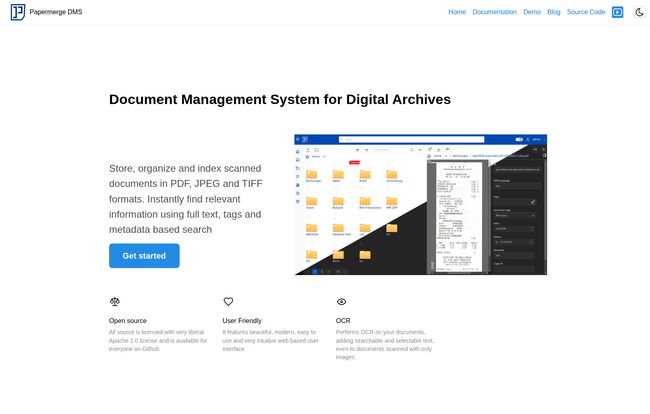
Think of it as a super-smart digital filing cabinet that lives on your own server. You feed it your scanned documents—PDFs, JPEGs and Tiffs are all welcome—and it doesn’t just store them. It reads them. It understands them. It makes them findable in a way that just dumping files into a folder never could.
Because it’s open-source (under a friendly Apache 2.0 license), you have complete control. Your data isn’t sitting on some third-party’s server, subject to their terms of service and privacy policy changes. It’s yours. For privacy advocates and anyone who’s just a little bit of a control freak about their own information (guilty!), this is a massive win.
Visit Papermerge DMS
The Game-Changing Magic of OCR
Alright, let’s talk about the killer feature, the secret sauce that makes Papermerge so effective: OCR. That stands for Optical Character Recognition. It’s a bit of a mouthful, but the concept is simple. It’s like giving your document archive a brain.
When you upload a scanned invoice, Papermerge’s OCR engine—which uses the powerful open-source Tesseract engine, by the way—scans the image and converts all the text into actual, searchable data. This is HUGE.
What does this mean in practice? You can have a file named scan-08-15-2023.pdf, but if the content mentions “Acme Corp Invoice #45B-2”, you can just type “Acme Corp” into the search bar, and BAM! Papermerge finds it instantly. It’s the difference between having a box of photos and having a photo album where every person and place is tagged and searchable. It completely changes how you interact with your digital files.
Beyond the Search Bar: My Other Favorite Features
While the OCR is the star of the show, Papermerge isn’t a one-trick pony. The whole platform is thoughtfully designed for managing documents, and a few features really stand out to me.
Versioning That Doesn’t Make You Want to Scream
Have you ever had a file named `Final_Contract_v2_updated_REALLY_FINAL.docx`? We all have. Papermerge elegantly solves this. When you upload a new version of a document, it doesn’t just overwrite the old one. It stacks them. You can easily view and revert to previous versions, which is a lifesaver for things like contracts, updated policies, or any document that evolves over time. It keeps the history clean and accessible.
Custom Fields and Categories for the Super-Organized
This is where you can really flex your organizational muscles. Instead of just relying on folder structures, you can add your own metadata. For my invoices, I have custom fields for “Amount,” “Due Date,” and “Status” (e.g., Paid/Unpaid). For my contracts, I have “Client Name” and “Renewal Date.” This lets you filter and sort your documents with incredible precision. It’s the kind of structured data that separates a professional DMS from a simple file storage service.
Tidying Up Messy Scans with Page Management
My scanner isn’t perfect. Sometimes it scans a page upside down, or includes a blank page at the end, or I scan a 10-page document in the wrong order. Before Papermerge, I’d have to open the PDF in some clunky editor to fix it. Here, you can do it right in the web interface. You can reorder, rotate, and delete individual pages within a document after it’s been uploaded. It seems like a small thing, but the time it saves adds up fast.
The Catch: Let’s Talk About the Downsides
Okay, it’s not all sunshine and perfectly scanned receipts. As with any self-hosted application, there are trade-offs. This isn’t a click-and-go solution for everyone, and it’s important to be real about that.
First and foremost, you have to set it up and maintain it yourself. This means you need a server. Now, that could be a dedicated machine, a virtual private server (VPS) from a provider like Linode or DigitalOcean, or even a humble Raspberry Pi sitting on your desk. If you’re comfortable with Docker or a bit of command-line tinkering, you’ll be fine. If that sentence made you break out in a cold sweat, this might not be the tool for you.
Second, the OCR is powerful, but it’s not a miracle worker. The old saying “garbage in, garbage out” applies. A crisp, clean 300 DPI scan will yield fantastic results. A blurry, crumpled photo of a receipt taken in a dark car… not so much. This is a universal truth for all OCR, not just a Papermerge flaw, but its something to keep in mind.
So, How Much Does This Digital Nirvana Cost?
Here’s the beautiful part. The Papermerge DMS software itself is free. As in, zero dollars. It’s a gift to the community from its developers.
The “cost” comes from where you decide to run it. If you have an old computer or a Raspberry Pi lying around, your cost could be close to nothing besides the electricity it uses. If you opt for a basic cloud server, you might be looking at $5-$10 a month. When you compare that to some commercial DMS solutions that charge that much per user, the value proposition is incredible—especially for a small business or a family.
Is Papermerge the Right Tool For You?
After using it for a while, I have a pretty good feel for who will love this and who should probably look elsewhere.
You’ll probably love Papermerge if:
- You’re a home user, freelancer, or small business owner drowning in paperwork.
- You value data privacy and want to own and control your own information.
- You’re tech-savvy, or at least willing to follow a good tutorial.
- The idea of a fully searchable, organized, and free document archive makes you giddy.
You might want to skip it if:
- You want a solution that requires zero technical setup.
- You’re part of a large corporation that needs enterprise-level features and dedicated 24/7 support.
- The thought of managing your own server sounds like a total nightmare.
Frequently Asked Questions about Papermerge
What types of files does Papermerge DMS support?
It’s built for scanned documents and handles the most common formats beautifully: PDF, JPEG, and TIFF.
Is Papermerge really free?
Yes, the software is 100% free and open source. Your only costs are related to the hardware or cloud server you choose to run it on.
Do I need to be a developer to install it?
Not necessarily a developer, but some technical comfort is definitely helpful. The official documentation is quite good, and there are plenty of community guides. If you’ve ever set up a WordPress site on your own server, you can probably handle this.
How exactly does the search work again?
It uses Optical Character Recognition (OCR) to read the text inside your documents. So you’re not just searching file names; you’re searching the actual content of every page you’ve uploaded.
Can I access my documents on my phone?
Yes! Since it’s a web-based application, you can access your Papermerge instance from any device with a web browser, including your phone or tablet. The interface is responsive and works well on smaller screens.
Where is my data stored?
This is the best part: it’s stored wherever you want it to be. On your home server, on a Raspberry Pi, on a cloud server you rent. You are in complete control of your data’s physical location.
The Final Word on Papermerge
Look, organizing your digital life takes a bit of effort. There’s no magic button. But Papermerge DMS is the closest thing I’ve found to a perfect system for managing the paper trail of modern life. It puts the power of enterprise-grade document management into the hands of regular people.
Yes, it requires a little bit of setup. But the payoff is immense. It’s the peace of mind that comes from knowing exactly where that warranty is, being able to pull up any invoice in seconds, and finally, finally, having a desk free of paper clutter. For me, that’s a trade I’ll take any day of the week.


