Categories: AI Answer, AI API, AI Chatbot, AI Documents Generator, AI PDF, AI PDF Summarizer, AI Quiz Generator
PDF.ai Review: Chatting With My Documents (Finally!)

Nobody enjoys staring at a 150-page PDF, dense with jargon and tiny font, knowing the one sentence you actually need is buried somewhere in page 97. It’s the modern-day equivalent of searching for a needle in a digital haystack. For years, I’ve just accepted this as my fate—a necessary evil of being a digital marketer, researcher, and just a curious person on the internet.
I’d download a whitepaper, a financial report, or a complex academic study, and my heart would sink a little. Out came the highlighters, the frantic CTRL+F searches that never quite found the right phrase, and the pot of coffee. It felt like a one-way conversation where the document just lectured me. But what if you could talk back? What if you could just… ask the document a question?
That’s the promise of PDF.ai, a tool I’ve been hearing whispers about for a while. And let me tell you, after spending some real time with it, it feels less like a tool and more like a magic trick.
Visit PDF.ai
So, What Exactly is PDF.ai?
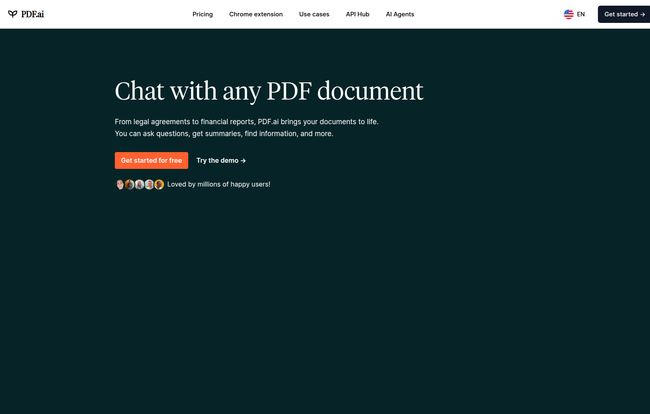
At its core, PDF.ai transforms static, boring documents into interactive conversational partners. You upload any PDF—be it a dense legal contract, a company’s annual report, a textbook chapter, or even a scanned user manual—and you can start asking it questions in plain English. It’s like having a dedicated research assistant who has already read, memorized, and understood every single word of your document.
Instead of you hunting for information, the information comes to you. It turns that document monologue into a genuine dialogue. A simple concept, but the execution is where things get really interesting.
My First Run-Through: Is It Actually Easy?
I’m naturally skeptical of any new tool that promises to make my life easier. Usually, that means a steep learning curve and a dozen video tutorials. Not here. The homepage literally lays it out for you: Upload documents, get instant answers, and see the sources.
And that’s… pretty much it. The interface is clean, almost minimalist. You drag and drop your file, a chat window pops up, and you just start typing. There’s no complex setup, no labyrinth of menus. It felt intuitive from the first click, which is a massive win in my book. We’re all busy, and the last thing we need is another complicated platform to learn.
The Standout Features That Make a Difference
Okay, so it’s easy to use. But what can it really do? I pushed it with a few different documents, from a technical SEO audit to a creative brief, and a few features really stood out.
Instant Answers and Summaries
This is the main event. I uploaded a 50-page market research report and asked, “What are the key growth trends for Q4?” Within seconds, it spat out a concise summary, pulling data points from different sections of the document. What would have taken me an hour of skimming and note-taking took about 5 seconds. This is the feature that will make you gasp the first time you use it. It’s just that good.
Source Citations: The AI Fact-Checker
Here’s where PDF.ai earns my trust. We’ve all seen AI get a little… creative with the facts. AI hallucinations are a real problem. But with every answer PDF.ai provides, it also gives you a citation, pointing to the exact page and section in the original document where it found the information. You can click it and instantly verify the source. For anyone in academia, law, or finance—where accuracy is non-negotiable—this isn’t just a cool feature; it’s a fundamental requirement. It gives you the confidence to actually use the AI-generated answers in your work.
Specialized AI Agents for Pros
This is a more advanced feature, but it’s brilliant. PDF.ai has pre-trained AI agents for specific fields like Legal, Finance, Healthcare, and Research. You can tell the tool to analyze a document as if it were a lawyer or a financial analyst. This fine-tunes the AI’s understanding and the kinds of insights it provides. When I tested a sample agreement with the Legal agent, the responses were more focused on clauses, obligations, and potential liabilities. It’s a subtle but powerful touch that shows they understand their users’ diverse needs.
Who Needs to Get Their Hands on This?
While I think almost anyone could find a use for it, some people will see their daily workflow completely transformed.
- Students and Researchers: Imagine turning a 30-page scientific paper into a Q&A session. Find methodologies, conclusions, and supporting evidence in seconds. It’s like having a study buddy for every PDF.
- Legal Professionals: Quickly analyze contracts, find specific clauses, and summarize case law without billing hours just for reading. The source citation is absolutley critical here.
- Financial Analysts: Sift through dense financial reports, find key performance indicators (KPIs), and get summaries of earnings calls instantly.
- Marketers & Business Owners: Analyze competitor reports, customer feedback surveys, and project briefs with ease.
Basically, if your job involves reading and understanding long documents, this tool is for you.
The Big Question: What’s the Cost?
Alright, let’s talk about the price tag. I appreciate that PDF.ai has a tiered structure, so you’re not forced into an expensive plan you dont need. Here’s a quick breakdown as I see it:
| Plan | Price | Who It’s For |
|---|---|---|
| Hobby | $0 (Free forever) | The casual user. Perfect for a student with an occasional paper to review or someone who just wants to try it out. The 1 PDF limit is restrictive, but it’s a great entry point. |
| Pro | $10/mo (billed yearly) | The sweet spot for most professionals and serious students. 100 PDFs and 1,000 questions a month is a generous allowance. |
| Ultimate | $20/user/mo (billed yearly) | The power user. If you live in PDFs and need the best AI models (like GPT-4 and Claude 3.5), unlimited everything, and the AI Agents, this is your plan. |
| Enterprise | $30/user/mo (billed yearly) | For teams and businesses needing features like white-labeling, early access, and dedicated support. |
For my money, the Pro plan offers the best bang for your buck for an individual. But the fact that a truly useful Free plan exists is a huge plus.
Okay, But What’s the Catch?
No tool is perfect. While I’m genuinely impressed, there are a few things to keep in mind. The free plan is quite limited, basically a trial to get you hooked. You’ll likely hit that 1 PDF upload limit fast if you’re serious. Secondly, some of the coolest features, like the advanced AI models and the AI Agents, are locked behind the more expensive ‘Ultimate’ tier. And if you want the chatbot widget to embed on your own website, that’s an additional paid add-on. These aren’t deal-breakers, but it’s good to know what you’re getting into.
My Final Take: Is PDF.ai the Real Deal?
Yes. Absolutely, yes. This isn’t just another flashy AI gimmick. It solves a real, persistent, and annoying problem. It saves time, reduces frustration, and genuinely makes information more accessible. I’ve been in the SEO and digital content world for years, and I’ve seen countless tools come and go. This one feels different. It has staying power.
Even Sam Altman, the CEO of OpenAI, is quoted as saying, “PDF.ai is one of the most useful AI applications I’ve used.” When the guy behind ChatGPT gives you a thumbs up, you know you’re onto something special. It’s a simple, powerful, and honestly, a joy to use.
Frequently Asked Questions about PDF.ai
- Can I use advanced AI models like GPT-4 with PDF.ai?
- Yes, you can! Access to GPT-4 models and Claude 3.5 Sonnet is available on the Ultimate and Enterprise plans. The free and Pro plans use the very capable GPT-3.5-Turbo model.
- Is my data secure when I upload a document?
- PDF.ai takes security seriously. According to their site, they employ secure cloud storage and protocols to protect your documents. However, as with any cloud service, it’s always wise to be cautious with extremely sensitive or confidential information and review their latest privacy policy.
- How accurate are the answers provided by the AI?
- The accuracy is impressively high, especially because of the source citation feature. Since every answer is linked back to the original text, you can quickly verify its accuracy yourself. This largely eliminates the risk of AI ‘making things up’.
- Does PDF.ai work with scanned documents?
- Yes, it has OCR (Optical Character Recognition) support, which means it can read text from scanned PDFs and images. This is a fantastic feature for working with older documents or archives that haven’t been digitized properly.
- Can I use PDF.ai on the go?
- Absolutely. Besides the main web application, there is a handy Chrome extension that lets you chat with any PDF you open in your browser, making the process even more fluid and integrated into your workflow.
Conclusion
PDF.ai isn’t just a step forward; it’s a leap. It fundamentally changes how we interact with what was once the most static file format on the web. It saves time, boosts productivity, and frankly, makes work a little less work. If you find yourself wrestling with PDFs on a regular basis, do yourself a favor and give it a try. Your future self will thank you.
Reference and Sources
- PDF.ai Official Website: https://pdf.ai/
- PDF.ai Pricing Page: https://pdf.ai/pricing