
Categories: AI Art Generator, AI Drawing, AI Sketch Generator, Image to Image, Text to Image
PenKetch Review: An AI Pencil Sketch Generator?

As a blogger, finding the right image is a huge pain. You know the drill. You spend what feels like an eternity scrolling through Unsplash or Pexels, looking for that one perfect photo that hasn’t been used by a thousand other blogs. Or worse, you settle for some cheesy, soulless stock photo of people in a boardroom laughing at a blank whiteboard. Ugh. The struggle is real.
I’ve been hearing the buzz about AI art generators for a while now, and honestly, I’ve been a bit skeptical. Some of them feel overly complicated or spit out images with, like, seven fingers on one hand. But then I stumbled upon PenKetch, an AI pencil sketch generator, and my curiosity got the better of me. A tool that could create unique, artistic pencil drawings just from a text prompt? Okay, I’m listening.
So, What Exactly is This PenKetch Thing?
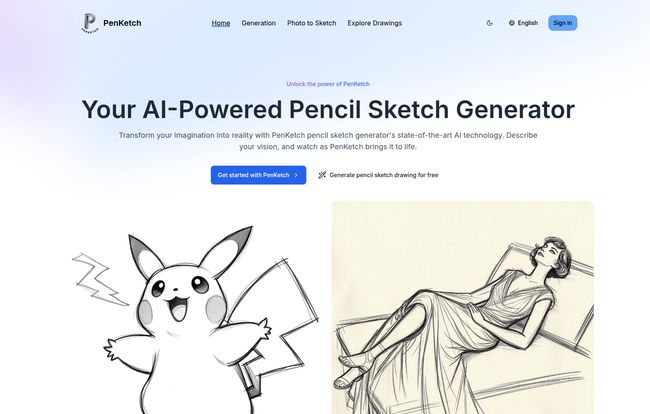
In a nutshell, PenKetch is your personal robot sketch artist. You give it a description—anything from “a majestic lion with a flowing mane” to “a quiet Parisian cafe scene at dawn”—and its AI engine gets to work, creating a custom pencil sketch just for you. It’s not just pulling from a database of existing drawings; it’s generating something entirely new based on your words.
What I found pretty cool is the tech behind it. It’s not some fly-by-night app. It’s powered by advanced transformer-based models from a place called BlackForestLabs. That might sound like a bunch of tech jargon, but what it means for us is that the AI has a pretty sophisticated grasp of language and art, allowing it to produce some seriously high-quality and detailed results. The images are also royalty-free, which is a massive win for any content creator.
Getting Started is Incredibly Simple
I was expecting a steep learning curve, but the process is almost laughably easy. It’s basically a four-step dance:
- Enter Your Text Prompt: This is where you tell the AI what you want. Be descriptive! The more detail you give, the better the result.
- Select Your Style: You can choose from different artistic models. More on that in a bit.
- Generate Your Image: You click a button and watch the magic happen. It usually takes less than a minute.
- Download and Share: See something you like? Just download the high-resolution file and you’re good to go.
That’s it. No complicated software to install, no confusing interfaces. Just you, your idea, and a text box.
My First Foray into AI Sketching
To really put it to the test, I decided to give it a prompt I’ve always struggled to find an image for: “A whimsical treehouse built into a giant, ancient oak tree, with a rope ladder and glowing lanterns hanging from the branches, nighttime scene.” I hit generate, held my breath, and… wow. The result was genuinely impressive.
It wasn’t just a generic treehouse. It had the hand-drawn, slightly imperfect charm that makes a sketch feel authentic. The lines were clean, the shading gave it depth, and the little details like the glowing lanterns were spot on. I’ve spent hours looking for something similar on stock sites and came up empty. PenKetch did it in about 45 seconds. It’s a game changer for content creatrs and marketers who need custom visuals on the fly.
Visit PenKetch
Exploring the Different Artistic Flavors
One of the things that sets PenKetch apart is the ability to choose your style. The default model, [Schnell], is fantastic for quick, clean line art. But they also have others like [Holzkohle] (which I’m guessing is German for charcoal, giving a smudgier, more dramatic look) and [Buntstift] (colored pencil!). This variety means you can tailor the output to match the specific vibe of your project, whether it’s a professional report or a creative blog post.
Also Read: Ghibli Style AI Generator: My Honest Review
But Who Is This Really For?
While I’m looking at this through the lens of a blogger, the applications are pretty broad. I could easily see this being a go-to tool for:
- Social Media Managers: Creating eye-catching, unique visuals for Instagram or Pinterest feeds.
- Authors and Writers: Visualizing characters or scenes, or even creating concept art for a book cover.
- Small Business Owners: Designing simple logos, website icons, or custom illustrations for marketing materials without hiring a designer.
- Artists and Designers: Getting a quick burst of inspiration or a foundation for a more detailed piece.
- Educators: Creating custom worksheets or presentation slides that are way more engaging than standard clipart.
Basically, if you ever need a custom drawing but don’t have the time, skill, or budget to commission one, PenKetch is a seriously compelling option.
Let’s Talk Money: The PenKetch Pricing Plans
Ah, the all-important question. What’s this going to cost me? The pricing structure is actually quite reasonable and flexible.
First off, there’s a Free plan. You get 5 trial credits to kick the tires and see if you like it. You can also convert 2 photos to sketches per day. It’s perfect for getting a feel for the platform, but the images you generate are public. No big deal for just playing around.
Next up is the Pro Plan at $19.90/month. This seems like the sweet spot for most regular users like me. You get 300 credits a month (which translates to about 300 drawings), priority support, and a private option to keep your creations to yourself. This is ideal for bloggers or small businesses with consistent content needs.
Finally, for the power users, there’s the Premium Plan at $29.90/month. This bumps you up to 800 credits and gives you unlimited drawing generations per day. If you’re an agency or a designer churning out a high volume of visuals, this plan makes a ton of sense.
I appreciate that all the paid plans can be canceled anytime. No scary annual lock-ins. You can just use it for a month if you have a specific project in mind.
The Good, The Not-So-Good, and The Sketchy
What I Absolutely Love
The biggest pro for me is the combination of quality and convenience. The interface is clean and intuitive, and the output is consistently high-quality. But the real clincher is that the images are royalty-free for commercial use. I can’t stress how huge this is. Creating a custom header for a blog post or an illustration for a client and not having to worry about licensing is just… chef’s kiss.
A Few Caveats
It’s not perfect, of course. The quality of your sketch is heavily dependent on the quality of your prompt. Vague prompts like “a person” will give you vague, generic results. You have to learn to be a bit of a prompt engineer, adding descriptive words and details to guide the AI. Also, the free plan is quite limited, so you really need to upgrade to one of the paid plans to get the full experience and utility out of the platform.
The Verdict: Should You Give PenKetch a Whirl?
Absolutely. One hundred percent yes. If you’re in any kind of creative or marketing field, this tool has the potential to save you a ton of time and money. It bridges the gap between generic stock imagery and expensive custom design work.
It’s like having a talented sketch artist on call 24/7, ready to bring your ideas to life without the back-and-forth emails or the hefty invoices. It won’t replace human artists for complex, emotionally resonant work, but for everyday content creation? It’s a powerful, fun, and incredibly useful tool to have in your arsenal.
Don’t just take my word for it. The free trial gives you 5 credits. Go spend ten minutes with it. Think of the craziest thing you can and see what it comes up with. You might be surprised.
Your Questions Answered: PenKetch FAQ
- Is PenKetch really free to use?
- Yes, there is a free plan that gives you 5 trial credits and allows for 2 photo-to-sketch conversions per day. For more features, like private generations and more credits, you’ll need a paid plan.
- Can I use the images I create for my business blog or products?
- Yes! According to their site, all images generated are royalty-free for both personal and commercial use. This is a major advantage.
- How good is the image quality really?
- The quality is surprisingly high, especially for an automated tool. However, the final output heavily depends on how specific and detailed your text prompt is. A little practice with prompting goes a long way.
- What kinds of art can I actually make with this?
- Pretty much anything you can describe. From realistic portraits and landscapes to abstract designs and whimsical characters. If you can write it, PenKetch will try to draw it.
- Do I need to be a professional artist or designer to use it?
- Not at all. The platform is designed to be extremely user-friendly. If you can type a sentence, you can create a sketch.


