
Categories: AI Copywriting, AI Text Generator, AI Translate, AI Writing Assistants
Penna.app Review: An AI Proposal Tool That Cures Dread?

If you’re a freelancer or run an agency, there’s a special kind of dread that sinks in when a potential client says those magic words: “Sounds great, can you send over a proposal?”
On one hand, yay! A hot lead! On the other, ugh. Now you have to spend the next three to five hours (or, let’s be honest, the entire day) cobbling together a document that you’re not even sure they’ll read past the first page. I’ve personally lost entire weekends to the proposal black hole. It’s a vortex of non-billable hours, self-doubt, and endless copy-pasting from old Word docs that look like they were designed in 1998.
So when I stumbled upon Penna.app, a platform that claims to use AI to whip up “high-converting business proposals in minutes,” my inner skeptic and my exhausted inner freelancer both sat up and paid attention. In my line of work—SEO, traffic, CPC—we see a lot of tools that promise to revolutionize everything. Most of them are just shiny new wrappers on old tech. But this one… this one felt a little different. I had to see for myself.
Visit Penna.app
So, What Exactly is Penna.app?
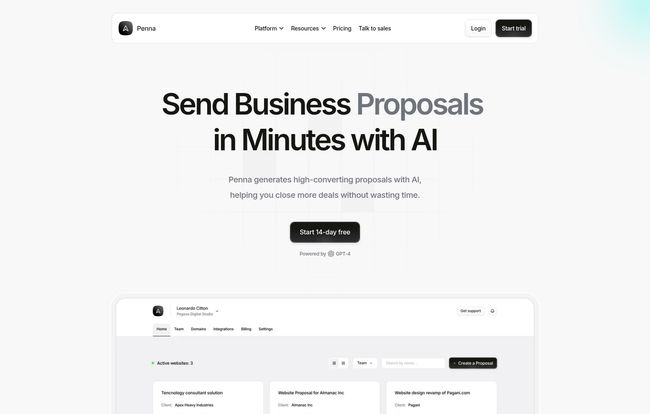
In short, Penna.app is an AI-powered proposal platform. But that’s a bit of a dry description. Think of it less like a document builder and more like a secret weapon for your sales process. You feed it some basic information about your project, your client, and what you’re offering, and its AI engine generates the bulk of the copy for you. But the real kicker? It doesn’t spit out a boring PDF. It builds a slick, modern, interactive website for each proposal. Yeah, a whole mini-website.
This immediately caught my eye. We spend all this time trying to build amazing online experiences for our clients, yet our very first real impression—the proposal—is often a static, lifeless file. It’s like sending a fax in the age of FaceTime. Penna aims to fix that disconnect.
The Features That Actually Matter
I’ve tested enough SaaS platforms to know that a long feature list doesn’t always translate to a great product. It’s about which features genuinely solve a problem. Here’s where I think Penna.app gets it right.
Proposals That Aren’t Boring PDFs
This is the big one for me. Sending a client a link to a clean, professionally designed, interactive proposal is a world away from attaching a PDF to an email. It feels premium. It shows you’re current with technology. It’s the difference between showing up to a meeting in a bespoke suit versus a wrinkled t-shirt. The proposal becomes an experience, not just a document. Clients can click through sections, see embedded content, and just generally get a better feel for the quality you bring to the table. This is a massive step up for client engagement before the project even starts.
The AI Copywriting Assistant (Your New Intern)
The AI generation is the heart of the platform. You provide the prompts, and it generates sections like an introduction, scope of work, and timeline. Now, is it perfect? No. You’re not going to just click a button and send it off without reading it. You’ll still need to go in and tweak the language, add your personal flair, and correct any weirdness. But it slays the dreaded “blank page syndrome.” It gets you 70-80% of the way there in a fraction of the time, leaving you to do the high-value work of refining and personalizing. For me, that’s a huge win.
Analytics That Tell You Who’s Actually Interested
Ever send a proposal and then just… wait? You’re stuck in limbo, wondering if they’ve even opened it. Penna.app builds analytics right in. You can see when your proposal was viewed, which sections the client spent the most time on, and how many times they’ve come back to it. This is pure gold. If you see they’ve spent 10 minutes on the pricing page, that’s a good sign to follow up. If they never got past the intro, maybe they’re not that serious. It takes the guesswork out of the follow-up and lets you focus your energy on the warmest leads. As an SEO guy who lives and breathes data, this is just chef’s kiss.
All the Other Necessary Bits
Of course, it also handles the essentials you’d expect. It has built-in, legally compliant e-signatures, so you can go from proposal to signed contract in one smooth motion. You can use a custom domain to make the proposals look like they’re coming directly from your own site, which is a big trust signal. There’s also real-time collaboration, which is great for teams that need multiple people to weigh in before a proposal goes out the door.
Let’s Talk About the Price Tag
Alright, this is usually the point where great tools become less great. The pricing for Penna.app is actually pretty straightforward, which I appreciate. No confusing tiers or hidden fees. Here’s the breakdown as of writing this:
| Plan | Price | Best For | Key Details |
|---|---|---|---|
| Plus Plan | $19.99 / month | Freelancers & small teams | 5 online proposals per month, unlimited offline proposals, branded website. |
| Pro Plan | $29.99 / month | Agencies & bigger businesses | Unlimited online proposals, unlimited offline proposals, branded website. |
My take? If you’re sending out 2-5 proposals a month, the Plus plan at $19.99 is a no-brainer. Seriously. Think about how much one billable hour of your time is worth. If this tool saves you even one hour a month, it has already paid for itself. For established agencies sending proposals weekly, the Pro plan at $29.99 is an absolute bargain for unlimited everything.
The Not-So-Perfect Parts (Because Nothing Is)
I’m not here to just sell you on something. There are a few things to keep in mind. First, as I mentioned, the AI is an assistant, not a replacement for your brain. You have to proofread and edit. Blindly trusting AI is a recipe for embarrassment. Treat it like a very fast, slightly weird junior copywriter.
Second, the pricing could be a barrier for someone just starting out with zero income. If you’re not yet at the stage where you’re consistently sending proposals, the monthly fee might feel like a stretch. Lastly, it’s a web-based platform, so you need an internet connection. No working on a proposal from a cabin in the woods with no Wi-Fi, I guess.
So, Who Should Use Penna.app?
This tool hits the sweet spot for a few groups:
- Busy Freelancers: SEO consultants, copywriters, web developers, designers… if you sell project-based services, this will save you a ton of administrative headache.
- Small to Medium Agencies: The collaborative features and unlimited proposals on the Pro plan make it perfect for teams trying to streamline their sales process and present a united, professional front.
- Anyone Tired of Making Boring Proposals: If you want to stand out from the competition and make a killer first impression, this is a very, very good way to do it.
Final Thoughts: Is It Worth It?
Yep. I think it is. Penna.app isn’t just another tool; it’s a genuine workflow improvement. It takes one of the most tedious, time-consuming parts of running a service business and makes it faster, smarter, and frankly, more impressive. It shifts your proposals from being a chore for you to create into a compelling experience for your clients to receive.
It won’t close the deal for you—you still need to have a great offer and solid skills. But it sure does set the stage beautifully. It removes friction, saves precious time, and gives you the data you need to follow up intelligently. For me, that’s more than worth the price of a few coffees a month.
Frequently Asked Questions
- What is Penna.app in simple terms?
- It’s an online tool that uses AI to help you write business proposals very quickly. Instead of a PDF, it presents your proposal as a mini-website to impress clients.
- Is the AI-generated content ready to send immediately?
- No, it’s best to think of the AI as a starting point. It gets you most of the way there, but you should always review, edit, and add your personal touch to ensure it accurately reflects your voice and the project details.
- Are the e-signatures legally binding?
- Yes, according to their site, the e-signature feature is designed to be legally compliant with global e-signature regulations like ESIGN and UETA, making your signed proposals official contracts.
- Can I use my own branding on the proposals?
- Absolutely. Both paid plans allow for branded proposals, and you can even use a custom domain so the proposal website appears to be hosted on your own URL, which adds a layer of professionalism.
- What if I need more than 5 online proposals a month?
- If you’re regularly sending more than five proposals, the Pro plan at $29.99/month is the way to go. It offers unlimited online proposals, making it ideal for high-volume freelancers or agencies.
- Is there a free trial to test it out?
- You’d have to check their website directly for the most current offers, but many SaaS platforms like this often have trial periods or a limited free plan to let you get a feel for the service before committing.


