
Categories: AI Answer, AI Copilot, AI Research Tool, AI Search Engine, Large Language Models (LLMs)
Perplexity AI Review: My New Favorite AI Search Engine?

You have a simple question, you type it into Google, and what happens next is a ritual as old as dial-up. You click the first link. It’s not quite right. You click the second, it’s a thinly-veiled ad. Before you know it, you have 47 tabs open, a vague sense of dread, and you’ve forgotten your original question. It’s a mess.
For years, we’ve just accepted this as the cost of admission to the internet. But the ground is shifting. The so-called “AI browser wars” are in full swing, with every developer and their dog trying to cram an AI assistant into our workflow. Some are clunky. Some are just ChatGPT in a different skin. And some… some are actually pretty interesting.
That’s where I found myself a few weeks ago, stumbling across Perplexity AI. It’s not just another chatbot; it calls itself an “answer engine.” And after using its Chrome extension pretty much non-stop, I think they might be onto something. Something big.
What on Earth is Perplexity AI Anyway?
So, what’s the secret sauce? Perplexity isn’t just pulling answers out of a hat like a magician. It’s more like a hybrid brain. It uses large language models (the same tech behind things like GPT) but combines their reasoning power with real-time information from traditional search engines. The result? You don’t just get a wall of text; you get a concise, direct answer with little footnote citations showing you exactly where it got the information.
It’s like having a research assistant who not only gives you the summary but also hands you the bibliography. For a data nerd like me, that’s huge. And for anyone tired of AI just… making stuff up (we’ve all seen those hilarious/terrifying screenshots), this transparent sourcing is a massive breath of fresh air.
The tech behind it is inspired by OpenAI’s WebGPT, and for the super geeks in the room, it can even translate natural language questions about Twitter into SQL code to query the platform’s social graph. I haven’t used that specific feature much, but just knowing it’s there tells me this isn’t a superficial tool.
Visit Perplexity AI
Getting Started with the Perplexity Chrome Extension
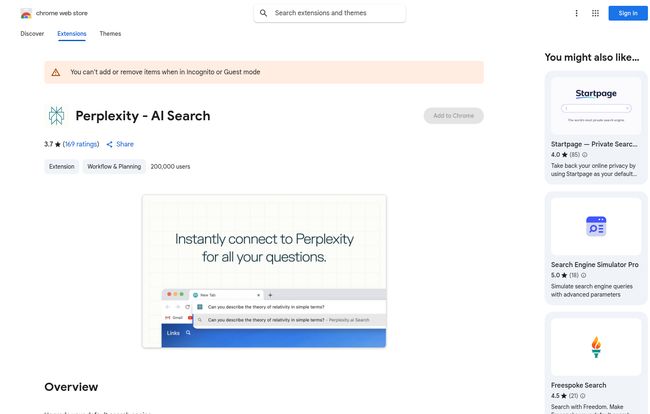
The first thing I did was grab the Perplexity – AI Search extension from the Chrome Web Store. The install is tiny (under 9KB, which is smaller than most images on this page) and takes seconds. The big change? It asks to become your default search engine. Instead of your queries going into the Google bar, they go straight to Perplexity.
I’ll admit, it was a little jarring at first. A lifetime of muscle memory fighting a new interface. But the UI is so clean and minimalist that I got over it fast. It felt less like a chaotic library and more like a quiet, organized study.
The Good Stuff: Where Perplexity Actually Impresses
Okay, so it looks nice. But can it perform? Here’s where I went from skeptical to genuinely impressed.
Direct Answers, Not a Maze of Links
My first real test was a classic complex query: “Explain the theory of relativity in simple terms.” Instead of ten blue links to Wikipedia, university sites, and science blogs, Perplexity gave me a few clear paragraphs breaking it down. It was conversational, accurate, and—most importantly—it cited its sources right below the answer. I could click to verify everything. This is the core promise, and it delivers.
Copilot: Your On-Demand AI Research Partner
For more complicated topics, there’s a feature called Copilot. Think of it as putting the AI into a deeper thinking mode. It asks clarifying questions to really understand what you’re after. For example, if you ask “What are the best SEO strategies for 2024?” Copilot might reply, “Are you interested in strategies for e-commerce, local businesses, or content publishing?” This interactive approach refines your search and leads to much more tailored, comprehensive answers. It’s not free to use indefinitely, which I’ll get to, but it’s a powerful tool for serious research.
Talk Directly to Your Documents
This one is a bit of a showstopper. You can upload files (like PDFs, text files, etc.) and ask questions about them. Imagine uploading a dense, 50-page market research report and just asking, “What are the key takeaways about consumer trends in Q3?” or “Summarize the section on competitor analysis.” I’ve used this to break down technical documentation and it saved me hours. A total game-changer for students, analysts, and anyone who deals with information-heavy documents.
A Privacy Policy You Can Actually Love
This might be the most underrated feature. The developers state clearly on their Chrome Store page: they do not collect or use your data. They don’t sell it to third parties. They don’t use it for things unrelated to the app’s core function. In an age where you feel like your every click is being monetized, this is a massive trust signal. It’s a direct shot across the bow of data-hungry tech giants, and I’m here for it.
Okay, But It Can’t Be Perfect, Right?
Right. No tool is a silver bullet, and Perplexity has its own set of trade-offs. While the core experience is great, it’s not without its quirks. When I checked, it had a 3.7-star rating on the Chrome store from over 160 reviews, which tells me some users have hit a few bumps.
The biggest thing to be aware of is the freemium model. The magic of Copilot? You only get a limited number of uses on the free plan. Want to use the most powerful AI models like GPT-4 or Claude-2 for your answers? That’s part of the Pro subscription. The same goes for the number of files you can upload. The free version is incredibly generous and fully functional for everyday questions, but the real power-user features are kept behind a paywall. This isnt a surprise, running these models costs real money, but it’s something to know going in.
A Look at Perplexity AI’s Pricing
So, what’s the deal with the Pro plan? It’s pretty straightforward. The platform operates on a freemium basis.
- Free Plan: This gives you a fantastic core experience. You get direct answers with citations and a good number of Copilot uses (reportedly around 5 every 4 hours). For most people, this will be more than enough to see if Perplexity fits their style.
- Pro Plan: This is for the heavy hitters. According to their site, upgrading gets you access to the best AI models (GPT-4 and Claude-2), which can provide more nuanced and creative answers. You get a huge boost in Copilot uses (over 300 per day), unlimited file uploads, and dedicated support. It’s designed for professionals, researchers, and anyone who needs top-tier AI assistance daily.
Is Pro worth it? In my opinion, if you’re a student, writer, or SEO who spends hours on research, the cost could easily be justified by the time you save. For the casual user, the free version is one of the best out there.
My Final Verdict: Who is This For?
After a few weeks, Perplexity has earned a permanent spot in my browser. It hasn’t entirely replaced Google for me—sometimes I still want that chaotic list of links for shopping or finding a specific login page. But for learning, for research, for getting straight answers to complex questions? It’s my new default.
I’d say Perplexity is perfect for:
- Students and Researchers: The citation feature and file upload are non-negotiable advantages.
- Content Creators and SEOs: Amazing for topic ideation, understanding search intent, and summarizing source material quickly.
- The Perpetually Curious: Anyone who loves to learn and hates wading through SEO-spam to do it.
Is it a “Google Killer”? I hate that term. It’s not about killing Google; it’s about offering a fundamentally different, and in many ways better, way to find information. It’s not just a search engine; its an answer engine. And it’s one of the first AI tools I’ve used that feels less like a gimmick and more like a genuine evolution.
Give the free extension a spin. What do you have to lose? Except, maybe, a few dozen unnecessary browser tabs.
Frequently Asked Questions about Perplexity AI
- What is Perplexity AI?
- Perplexity AI is a conversational AI answer engine. It uses large language models and search engines to provide direct, accurate answers to questions, complete with source citations.
- Is Perplexity AI free to use?
- Yes, there is a very capable free version that is great for everyday use. There is also a Perplexity Pro subscription that unlocks advanced features like GPT-4, more Copilot uses, and unlimited file uploads.
- How is Perplexity different from ChatGPT?
- The biggest difference is the focus on accuracy and sourcing. Perplexity always provides citations for its answers, linking to the live web sources it used. This makes it a more reliable tool for research and fact-finding, reducing the risk of AI “hallucinations.”
- Is Perplexity AI better than Google?
- It depends on your goal. For getting direct answers to complex questions and conducting research, many people find it superior. For other tasks, like navigating to a specific website or shopping, Google’s traditional link-based format may still be preferable.
- Does Perplexity AI collect my personal data?
- According to the developer’s privacy disclosure, the Perplexity AI extension does not collect or use your data for sale or purposes outside of its core functionality, which is a significant privacy advantage.
- Can I use GPT-4 with Perplexity AI?
- Yes, access to OpenAI’s GPT-4 model is one of the premium features available to users who subscribe to the Perplexity Pro plan.


